30 TASCAM CD-VT2
IMPORTANT SAFETY PRECAUTIONS
Using mics with the trainer
By connecting mics to this player, you can mix the input from
the mics with the CD playback sound. You can also use the
built-in mic effects for voice and instrument practice.
Adjusting the input level
Use the INPUT volume control next to the MIC IN jacks to
adjust the input level.
Use the LEVEL screen to adjust the signal levels from
each MIC IN jack individually after their sounds have
been processed by the mic effects. (See “Singing or
playing along with a CD” on this page.)
Adjusting the monitoring volume
Use the PHONES VOLUME (+, –) keys to adjust the head-
phones output volume. Follow the same procedure used when
adjusting the playback volume of a CD. (See “Adjusting the
volume” on page 25.)
When monitoring through the LINE OUT jack using an
audio system or speakers with built-in amplifiers, adjust
the volume on the external device. You cannot adjust the
output level of this device’s LINE OUT jack.
Singing or playing along with a CD
This device combines the signal input through the MIC IN 1
and MIC IN 2 jacks and the CD playback signal and outputs
this mix to the PHONES and LINE OUT jacks. In other words,
you can connect mics to the player and hear yourself sing or
play along with a CD through the outputs.
Use the following procedures to adjust the CD playback signal
and input signal levels independently to achieve the mix
balance that you desire.
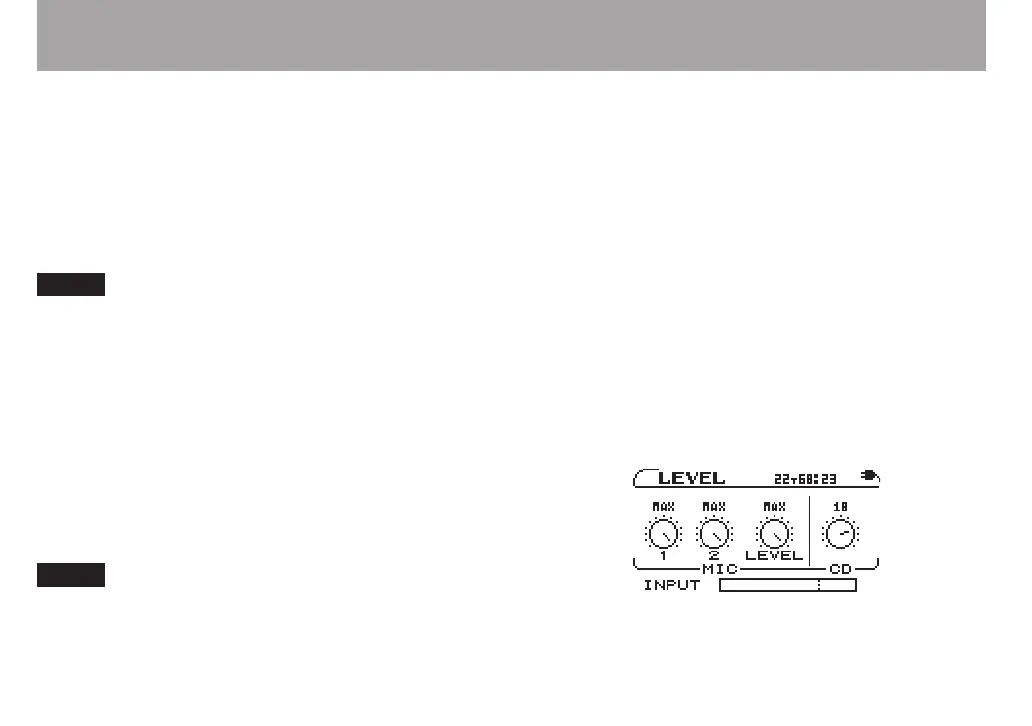
1 Press the LEVEL key to open the LEVEL screen.
Four knob icons appear. From left to right these adjust the
input signal levels from the MIC IN 1 and MIC IN 2 jacks, the
combined input level of both mics and the CD playback level.
Use the two knobs on the left to adjust the balance between
mic inputs 1 and 2. Use the two knobs on the right to adjust
the balance between both mic inputs and the CD.
2 Use the CURSOR (˙, ¥) keys to select the knob that
you want to adjust. The level value of the selected knob
appears highlighted in a pop-up.



 To Next Page