IMPORTANT SAFETY INSTRUCTIONS
35 TASCAM CD-VT2
Other functions
AUTO (chromatic tuner)
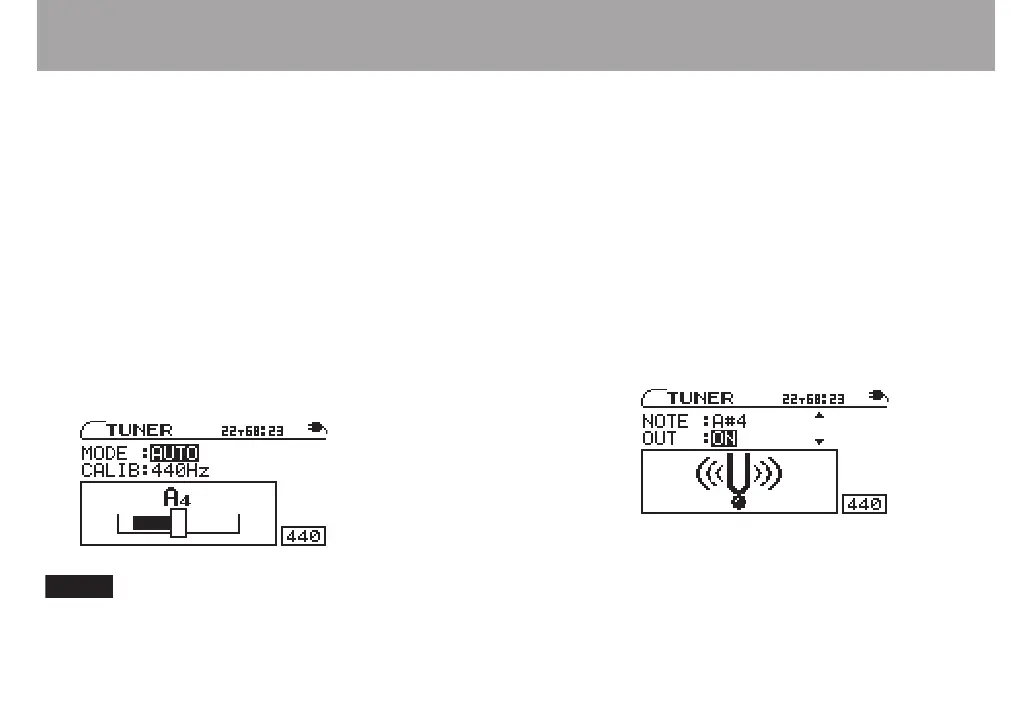
In this ordinary mode, you can tune an instrument while
looking at the tuning meter on the screen. The tuning meter
and input signal pitch appear on the screen (see the preceding
gure). (“---” appears when there is no input).
1 Connect a mic to either of the MIC IN jacks and play
the instrument that you want to tune into the mic.
The pitch closest to the frequency of the played note
appears at the top of the meter.
2 Tune the instrument until the desired pitch name is
shown and the center of the meter is highlighted. A
bar appears to the left if the tuning is too low and a
bar appears to the right if it is too high. The longer the
bar is the more out of tune the string is.
Use the CURSOR ¶ key to select CALIB. See the
explanation in the OSC. section. This setting effects
both tuner modes.
OSC. (oscillator mode)
The built-in oscillator can output a sine wave of a pitch in the
three octaves between C4 and B6 through the PHONES and
LINE OUT jacks. The oscillator mode has the following four
setting items. Use the CURSOR (§, ¶) keys to select the items
and the VALUE (+, –) keys to change their settings.
NOTE
Set the output pitch (C4–B6).
OUT
Set whether or not the oscillator sound is output from the
PHONES and LINE OUT jacks. When ON, an image of a
vibrating pitchfork appears on screen.
LEVEL
Adjust the output sound level between 0 and 100 with the
VALUE (–, +) keys.
CALIB
Set the standard frequency of middle A between 435 Hz and
445 Hz. This setting also affects the AUTO tuner modes.



 To Next Page