35
Step 7: Once you have gotten to the APP page, the treadmill will nd the APP. As soon
as the APP has successfully connected to the treadmill, the APP sign will appear on
the screen. Then you can use any mode in the APP interface in order to control the
treadmill.
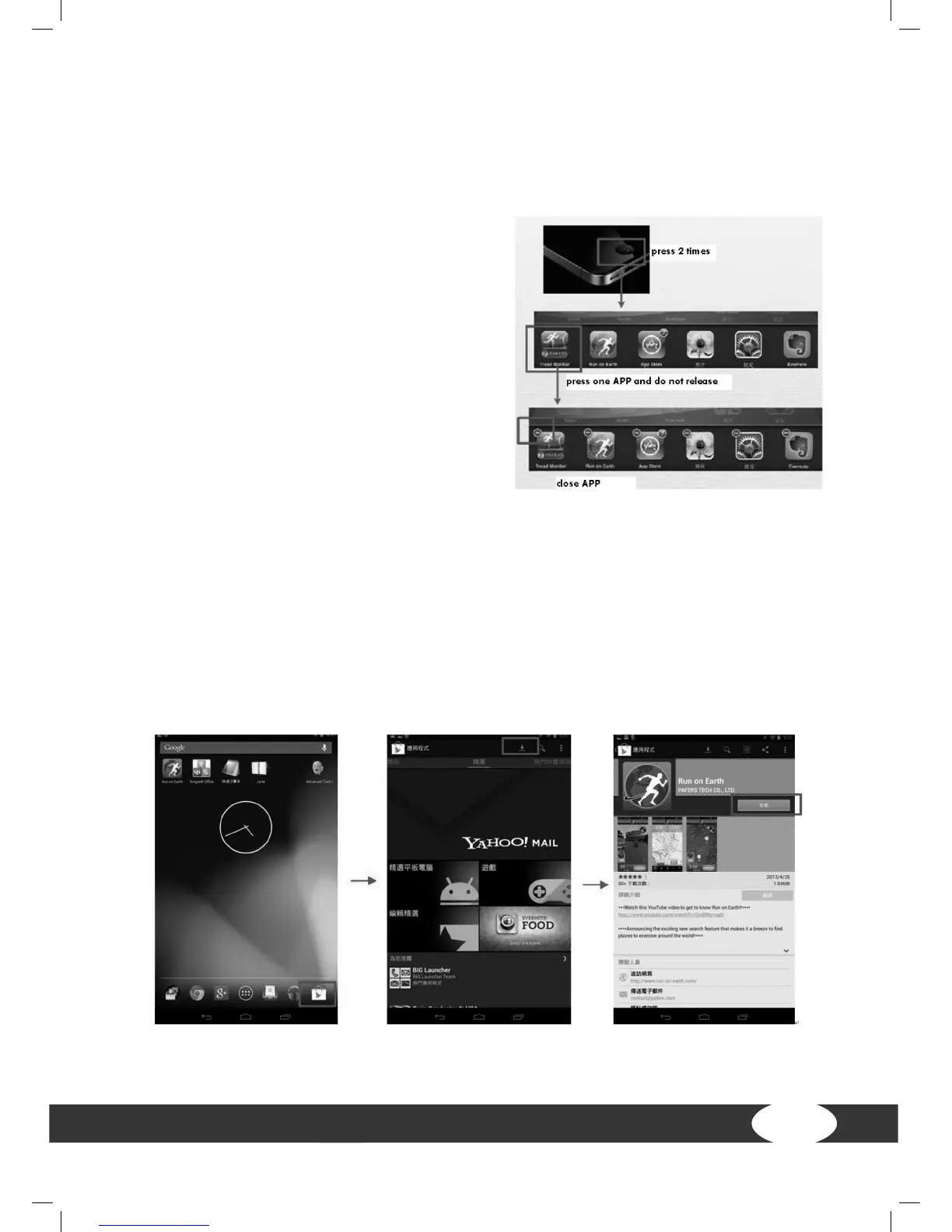
Step 8: After any usage of the APP, press
HOME twice on the iPad. Close the APP that
was just used in the background (see image).
Then go back to the iPad settings in order to
close the Bluetooth function. After about 10
seconds, a beep will sound and the screen
will return to the regular LCD display.
For Android devices
1. APP Software Download
Connect the Android tablet with the Play Store and search for PAFERS. Read through
the APP manual and download the APP, which has a treadmill function, e. g., “Tread
Monitor”and “Run on Earth”. Other APPS that are not created for the treadmill cannot
be connected with the computer.


 To Next Page