11
TYPICAL SETUPS
Serial Setup
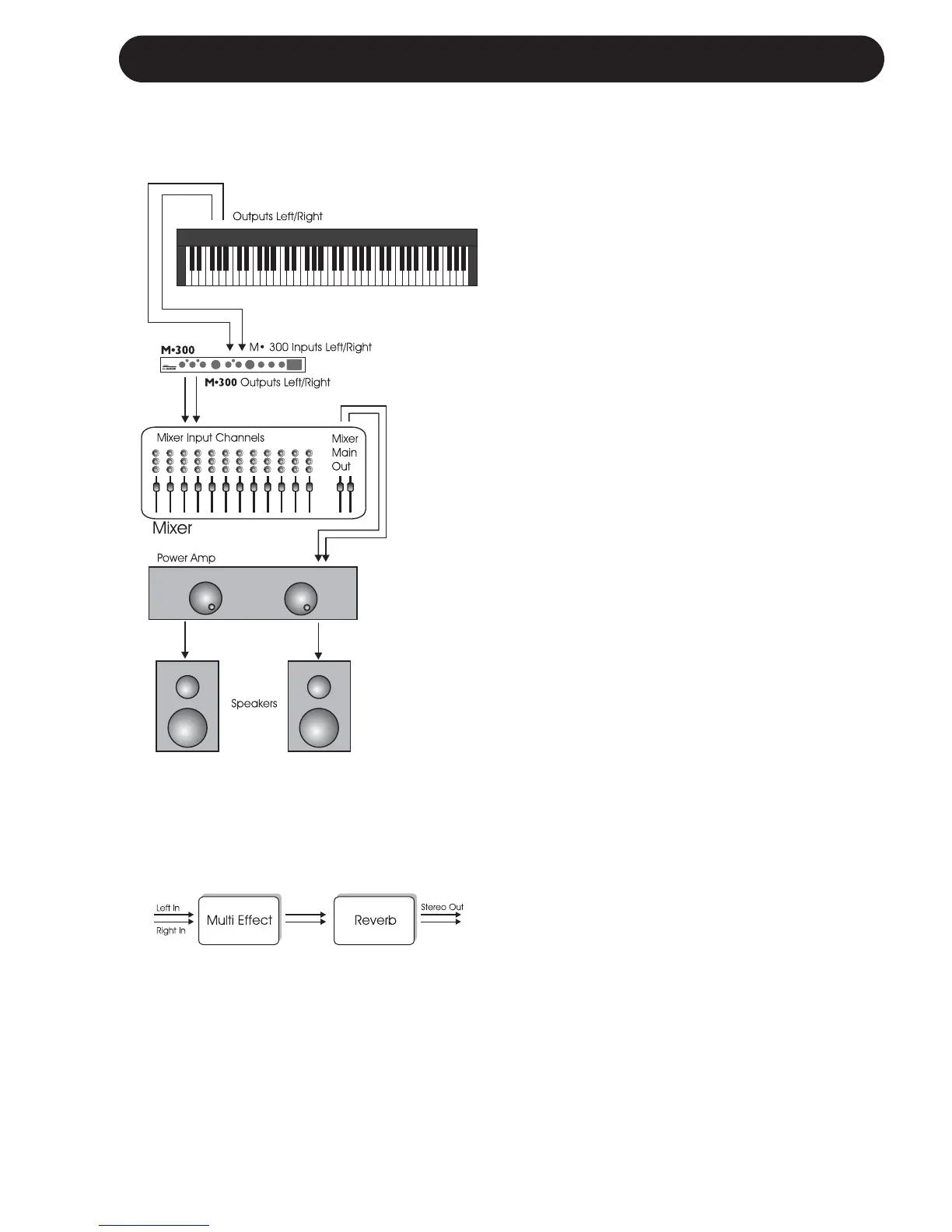
This setup utilizes the M300 as a Multi-
effects processor connected in serial to a
Reverb. It is ideal when you wish to add
Reverb to a signal already processed by
one of the Multi-effects. The illustrated
setup is a typical live instrument setup.
• On the rear panel select SERIAL routing by
leaving the switch in “OUT “ position.
• Connect Line signal directly from your
instrument or from a DI-box to the M300
Inputs. (use Left Input for mono signals).
• Connect the M300’s Left and Right Outputs
to mixer or amplification.
• Set Input level to 12 o’clock position.
• Set MIX level to 12 o’clock position.
• Set BALANCE to 12 o’clock position.
• Adjust/fine-tune the M300 Input level so the
Input LED on the front panel often is Orange
but only rarely peaks at Red color.
• Select Reverb type and Multi-effect type
using the selectors on the front panel.
• Now fine-tune:
- MIX between wet and dry signal
- BALANCE between the two effect Engines.
Setup
M300 Routing Schematic


 To Next Page