20
THE REVERB ENGINE
Reverb Engine
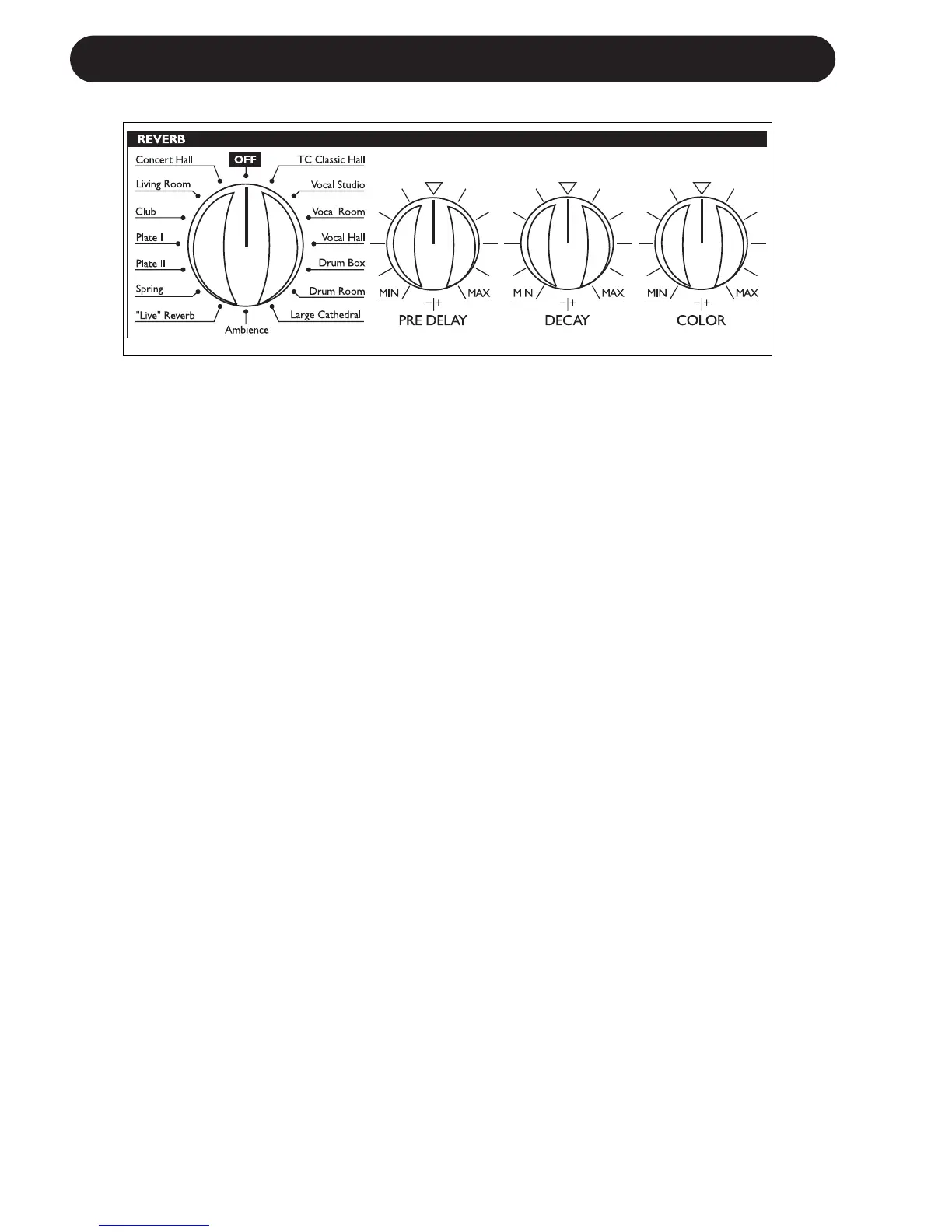
Reverb Selector
Select between the following Reverb types or
“Off”.
• Concert Hall • Classic Hall
• Living Room • Vocal Studio
• Club • Vocal Room
• Plate I • Vocal Hall
• Plate II • Drum Box
• Spring • Drum Room
• “Live” Reverb • Large Cathedral
• Ambience • Off
To hear the carefully designed default settings
for each of the Reverb types set PRE DELAY,
DECAY and COLOR knobs in “12 o’clock”
position (neutral). Then adjust and fine-tune to
the given application.
It is worth noticing that the range of each of
these parameters will vary from algorithm to
algorithm.
As an example it is possible to set a much
longer Decay time for a Classic or Concert Hall
Reverb than for a Drum Box.
Pre Delay
A short Delay placed between the direct signal
and the Reverb Diffuse Field. By using Pre
Delay the source material is kept clear and
undisturbed by the more diffuse Reverb Field
arriving shortly after.
Decay
The Decay parameter determines the length of
the Reverb Diffuse Field. The length is defined
as the time it takes for the Reverb to decay
approximately 60dB.
Color
Varies the “color” of the Reverb. From dark to
crisp and bright the Color parameter can really
change the characteristics and style of the
Reverb.


 To Next Page