26
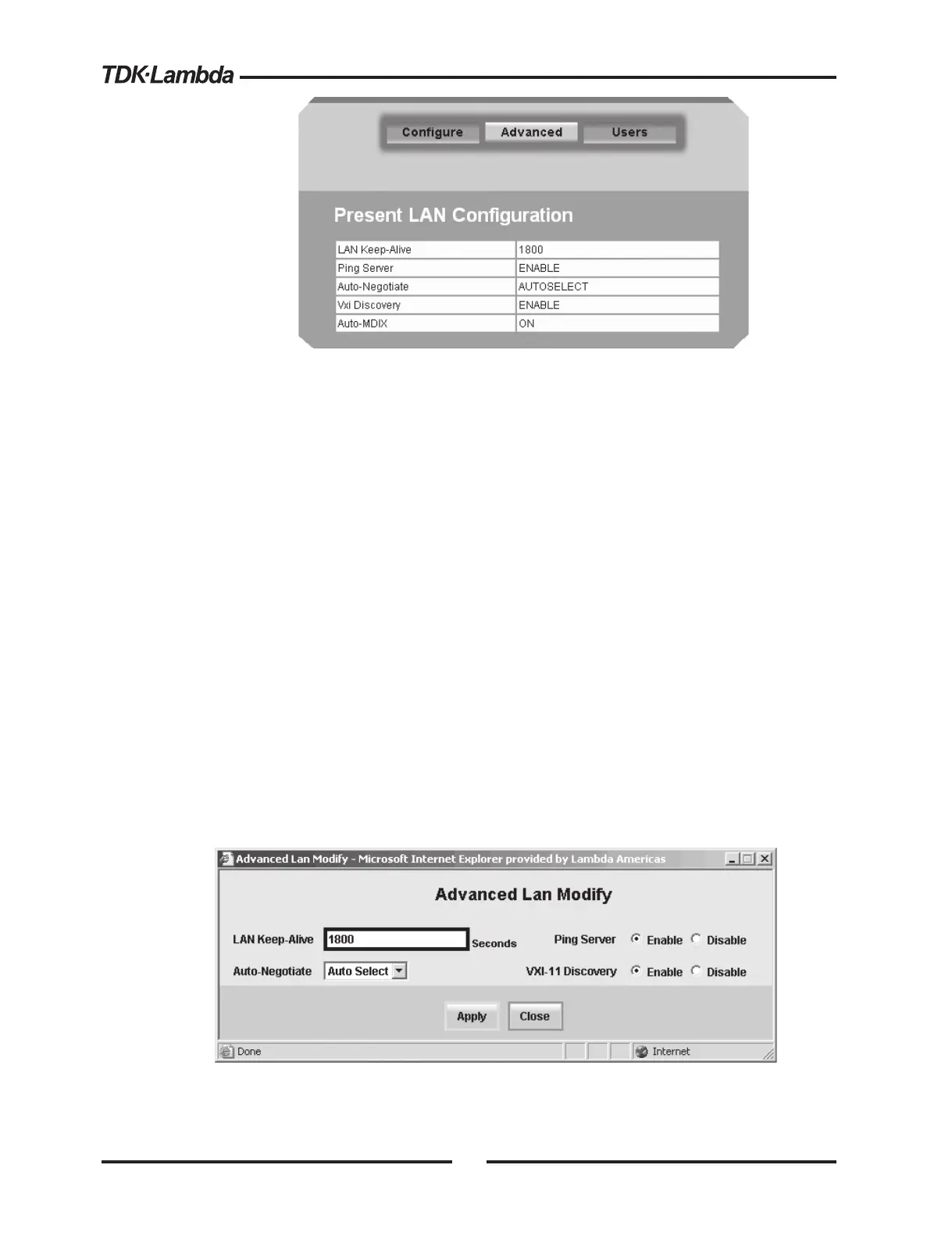
LAN Keep-Alive: If you are logged in as an administrator, this is how many seconds the
web pages may be unused (idle) before the power supply automatically logs you out.
The default is 1800 seconds = 30 minutes. Any mouse click on any page will reset the timer
Ping Server: ‘Ping’ is a simple network utility that allows the LAN connected computer to
verify communication with the LAN power supply. This service may be disabled in the
“LAN ‡ Advanced ‡ Modify” web page
Auto-Negotiate: This shows what network speed the LAN card is allowed to operate at.
See glossary section 1.3.3
VXI Discovery: This is a protocol which allows the network server to detect what
instruments are connected to the LAN
Auto-MDIX: This service is always enabled in the power supply. The power supply LAN
connection will always detect a patch or cross-over cable. See glossary section 1.3.2
Modify: After logging in, click this button to open the window shown below
5.5.4. LAN ‡ Advanced ‡ Modify Page
In the window below, you may enter new values for the LAN settings. Changes to these
setting will take place when the “Apply” button is clicked. The web page does not have to be
re-started after changing these settings
The window’s fields are described in section 5.5.3 above














 To Next Page