Note!
For adjustments and simple installation work, use the enclosed Allen key located in the top section of the
print unit. No other tools are required for the work described here.
4.1 Loading Media from the Roll
4.1.1 Inserting the Media Roll
4
3
1
2
5
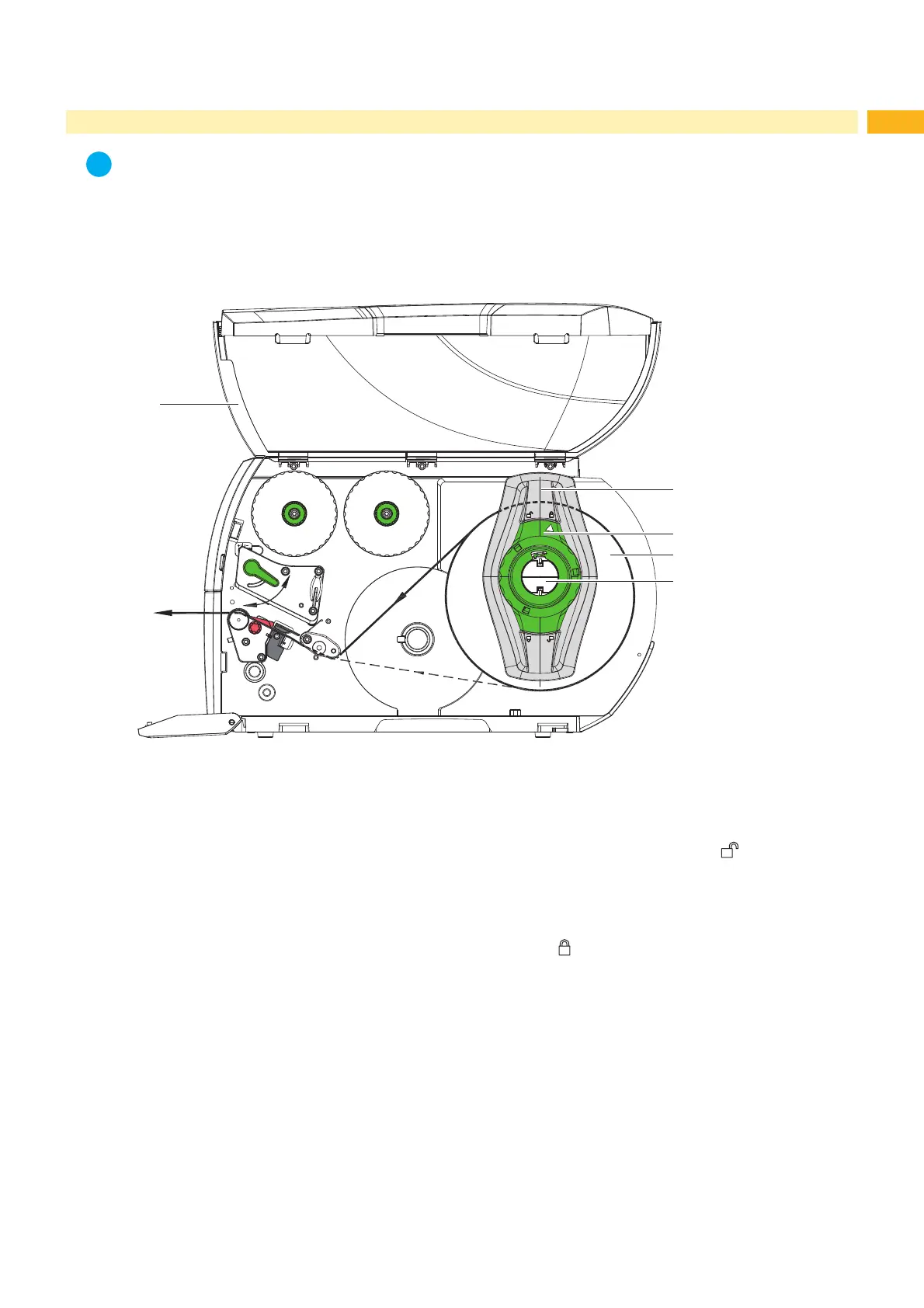
Fig. 10 Loading media from the roll
1. Open cover (5).
2. Turn ring (2) of the margin stop (1) counterclockwise, so that the arrow points to the symbol
, unlocking the
margin stop.
3. Remove the margin stop (1) from the roll retainer (4).
4. Load the label roll (3) so that the labels can be fed into the printhead facing up. Re-mount the margin stop (1) onto
the roll retainer (4). Push the margin stop (1) against the roll (3) until the roll is clamped between the margin stops.
5. Turn ring (2) clockwise, so that the arrow (2) points to the symbol
DQG¿[HVWKHPDUJLQVWRSWRWKHUROO
retainer (4).
6. Feeding label strips:
For tear-off mode: approx. 40 cm.



 To Next Page