6
1
2
3
4
5
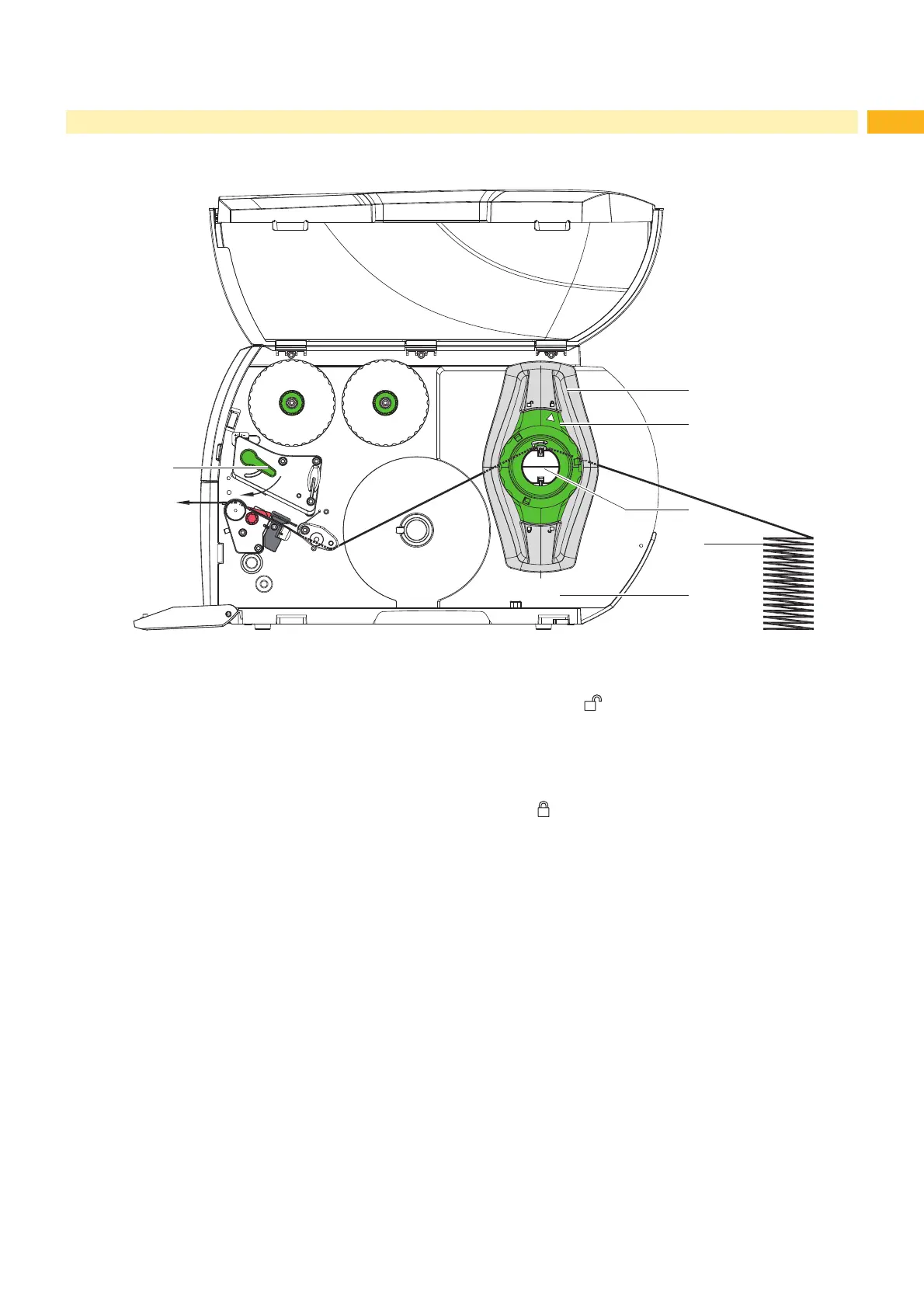
Fig. 12 Feed path of fanfold media
1. Turn ring (2) counterclockwise, so that the arrow points to the symbol , and thus release the margin stop (1).
2. Move the margin stops (1) in a position that the media can pass between the two margin stops.
3. Position media stack (4) behind the printer. Ensure that labels on the lining are visible from above.
4. Guide the media over the roll retainer (3) to the print unit.
5. Push the margin stop (1) against the media strip without clamping or bending it.
6. Turn ring (2) clockwise, so that the arrow points to the symbol
, locking the margin stop (1) of the roll
retainer (3).
7. Insert the media strip into the printhead Z 4.1.2 on page 14).
8. Set the label sensor (Z 4.1.3 on page 14).
9. Set the head locking system (Z 4.3 on page 16).
10. Turn lever (6) clockwise to lock the printhead.
4 Loading Material



 To Next Page