23
7 Fault Correction
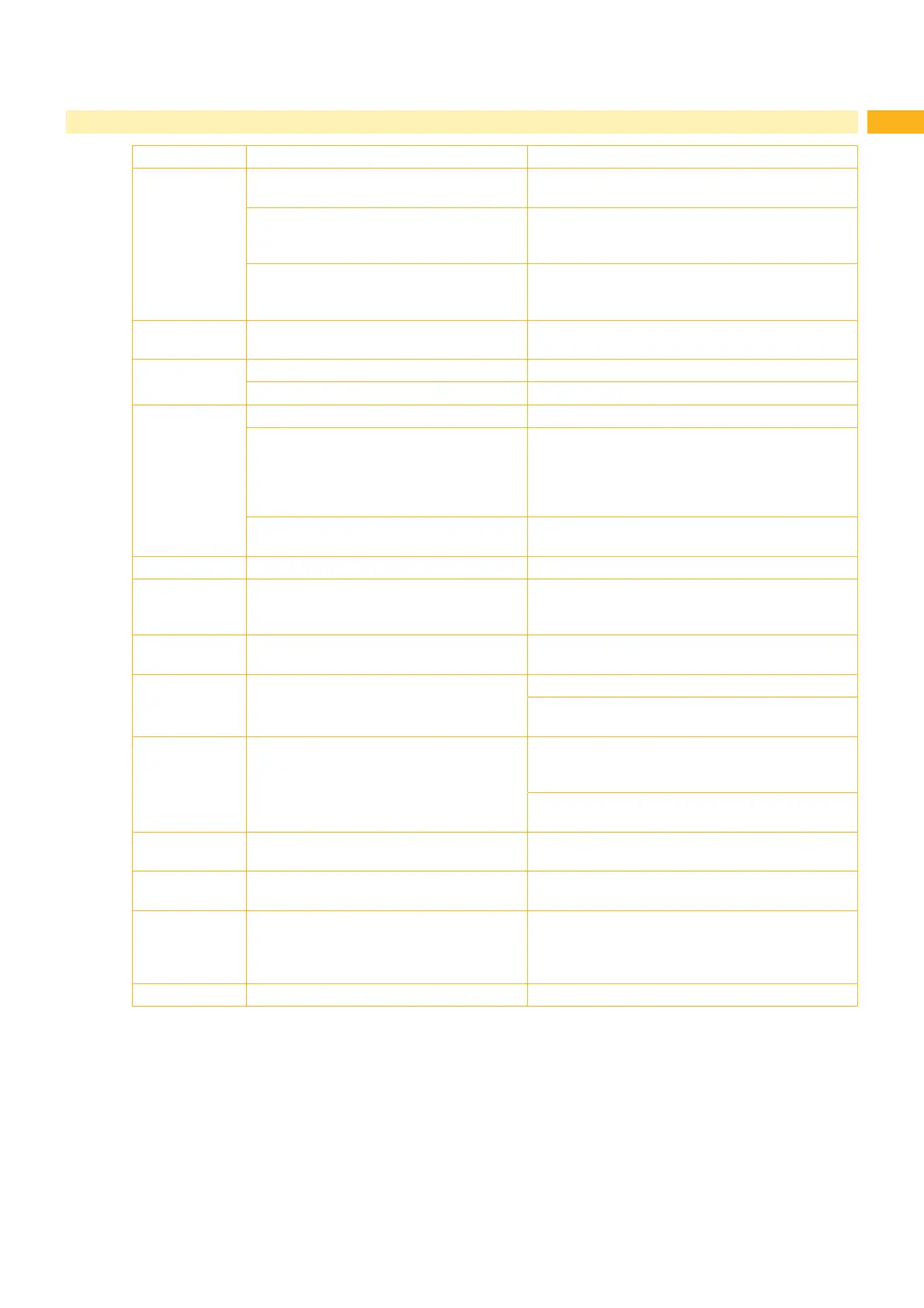
Error message Cause Resolution
No label found There are labels missing from the label
material.
Press Repeat repeatedly until printer recognizes the
next label on the material.
The label format, as set in the software,
does not correspond with the actual label
format.
Cancel current print job.
Change the label format set in the software.
Restart print job.
Printer is loaded with continuous paper but
the software is set to labels.
Cancel the current print job.
Change the label format set in the software and
restart the print job.
No label size 7KHVL]HRIWKHODEHOLVQRWGH¿QHGLQWKH
programming.
Check correct template selected in software.
Out of paper Out of label roll Load labels
Error in the paper feed Check the paper feed.
Out of ribbon Out of transfer ribbon Insert a new transfer ribbon.
The transfer ribbon melted during printing. Cancel the current print job.
Change the heat level via the software.
Clean the printhead Z 6.3 on page 20
Load transfer ribbon.
Restart the print job.
The printer is loaded with thermal labels
but the software is set to transfer printing.
Cancel the current print job, set the software to
direct thermal printing then restart print job.
Printhead open Printhead not locked Lock the printhead.
Printhead too hot Printhead overheated After pausing, the print job will be continued
automatically. If the fault recurs repeatedly, reduce
the heat level or the print speed via the software.
Read error Read error when reading from the memory
card
Check the data of the card, backup the data and/or
format the card.
Remove ribbon Transfer ribbon is loaded although the
printer is set to direct thermal printing
For direct thermal printing remove the ribbon.
For thermal transfer printing set the printer in the
FRQ¿JXUDWLRQRULQWKHVRIWZDUHWRWUDQVIHUSULQWLQJ
Ribbon ink side 7KHLGHQWL¿HGULEERQXQZLQGLQJGLUHFWLRQ
does not match the settings.
Ribbon loaded incorrectly.
Clean the printhead Z 6.3 on page 20.
Load the ribbon correctly.
Setting does not match the used ribbon.
Please correct the setting.
Syntax error Printer has received an unknown or invalid
command from the computer.
Press Ignore to skip the command or
press Cancel to cancel the print job.
8QNQRZQFDUG Card not formatted/
the type of card is not supported
Either format the card or use a different type of
card.
Voltage error Hardware error Switch the printer off and then on again.
If the error recurs call the service department.
Please note that it is displayed which voltage has
failed.
Write error Hardware error Repeat the writing process or format the card.
Table 6 Error Messages and fault correction



 To Next Page