21
ENGLISH
Title Search
Playback starts from the specified point.
<
If you selected the title number, playback will start from the
first chapter of the selected title.
<
The first track of a SACD is not always track no.1.
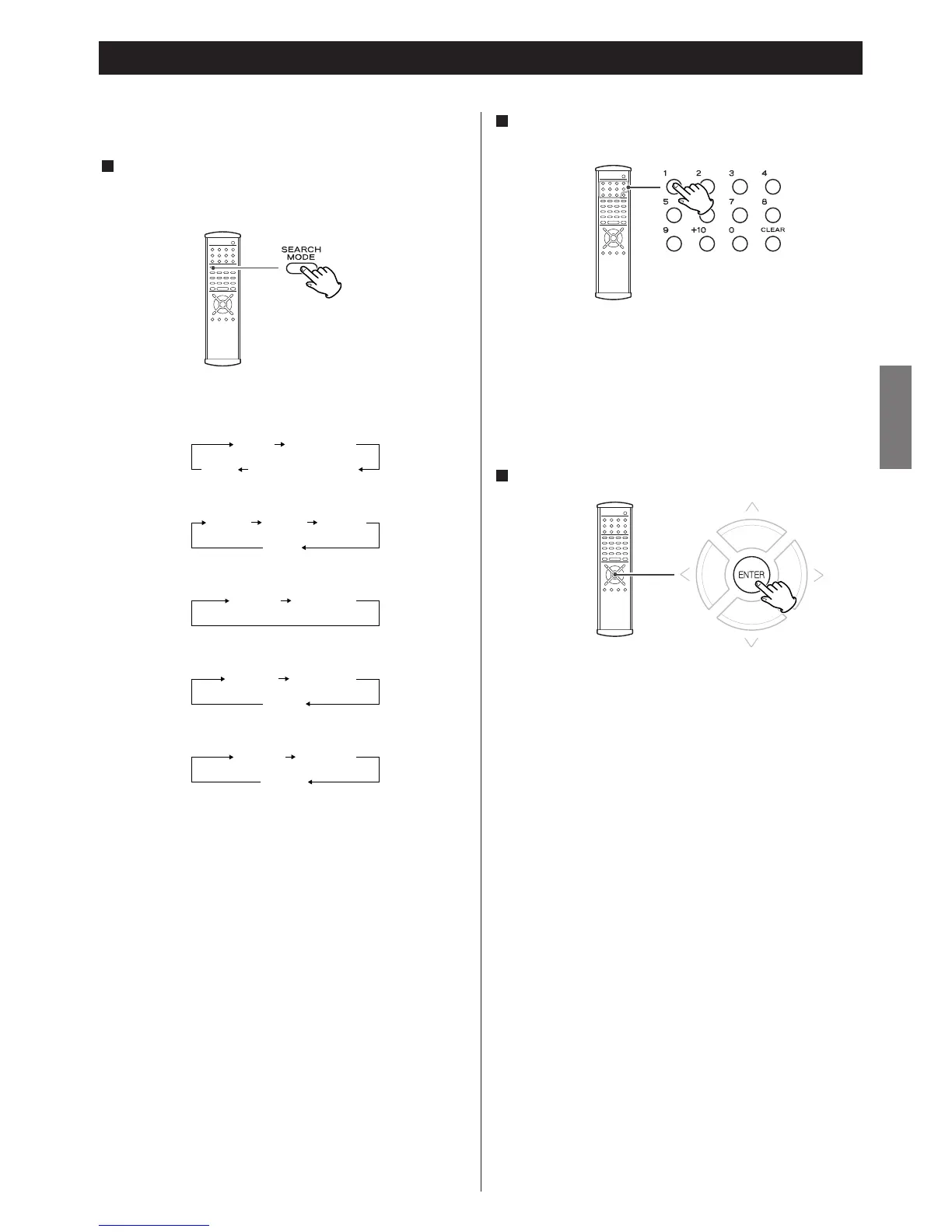
You can directly access any point on a disc using one of the
search modes. Playback jumps to the point specified.
Select a search mode by pressing the SEARCH MODE button.
Each time the SEARCH MODE button is pressed, the mode is
changed as follows:
1
DVD VCD CD SACD MP3
< When the unit is stopped, you cannot select time search nor
frame search of DVD-Video.
*
: Some DVD-Audio discs have still pictures. You might be able to
search the still pictures by this function.
Enter the number of title, chapter, group or track by pressing
the numeric buttons.
2
Example:
To select 10 : 1 q
0
To select 12 : 1 q
2
<
The +10 button cannot be used.
Press the ENTER button or the PLAY button.
3


 To Next Page