Audio1 A2 Video1 V2 Language General
SETUP
Move Exit
Setup Menu Mode
Setup Navigator
Parental Lock
Bonus Group
Auto Disc Menu
Group Playback
Expert
Password
Level
Country Code
All
Single
Audio1 A2 Video1 V2 Language General
SETUP
Move
Exit
Return
Parental Lock : Register Code Number
Playing some DVD discs can be limited depending on the age of
the users.
Some DVD discs also support the Country Code feature. The
player does not play certain scenes on these discs, depending on
the country code you set.
When you use this function for the first time, you have to set a
password.
How to set a password
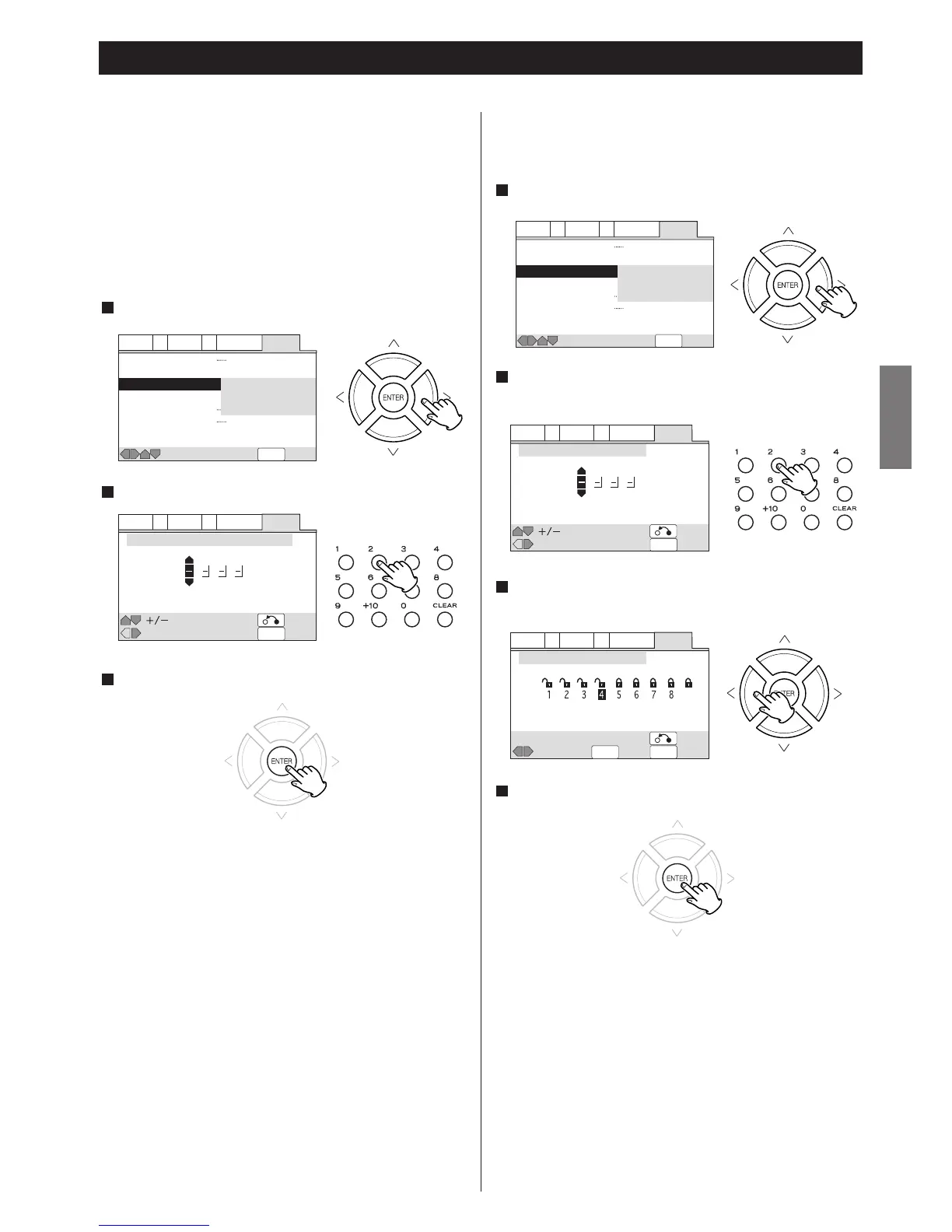
Select "Password" and press the ENTER button.
1
Enter your 4-digit password using the numeric buttons (0 to 9).
2
Press the ENTER button.
3
Now the password is set. Please write your password down
and put in a safe place.
<
If you forget your password, initialize the settings and set a
new password again.
How to change your password
1. Select "Password Change" and press the ENTER button.
2. Enter your old password using the numeric buttons (0 to 9)
3. Press the ENTER button.
4. Enter your new password using the numeric buttons (0 to 9).
5. Press the ENTER button.
How to change the Parental Lock Level
The default setting is "Off".
Audio1 A2 Video1 V2 Language General
SETUP
Move Exit
Setup Menu Mode
Setup Navigator
Parental Lock
Bonus Group
Auto Disc Menu
Group Playback
Expert
Password Change
Level
Country Code
All
Single
Audio1 A2 Video1 V2 Language General
SETUP
Move
Exit
Return
Level : Confirm Code Number
Audio1 A2 Video1 V2 Language General
SETUPENTER
Move
ExitSelect
Level
Return
Parental Lock : Level Change
Off
Now the parental lock level has been changed.
< If the rating of the loaded DVD disc is higher than the level you
set, the system will require a password. Enter your password
and press the ENTER button to start playback.
Change the level by pressing the RIGHT or LEFT button.
The lower the level is set, the stricter the limitation is offered.
3
Enter your password using the numeric buttons (0 to 9), and
press the ENTER button.
2
Select "Level" and press the ENTER button.
1
Within 30 seconds, press the ENTER button.
4
DVD


 To Next Page