39
ENGLISH
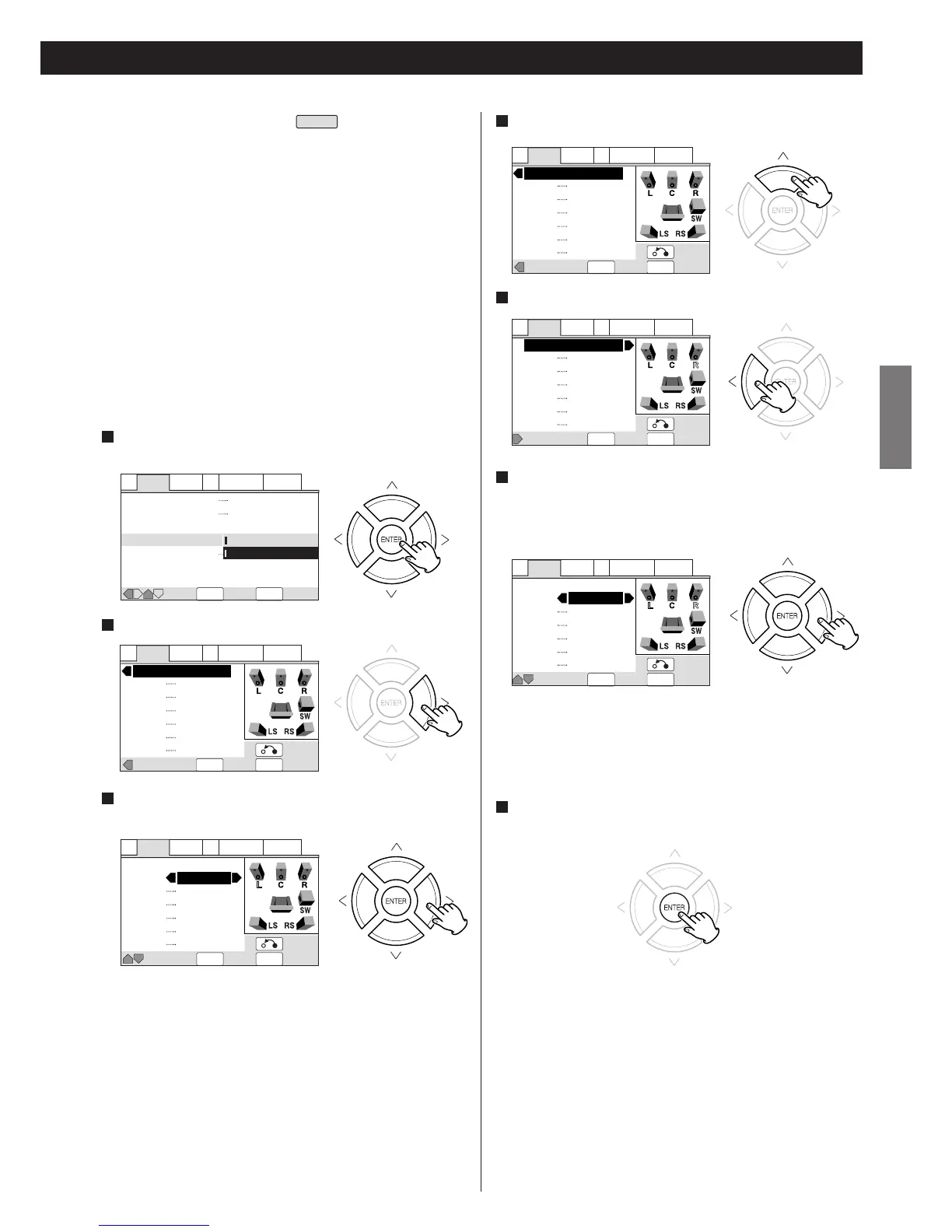
Move the cursor to "Test Tone" by pressing the UP button.
4
A1 Audio2 Video1 V2 Language General
SETUP
Move Exit
ENTER
Select
Virtual Surround
Audio Out
Speaker Setting
Gain Setting
CD Digital Direct
Off
5.1 Channel
Fix
Variable
A1 Audio2 Video1 V2 Language General
SETUP
Gain Exit
Return
ENTER
Select
Test Tone
L
C
R
RS
LS
SW
Off
Off
Off
Off
Off
Off
A1 Audio2 Video1 V2 Language General
SETUP
Gain Exit
Return
ENTER
Select
Test Tone
L
C
R
RS
LS
SW
Auto
Auto
Auto
Auto
Auto
Auto
A1 Audio2 Video1 V2 Language General
SETUP
Move Exit
Return
ENTER
Select
Test Tone
L
C
R
RS
LS
SW
Auto
Auto
Auto
Auto
Auto
Auto
Gain Setting (Test Tone)
If a surround amplifier is connected via the 5.1CH AUDIO OUT
terminals, this function is useful to adjust the relative volume
between speakers.
Once the balance is set, you don't have to change the balance as
long as the speakers aren't moved.
<
Use the remote control from your listening position.
<
Set the "Audio Out" to "5.1 Channel".
<
The test tone will not work with the disc tray open, or while a
disc is playing.
<
Finish the "Speaker Setting" beforehand.
<
Default setting is "Fix". Under the default setting, all channels
are output at the relative volumes they were recorded at.
Change the setting to "Variable" if you want to adjust the
relative volume levels of any of the speakers.
Select "Variable" by pressing the DIRECTION buttons, and
press the ENTER button.
1
EXPERT
Press the RIGHT button to switch to "Test Tone" screen.
2
Select a speaker by pressing the UP/DOWN buttons, and
select "On" or "Auto" by pressing the LEFT/RIGHT buttons.
3
Off:
Test tone is off.
On:
Test tone is emitted from the selected speaker.
Auto:
Test tone is emitted from each speaker (excluding the
subwoofer) at 2-second intervals.
<
If one of the speakers is set to "Auto", others are fixed to "Auto"
automatically.
<
If certain speakers are not being used, (for example, no center
speaker) the test tone will automatically skip over that
channel.
A1 Audio2 Video1 V2 Language General
SETUP
Test Tone Exit
Return
ENTER
Select
Gain Setting
L
C
R
RS
LS
SW
0.0 dB
0.0 dB
0.0 dB
0.0 dB
0.0 dB
0.0 dB
A1 Audio2 Video1 V2 Language General
SETUP
Move Exit
Return
ENTER
Select
Gain Setting
L
C
R
RS
LS
SW
2.5 dB
0.0 dB
0.0 dB
0.0 dB
0.0 dB
0.0 dB
< Many AV amplifiers allow you to make similar settings at the
amplifier side. In this case, set the channel levels at the player
or the amplifier, not both.
<
When "Variable" is selected, the output level of all the speakers
are lowered by 6dB to make space for adjustment.
Consequently the total output level may sound lower
compared with "Fix".
<
Gain settings are not effective when playing a CD with "CD
Digital Direct" (see page 40).
Press the LEFT button to switch to "Gain Setting" screen.
5
Adjust the volume of each speakers so that the test tone from
each speakers sounds the same.
Select a speaker by pressing the UP/DOWN buttons, and
change the level by pressing the LEFT/RIGHT buttons.
6
< The level can be adjusted in 0.5 dB steps from -6 dB to +6 dB.
<
The name of currently selected speaker is highlighted in sky
blue, a speaker emitting the test tone is highlighted in yellow,
and the speaker currently selected and emitting the test tone
is highlighted in bright green.
When the setting has been finished, press the ENTER button
to save the setting and return to the setup menu.
7


 To Next Page