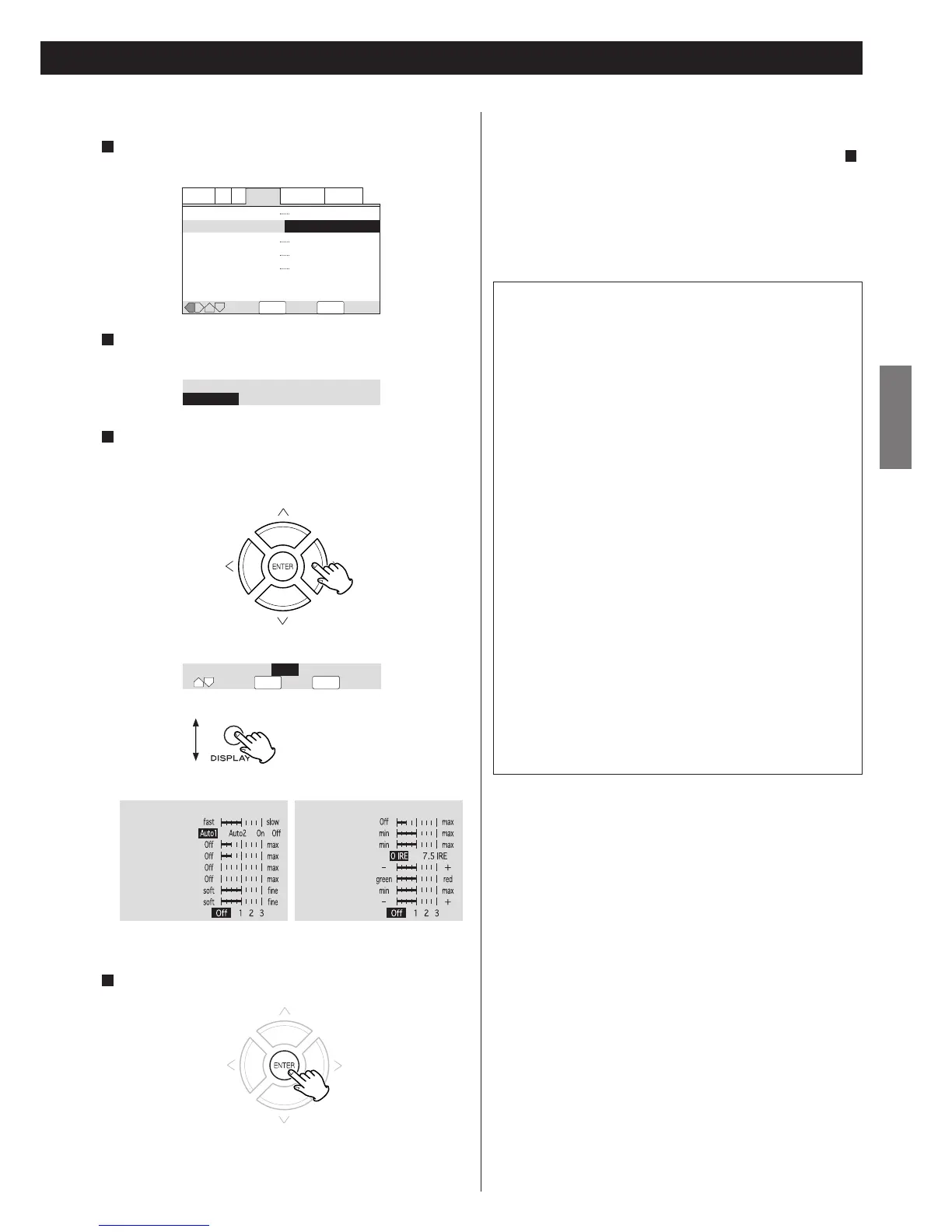
Press the DISPLAY button
to list the parameters.
Creating your own setting
Select "Start" by pressing the DIRECTION buttons, and press
the ENTER button.
1
Select "Video Setup" by pressing the DIRECTION buttons, and
press the ENTER button.
2
Select a parameter by pressing the UP/DOWN buttons, and
change the value by pressing the RIGHT/LEFT buttons.
Repeat this step to set other parameters.
3
Press the ENTER button to save the change and exit.
4
PureCinema
Video on a DVD discs may be either video material (originally shot
on video) or film material (originally shot on film). Video material
has a frame rate of 30 frames/sec.(NTSC), compared with 24
frames/sec. for film. This player converts film material to 60
frames/sec. (in progressive scan mode). PureCinema adjusts the
picture so that it matches more closely the picture quality of a
cinema screen.
You can see whether video on a DVD disc is film or video material
by displaying the video transmission rate (see page 30).
Prog.Motion : When using progressive scan, this adjusts the
motion and still picture quality.
PureCinema : When watching DVD movies, PureCinema
optimizes the picture quality. The default setting is
Auto1, but if the picture appears unnatural, set to
Auto2, On or Off.
YNR : Adjusts the amount of noise reduction (NR) applied
to the Y (brightness) component.
CNR : Adjusts the amount of noise reduction (NR) applied
to the C (color) component.
MNR (Mosquito Noise Reduction) : Adjusts the amount of noise
reduction applied to the mosquito noise (video
artifacts on the edge of the image resulting from
MPEG compression).
BNR (Block Noise Reduction) : Adjusts the amount of noise
reduction applied to the block noise.
Sharpness High : Adjusts the sharpness of the high-frequency
(finely detailed) elements in the picture.
Sharpness Mid : Adjusts the sharpness of the mid-frequency (less
detailed) elements in the picture.
Detail : Adjusts how sharp edges appear in the picture.
White Level : Adjusts the intensity of white in the picture.
Black Level : Adjusts the intensity of black in the picture.
Black Setup : For correction of floating black color.
Gamma : Adjusts the brightness of the darker images in the
picture.
Hue : Adjusts the overall color balance between red and
green.
Chroma Level : Adjusts how saturated colors appear.
Chroma Delay: Compensates for misalignment of the Y
(brightness) and the C (color) components.
If you want to save your setting in Memory 1, 2 or 3:
1. When all the video adjustment has been finished in step ,
select "Memory" by pressing the UP/DOWN buttons, and select
1, 2 or 3 by pressing the RIGHT/LEFT buttons.
<
The older setting will be overwritten.
2. Press the ENTER button to save and exit.
Your setting is stored in the selected memory.
3


 To Next Page