8
View of Unit
1. USB PORT
Connect the USB device for DVR
record/playback and software upgrade.
2. HDMI 1 and HDMI 2 Input Jacks
Connect the HDMI signal source.
3. VGA IN Jack
Connect the VGA signal source in VGA mode.
4. COMPOSITE 2 and L/R Audio Input Jacks
Connect Composite signal source in
Composite 2 mode.
5. Power Supply Cord
6. AV Output Jacks
Connect to output the audio/video signals.
7. COAXIAL OUTPUT Jack
Output the coaxial digital audio signal.
8. Y/Pb/Pr and L/R audio Input Jacks
Connect the Y/Pb/Pr signal source in
Component mode.
9. COMPOSITE and L/R Audio Input Jacks
Connect Composite signal source in
Composite 1 mode.
10. S-VIDEO Input Jack
Connect S-Video signal source in S-Video
mode. Composite 1 and S-Video share L/R
audio jacks.
11. VGA AUDIO IN Jack
Connect the audio signal in VGA mode.
12. TV Antenna Input Jack
Connect the external TV antenna signal
source.
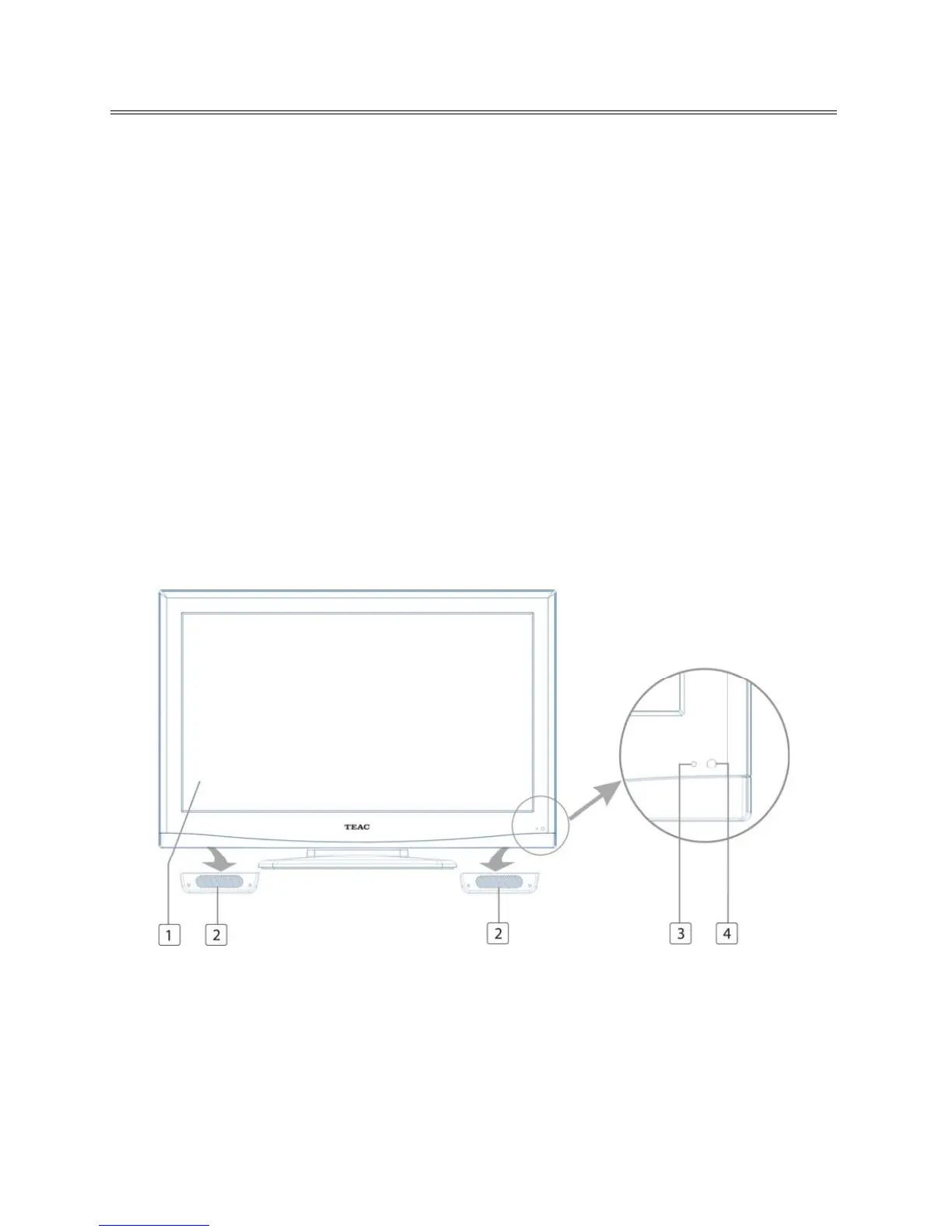
Front Panel
1. Color TFT Screen
2. Speakers
3. Power Indicator
Lights blue while system is active and red while system is in standby mode.
Flash red and blue light consecutively while DVR playback/Recording.
4. Remote Sensor



 To Next Page