40
DVR Function
Playing recorded program
The Digital Video Recording List contains a list of past recorded programs.
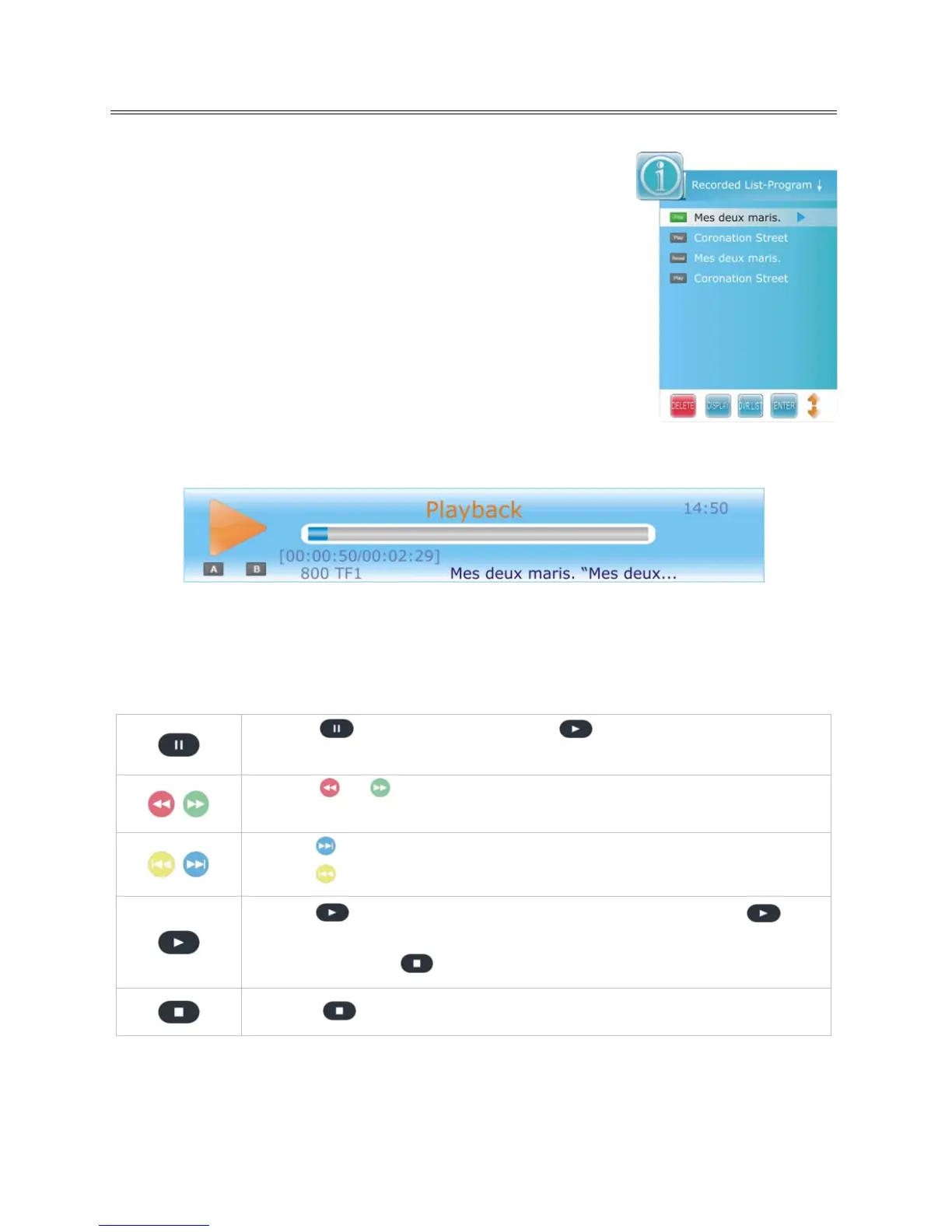
1. Press the DVR.LIST button on the remote control to enter the
Recorded List, as shown:
Press the DVR.LIST button repeatedly to list the files in the order of
either Program, Channel or Time.
2. Press the ▲▼ button to select desired file and press the DISPLAY or
►direction button to display file information.
3. Press the ▲▼ button to select a desired file and press the ENTER
button to play the selected file.
4. While the file is in play, a playback progress bar as sho
wn below would be displayed.
The progress bar will fade out in 10 seconds.
Press EXIT button to toggle between the Time Shift info banner and the minimized icon at the bottom
right of the screen. Both info banner and minimized icon will fade out in 10 seconds.
During playback, operations below can be use.
Press the
to pause playback. Press the button to return to a normal
playback.
Press the
or button repeatedly to increases the fast forward/rewind
speed.
Press the
button to jump about 30 seconds forward.
Press the
button to jump about 30 seconds backward.
Press the
button once to set the beginning point “A” and press the
button again to set the end point “B”. Then, the segment A-B will be played
repeatedly. Press the
button to cancel the repeat segment.
Press the
button to exit DVR mode and resume normal viewing.



 To Next Page