24
FRANÇAISENGLISH
Playback of CD (2)
A
Lecture des disques compacts (2)
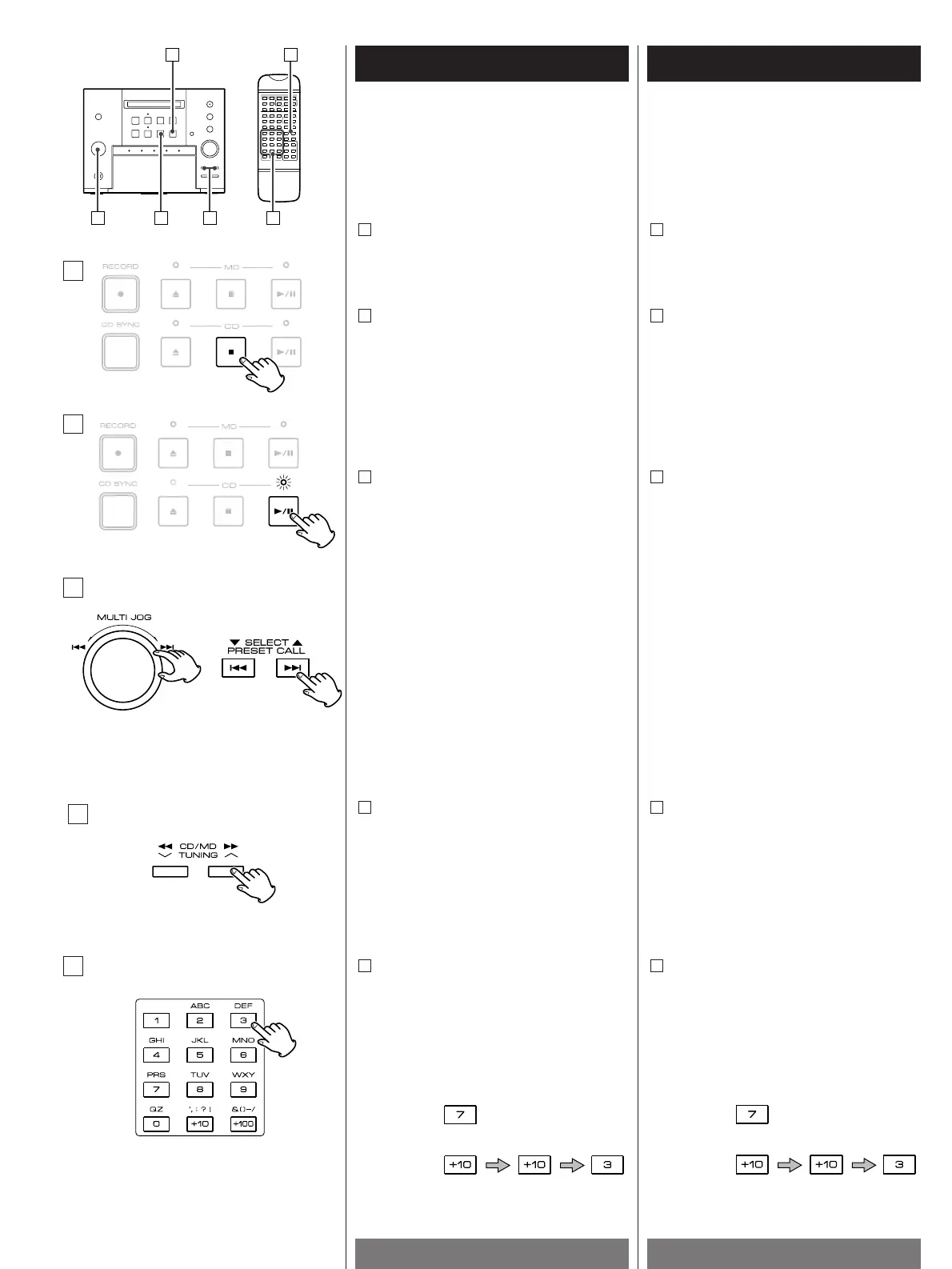
To skip to the next or a previous track
Turn the MULTI JOG or press the SKIP
button (.
or/ ) of the remote
control unit several times until the
desired track is found. The selected track
will be played from the beginning.
<
When the MULTI JOG is clicked to the
.
(or the .button is pressed) once
during playback, the track being played
will be played from the beginning.
<
To return to the beginning of the previous
track, turn the track knob twice or press
the .
button twice.
C
Pour passer à la plage suivante ou
revenir à une plage précédente.
Tournez le bouton MULTI JOG(ou
appuyez sur la touche SKIP(.
ou/)
de la télécommande) autant de fois que
nécessaire pour atteindre la piste
désirée. La piste choisie sera lue à partir
du début.
<
Si vous tournez brièvement le bouton
MULTI JOG une fois à la position .
(ou
si vous appuyez sur la touche .
de la
télécommande), la piste en cours de
lecture est reprise au début.
<
Pour revenir au début de la piste
précédente, tournez le bouton JMULTI
JOG deux fois (ou appuyez deux fois sur
le bouton .
).
C
Example
Track number 7
Track number 23
Direct playback
Press the numeric buttons of the remote
control unit. Playback starts from the
selected track.
E
Lecture directe.
Appuyez sur les touches numériques de
la télécommande. La lecture commence
à la plage sélectionnée.
E
Exemple
Plage n° 7.
Plage n° 23.
B
C
D
E
Search for a part of a track
During playback, hold down the SEARCH
button(m
or,) and release it when
the part you want to listen to is found.
D
Recherche d'une partie d'un titre.
Pendant la lecture, maintenez la touche
SEARCH (m
ou,) enfoncée puis
relâchez-la dès que vous avez trouvé la
partie du morceau que vous souhaitez
écouter.
D
To stop playback
Press the STOP button(H ) to stop
playback.
A
To suspend playback temporarily (pause
mode)
Press the PLAY/PAUSE button(G/J).
Playback stops at the current position. To
resume playback, press the PLAY/PAUSE
button(G
/J) again.
B
Pour arrêter la lecture.
Pour arrêter la lecture, appuyez sur la
touche STOP(H
) .
A
Pour arrêter provisoirement la lecture du
disque en cours (mode pause).
Appuyez sur la touche PLAY/PAUSE
(G
/J). La lecture s'arrête à l'endroit
atteint. Pour reprendre la lecture,
appuyez sur la touche PLAY/PAUSE
(G
/J).
B


 To Next Page