92
FRANÇAISENGLISH
Setting the Clock Réglage de l'horloge
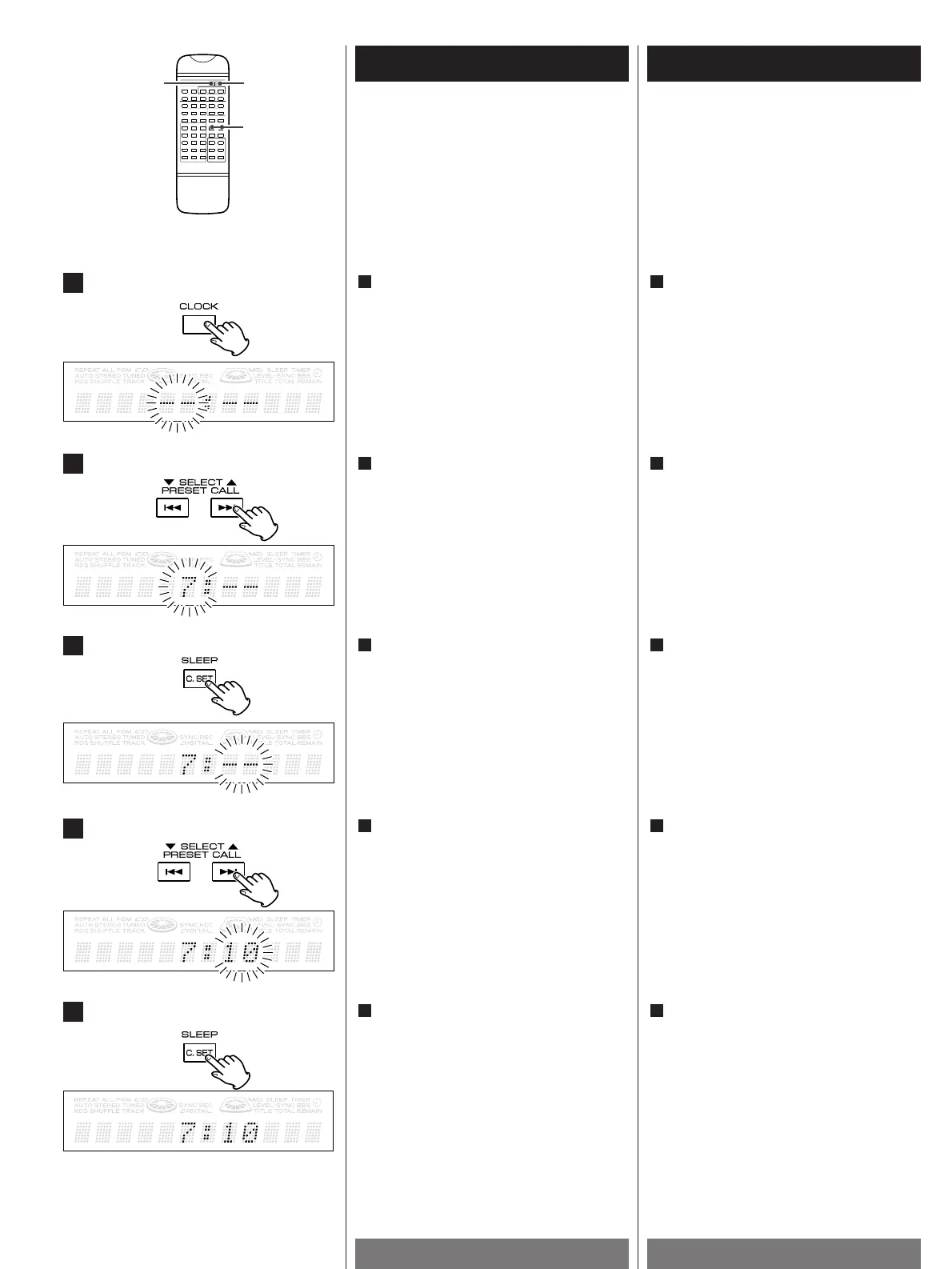
Press the CLOCK button for 2 seconds.
The time display becomes active, and
"hour" blinks.
1
Appuyez sur le bouton CLOCK pendant 2
secondes.
L'affichage de l'heure devient actif, et
l'indication hour clignote.
1
2
3
1
4
5
Press the C.SET button.
The clock starts from 00 second.
5
Appuyez sur la touche C.SET.
L'horloge démarre à 00 seconde.
5
Press the SELECT button(.or/) to
set the current minute.
4
Appuyez sur la touche SELECT
(.
ou/) pour régler les minutes.
4
Press the C.SET button.
3
Appuyez sur la touche C.SET.
3
Press the SELECT button(.or/) to
set the current hour.
2
Appuyez sur la touche SELECT
(.
ou/) pour afficher l'heure.
2


 To Next Page