54
FRANÇAIS
Enregistrement synchro du CD
ENGLISH
1
CD Synchro Recording
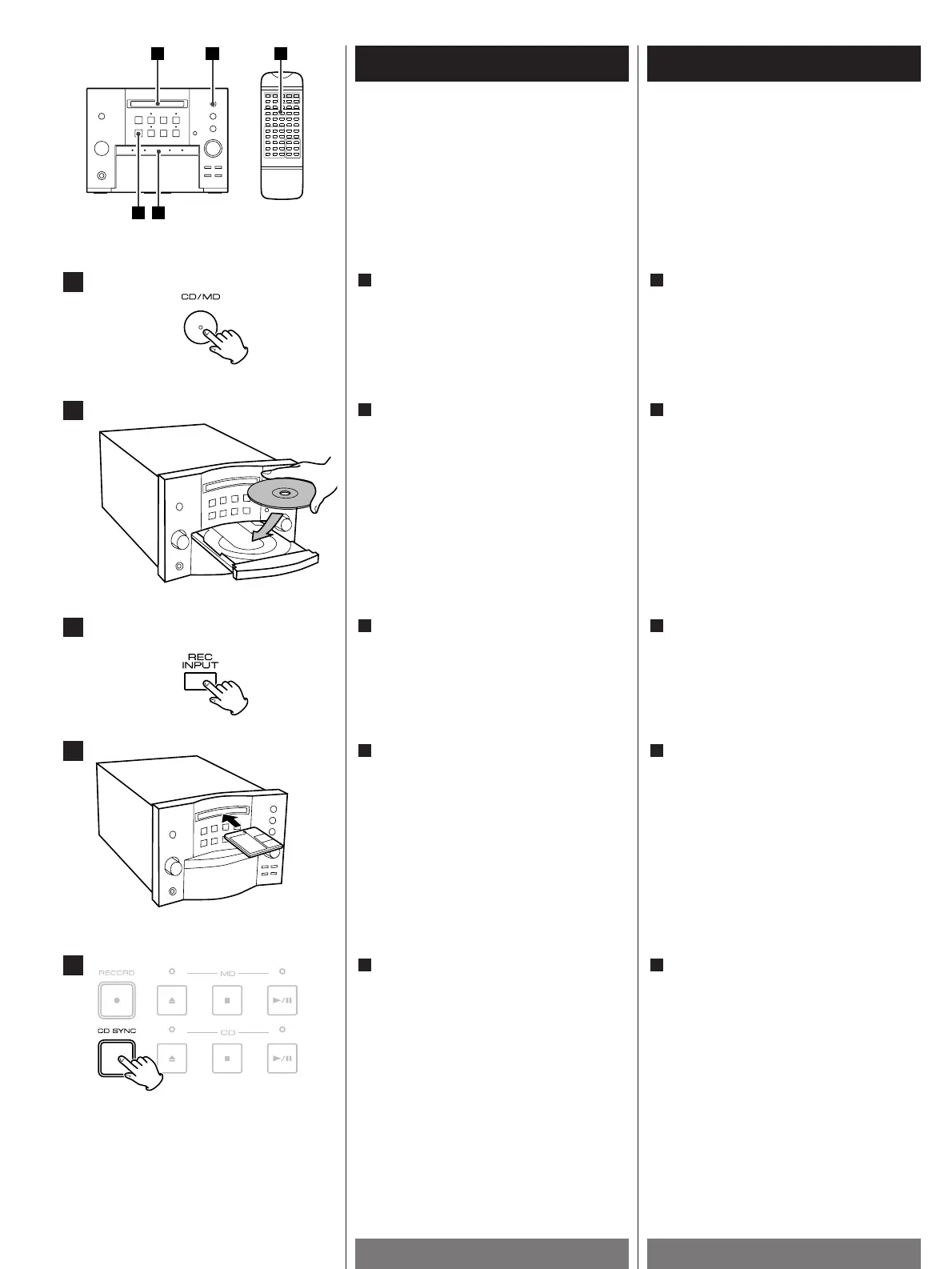
Press the CD/MD button to select "CD".
1
Appuyez sur le bouton CD/mini-disc pour
sélectionner "CD".
1
3
5
4
2
Press the CD SYNC button to start
recording.
Notes:
During synchronous recording, only the
STOP(H
) and POWER buttons are
operational.
5
Appuyez sur le bouton CD SYNC pour
commencer l’enregistrement.
Remarques :
Pendant l’enregistrement synchrone,
seul les boutons STOP(H
) et POWER
sont opérationnels.
5
Insert a recordable MD.
4
Insérez un mini-disc enregistrable.
4
Press the REC INPUT button and select
DIGITAL.
3
Appuyez sur le bouton REC INPUT et
sélectionnez DIGITAL.
3
Prepare the playback of the CD.
Program Playback is possible.
2
Préparez la lecture du CD.
La lecture d’un programme est possible.
2


 To Next Page