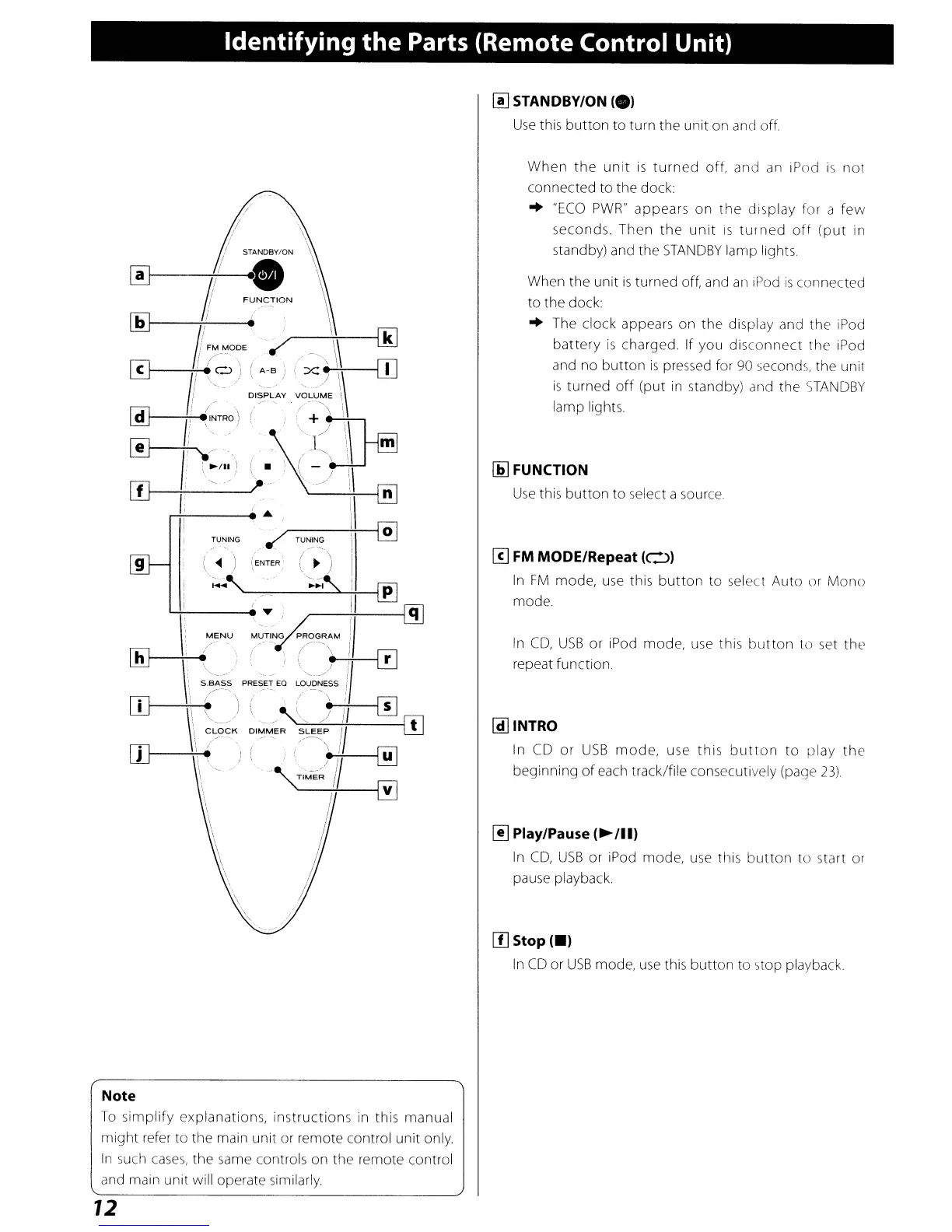
Identifying the Parts (Remote Control Unit)
~
STANDBY/ON
(e)
Use
this
button
to turn the unit on and
off
9
/
/
(
~
')
(ENTER
\~,
When
the
unit
is
turned
off, and
an
iPod
is
not
connected to the dock:
..
"ECO
PWR"
appears
on
the
display
for a
few
seconds.
Then
the
unit
IS
turned
oft
(put
in
standby) and the
STANDBY
lamp lights.
When the unit
is
turned off, and
an
iPod
is
connected
to the dock
..
The clock appears on the display and the iPod
battery
is
charged. If you
disconnect
the iPod
and no
button
is
pressed for
90
seconds, the unit
is
turned
off
(put
in
standby) and the
STANDBY
lamp lights.
Ii]
FUNCTION
Use
this
button
to select a source
[!]
FM
MODE/Repeat
(0)
In
FM
mode,
use
this
button
to select Auto or
Mono
mode.
In
CD,
USB
or
iPod mode, use this
button
to set
the
repeat function.
~INTRO
In
CD
or
USB
mode,
use
this
button
to
play
the
beginning
of
each track/file consecutively (page
23)
~
Play/Pause
(~/II)
In
CD,
USB
or iPod mode,
use
this
button
to start or
pause playback.
[I]
Stop
(-)
In
CD
or
USB
mode,
use
this
button
to stop playback
Note
To
simplify explanations, instructions in this manual
might
refer to the main unit or remote control unit only.
In
such
cases,
the same controls on the remote control
and main unit will operate similarly
12



 To Next Page