Connections
Lh
After all connections are complete, connect
the
power cord's plug
to
the
AC
wall socket.
•
Read
the instructions
of
each device that you intend to
use
with this unit.
•
Be
sure
to connect
each
plug securely.
To
avoid hum and noise,
do
not
bundle the connection cords.
Q~
9gQ
0000
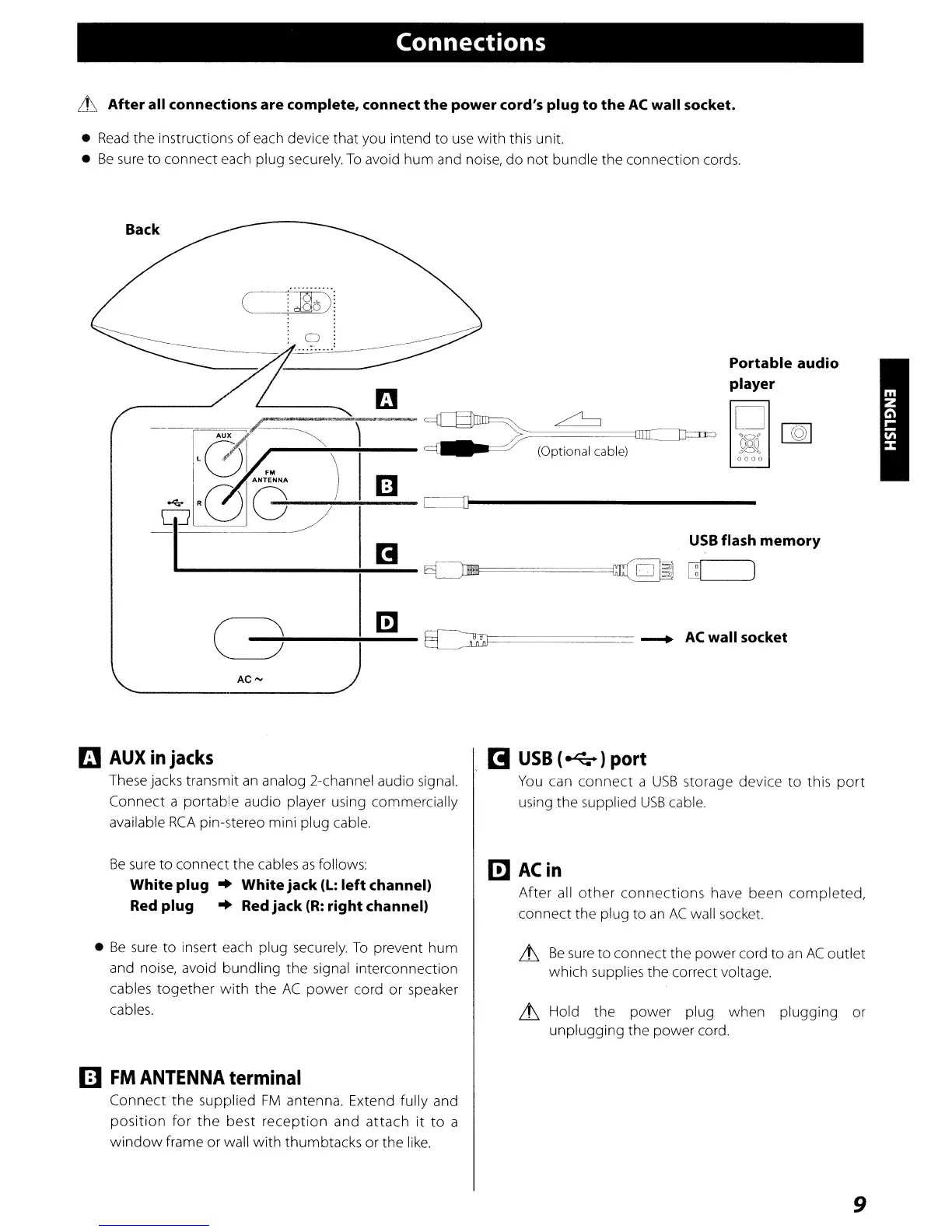
Portable audio
player
..
9
....
:
CJa¢>
. .
a
AUX~
,.---.....-~~---~l--
~:::==~===OrrC:::tP=
~
(Optional cable)
c=::]1----------------
USB
flash
memory
(~
AC""
j
-------..-
~}=i
=======
---+-
AC
wall socket
a
AUX
in
jacks
These jacks transmit
an
analog 2-channel audio signal.
Connect a portable audio player using commercially
available
RCA
pin-stereo mini plug cable.
I!I
USB
(
~
) port
You
can connect a
USB
storage device to this
port
using the supplied
USB
cable.
Be
sure
to connect the cables
as
follows:
White plug
..
White jack
(L:
left
channel)
Red plug
..
Red jack
(R:
right channel)
m
ACin
After
all
other
connections
have been completed,
connect the plug to
an
AC
wall socket.
•
Be
sure
to insert
each
plug securely.
To
prevent hum
and noise, avoid bundling the signal interconnection
cables together
with
the
AC
power cord or speaker
cables.
~
Be
sure
to connect the power cord to
an
AC
outlet
which supplies the correct voltage.
~
Hold the power plug when plugging or
unplugging the power cord.
IE]
FM
ANTENNA
terminal
Connect the supplied
FM
antenna. Extend fully and
position
for
the
best reception and attach
it
to
a
window
frame or wall with thumbtacks or the
like.
9



 To Next Page