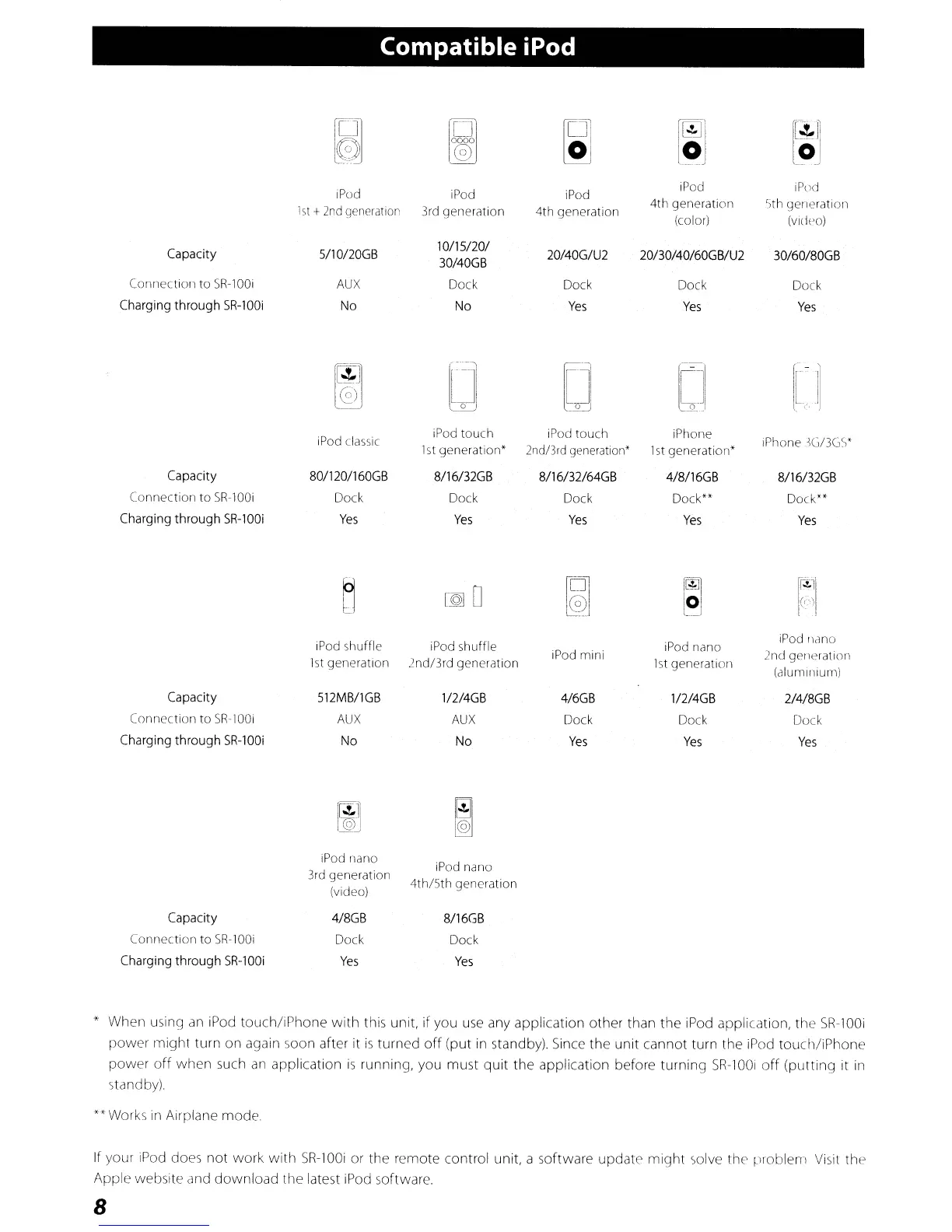
Compatible iPod
B
~
~
r@JJ
~~
~
w
l~
[~JI
L~-J
iPod
iPod iPod
iPod iPod
1st
+
2nd
generation
3rd generation 4th generation
4th generation 5th generation
(color)
(vidpo)
Capacity
5/10120GB
10/15/20/
20/40G/U2 20/30/40/60GB/U2
30/60/80GB
30/40GB
Connection to
SR-100i
AUX
Dock Dock Dock
Dock
Charging
through
SR-100i
No No
Yes Yes
Yes
~
0
D
DJ
1-
'I
@)
[jJ
iPod classic
iPod touch iPod touch iPhone
iPhone
,G/3G'!
1st
generation" 2nd/3rd generation'
1st
generation"
Capacity
80/120/160GB 8/16/32GB 8/16/32/64GB 4/8/16GB 8/16/32GB
Connection to
SR-lOOi
Dock Dock Dock
Dock""
Dock**
Charging
through
SR-lOOi
Yes
Yes
Yes
Yes
Yes
~
~O
~
~
f11
,(")
I'
.
iPod shuffle iPod shuffle iPod nano
iPod
llano
1st
generation
2nd13rd generation
iPod mini
1st
generation
2nd generation
(aluminium)
Capacity 512MB/1GB
1/2/4GB 4/6GB
112/4GB
2/4/8GB
Connection to
SR-lOOi
AUX
AUX
Dock Dock
Dock
Charging
through
SR-100i
No
No
Yes
Yes
Yes
Capacity
Connection to
SR-lOOi
Charging
through
SR-100i
iPod nano
3rd generation
(video)
4/8GB
Dock
Yes
iPod nano
4th/5th
generation
8/16GB
Dock
Yes
" When using
an
iPod tOlich/iPhone with this unit,
if
you
use
any application other than the iPod application, the
SR-100i
power might turn on again soon after it
is
turned
off
(put
in
standby),
Since
the unit cannot turn the iPod touch/iPhone
power
off
when such
an
application
is
running, you must quit the application before turning
SR-100i
off
(putting it
in
standby)
"'Works
in
Airplane mode.
If your
iPod
does
not
work with
SR-100i
or the remote control unit, a software update might solve the problem
Visit
the
Apple website and download the latest
iPod
software,
8



 To Next Page