EasyManua.ls Logo

Teac SR-100i - Programmed Playback; Programmed Playback Setup

Teac SR-100i
36 pages
Print Icon
To Next Page IconTo Next Page
To Previous Page IconTo Previous Page
Loading...
I
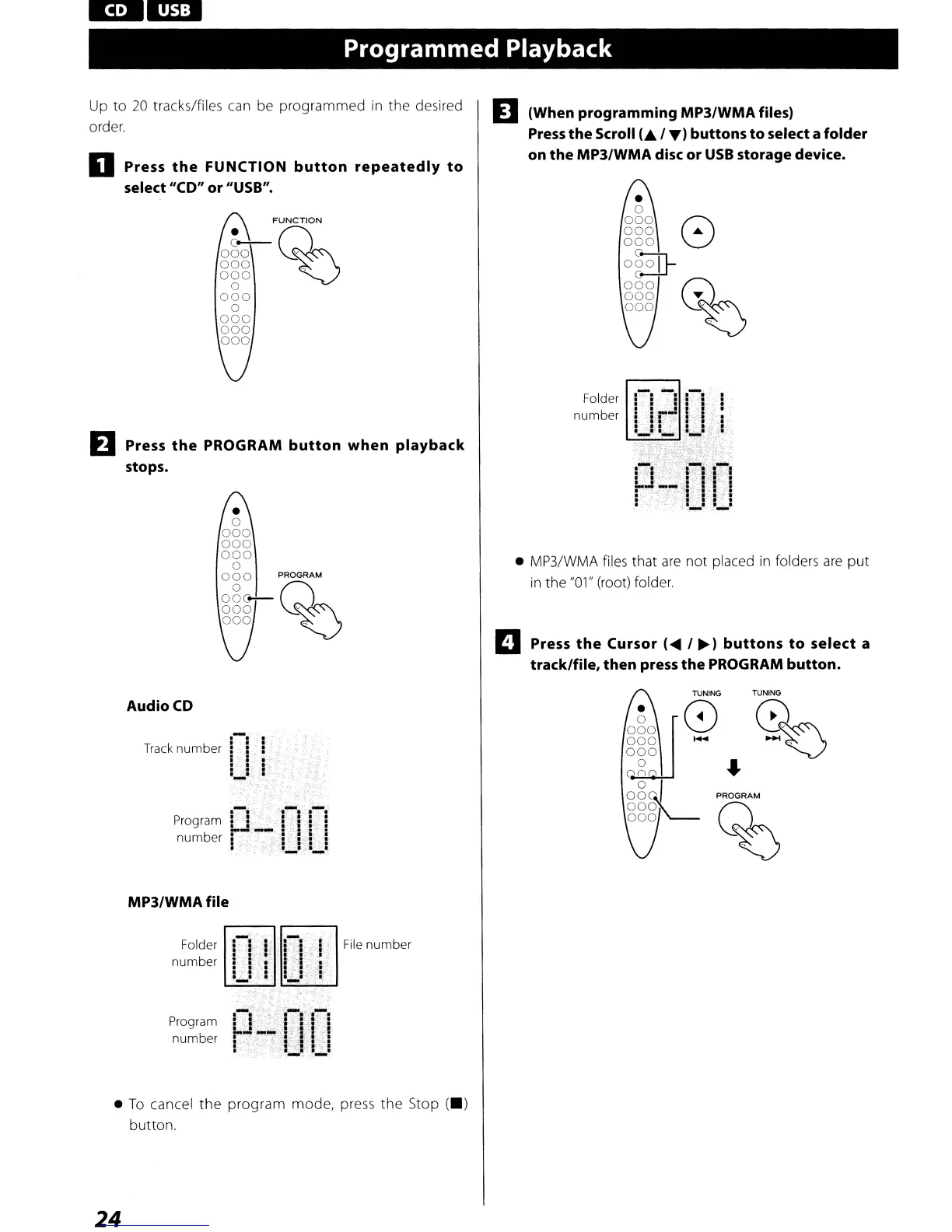
Programmed Playback
Up
to
20
tracks/files can be programmed
in
the desired
order.
o Press
the
FUNCTION
button
repeatedly
to
select
"CO"
or "USB".
FUNCTION
o80Q~
000
~
000
o
000
o
000
000
000
EJ
Press
the
PROGRAM
button
when
playback
stops.
D (When programming MP3/WMA files)
Press
the Scroll
C./.)
buttons
to
select a folder
on the MP3/WMA disc or
USB
storage device.
o
000
8
000
...
000
0SJ-
000
W
000
~
000
~
Folder
number
MP3/WMA files that
are
not placed
in
folders
are
put
in
the
"01"
(root) folder.
D Press
the
Cursor (... /
~)
buttons
to
select a
track/file, then press the PROGRAM button.
TUNING
8
Audio
CD
.-.
:
Track
number
! i :
i !
~
:.
,;,
I._I:,;
I"
MP3/WMA file
TUNING
%
'"
PROGRAM
%
Folder
number
Program
number
File
number
To
cancel
the
program mode, press the Stop
(.)
button.
24

Other manuals for Teac SR-100i

Related product manuals