63
14-1.
Media information
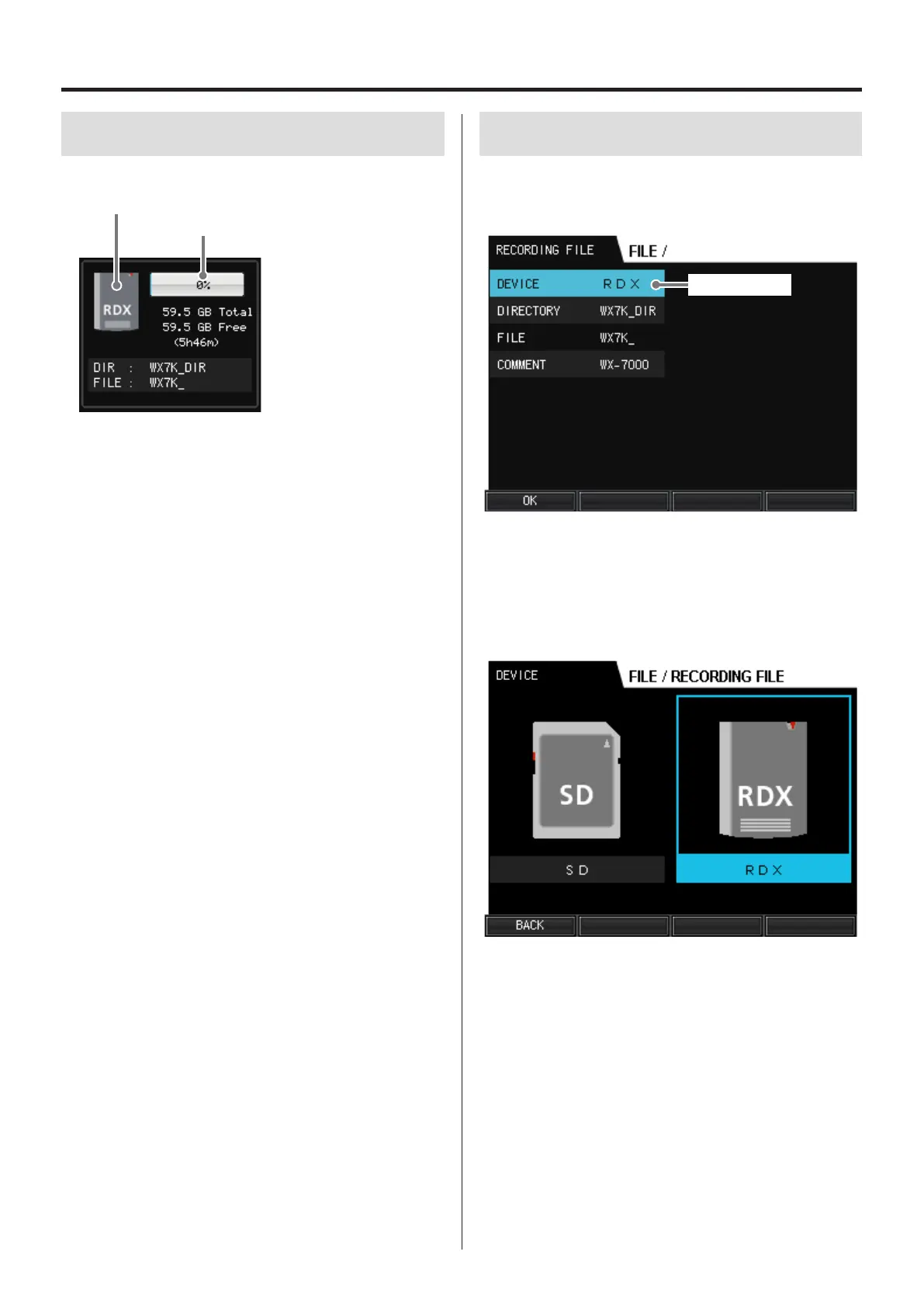
This screen shows information about the selected recording media.
Usage
Selected media
Recording files will be written to the media shown.
“NO MEDIA” appears if no media has been loaded.
Usage
The amount of the total media capacity used is shown graphically
and as a percentage (%).
Total
Total media capacity
Free
Amount of open space on the media
The time shown in hours and minutes in parentheses is the possible
recording time calculated according to the set sampling frequency,
bit depth and number of recording channels.
DIR
The name of the directory where recorded data is saved.
FILE
The prefix given to the names of recording data files.
14-2.
New file settings
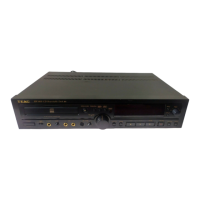
In the FILE menu, select RECORDING FILE and press the VALUE knob
to open the RECORDING FILE screen.
Current selection
14-2-1. DEVICE
Select the media where recording files are saved.
The options are SD and RDX.
The selected media is shown inside a box.
o “NO MEDIA” appears if no media has been loaded.
Selection
Use the VALUE knob and the left and right (g, t) buttons to
change the selection.
BACK (F1 button)
Return to the RECORDING FILE screen.
14. FILE settings


 To Next Page