73
16. MISC settings
16-2.
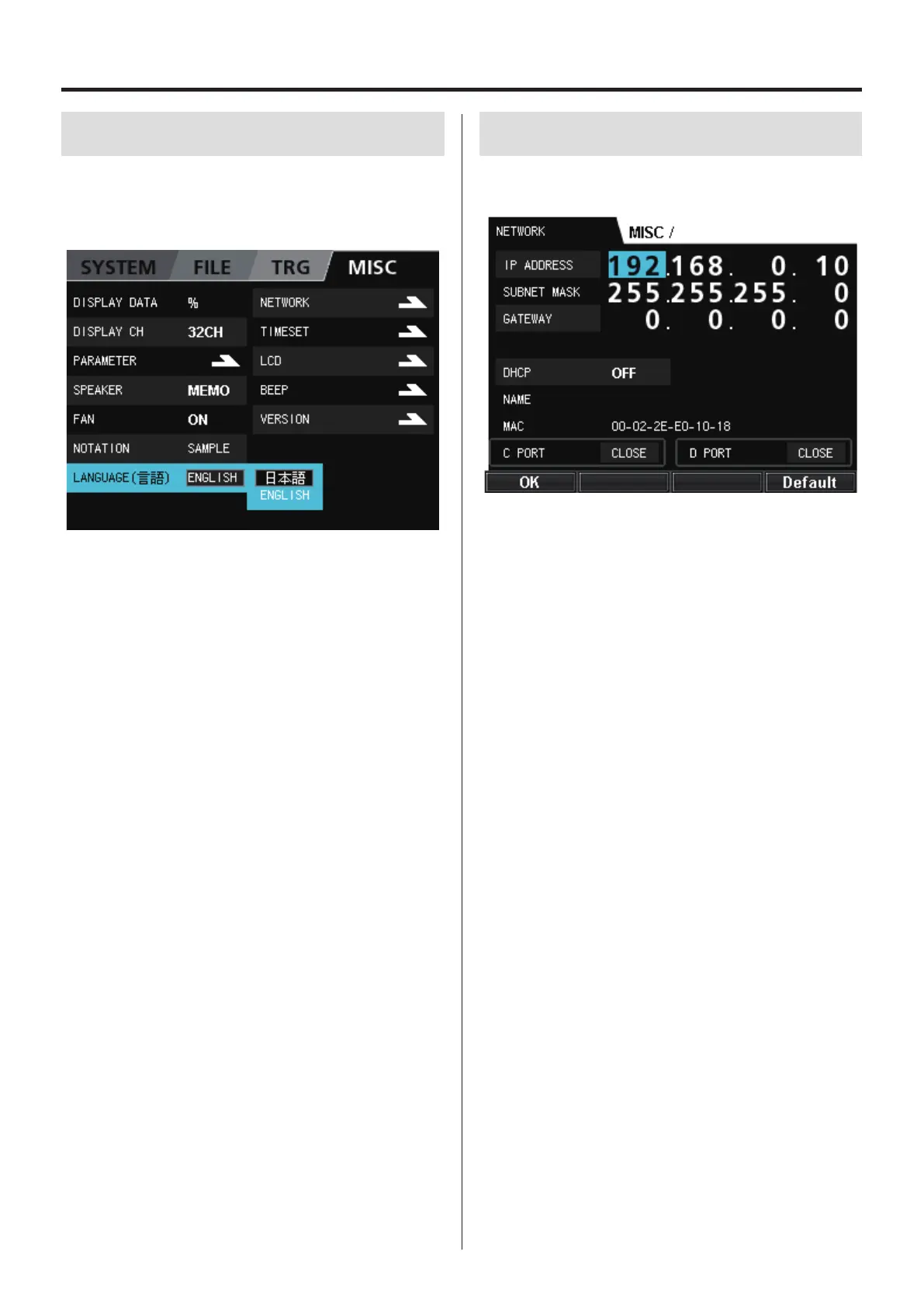
LANGUAGE
You can set the unit to use Japanese or English.
Select LANGUAGE (言語) and press the VALUE knob to change the
setting of the selected parameter.
16-3.
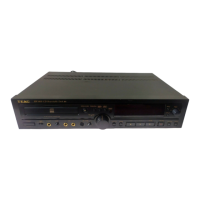
NETWORK
Follow the instruction of your LAN administrator when making net-
work settings.
o For instructions about inputting numbers, see “12-3. Inputting
numbers as setting values” on page 50.
Depending on the DHCP setting, other input items will change.
When DHCP is OFF, the following items can be set.
IP ADDRESS
SUBNET MASK
GATEWAY
When DHCP is ON, the following items show values set by
DHCP, but they cannot be set from this system.
IP ADDRESS
SUBNET MASK
GATEWAY
NAME
Sets the name that is used to identify this system when using the
included WX Navi software.
MAC
Shows this system’s MAC address.
OK (F1 button)
Confirm the settings and return to the MISC screen.
Default (F4 button)
Restore settings to their original values. If DHCP is OFF, settings will
be restored to their original factory values.


 To Next Page