12
Call: 1-631-648-7481 or Visit: support.technocnc.com
Titan Series WinCNC Manual
WinCNC
2.1 Control Panel Functions
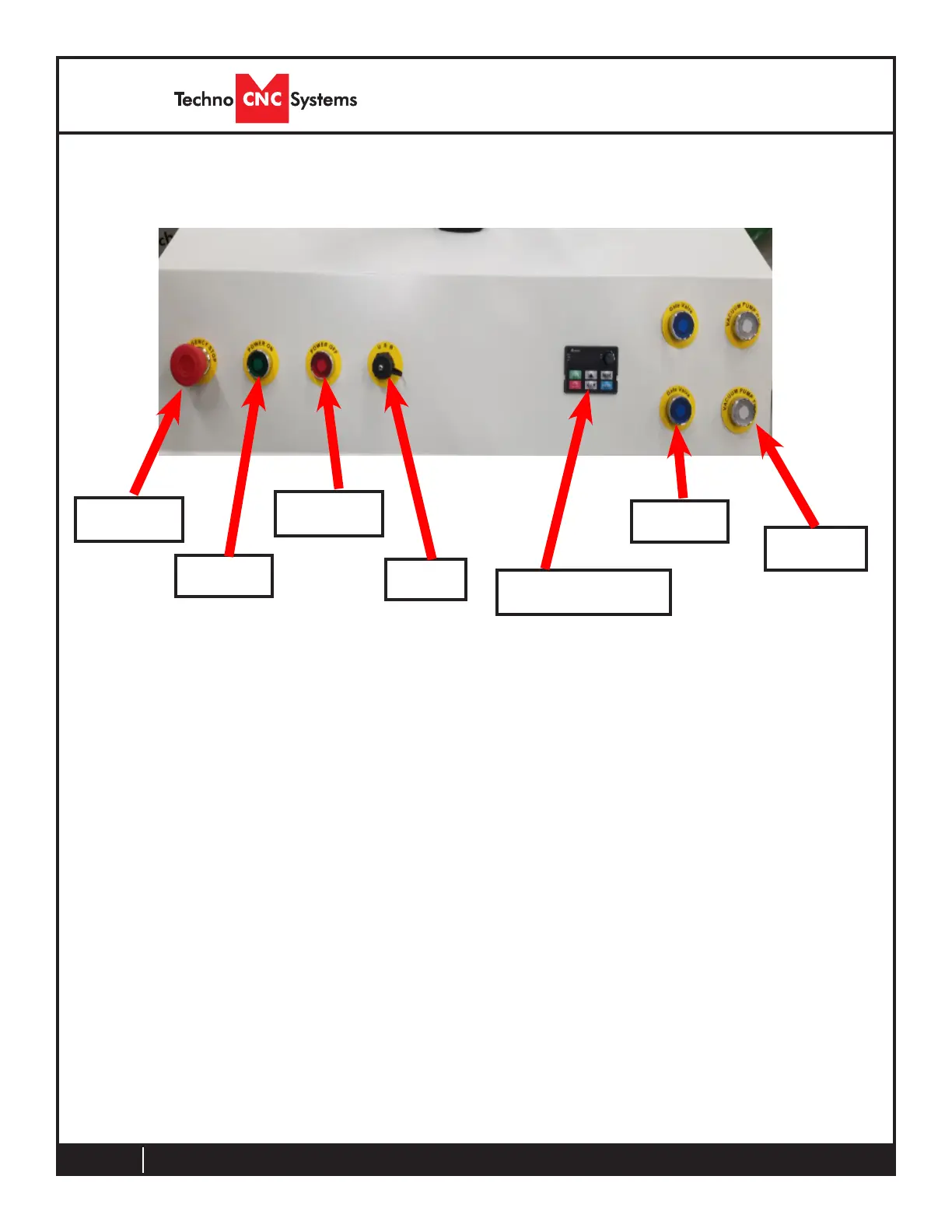
Emergency Stop - This button will cut power to the entire machine. Used in
emergency situation to completely stop the machine.
Power Enable - Once the main power breaker has been engaged, the controller is
turned on by pressing this green button.
Power Disable - Once the machine has been turned on, the controller is turned off
by this red button.
Gate Valve(s) - If using a vacuum pump, this controls the gate valve(s) to control
vacuum to the machine.
Spindle Inverter Readout - This displays the actual spindle RPM in hertz.
USB Port - This is used as an extension port for the PC
Vacuum Control(s) - These buttons will remotely turn the vacuum pumps on and
off
Emergency
Stop
Power
Enable
Power
Disable
Spindle Inverter
Readout
Vacuum
Control(s)
USB
Port
Gate
Valve(s)
II. Control Functionality



 To Next Page