29
Call: 1-631-648-7481 or Visit: support.technocnc.com
Titan Series WinCNC Manual
WinCNC
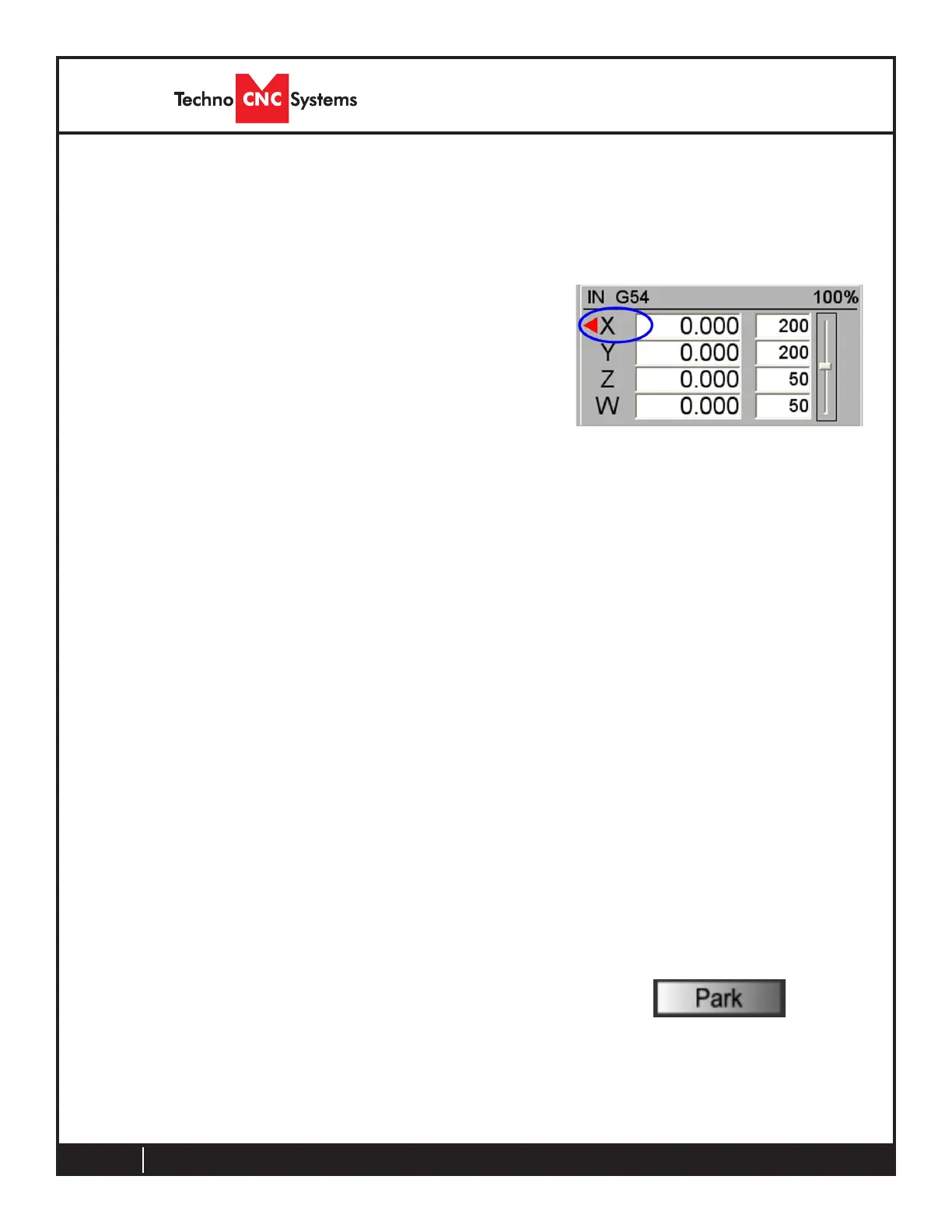
The axis window is the primary display for current
information about each axis on your machine. The
current positions and velocities for each axis are
displayed in the text boxes. Displayed above the position
and velocity boxes are the current units of measure
(IN), any currently active modes (G54), and the current
feed rate override percentage (100%). Red triangles to
the left and right of each axis label indicate low or high
limit switch hits. A red triangle to the left of an axis label
indicates a low limit switch hit, and to the right indicates
a high limit switch hit. A green box displayed to the right
of the position box indicates that a zero position has
been set for that axis. A blue box displayed to the right
of the position box indicates that an offset has been set
for that axis. This is often the Z axis, indicating that the
tool length has be learned.
To the far right side of the axis window is the feed rate
override control slide bar.
Feed Rate Override
WinCNC accepts feed overrides to increase/decrease the feed rate. The feed rate can be adjusted
from 1% to 200% of the programmed rate. The override rate cannot be set higher than the max
velocity or G0 rate for a given axis. Use the Insert key to increase and the Delete key to decrease
the programmed feed rate, holding CTRL and pressing either Insert or Delete will result in the
feed rate being reset to the programmed value. There is also a slider bar to the right of the feed
rate screen display that can be used to initiate a feed rate override. The override feed rates will be
displayed in place of the programmed feed rates in the display. The feed rate will change colors to
depict that an override is in use. If the override rate is higher than the programmed rate the color
of the feed rate display will be red, if it is lower than the programmed feed rate it will be blue.
3.3- Axis Window
Use this button to send the machine to a known Park
position. The position is set to be toward the back of the
table, convenient when loading and unloading material from
the bed of the machine.
In its usage, the Z axis will lift up out of the way to its home
position and then the machine will rapid to the park location.
Pressthe“Park”buttontosendthemachinetothepark
location.
Thelocationofthepositioncanbeadjustedinthe“Park.mac”
leintheWinCNCinstalldirectory.
3.4- Park Position



 To Next Page