32
Call: 1-631-648-7481 or Visit: support.technocnc.com
Titan Series WinCNC Manual
WinCNC
Setting the XY Zero Position
Jog the machine using the directional arrows so that the
center of the bit is located directly above the position you
would like to set as XY0. It is useful to utilize a small bit
orabitwithanepointwhenaccurateltysettingthis
position.
Oncethemachineisinlocation,pressthe“SetXY”
button, the coordinates will change to 0.000 and a green
box will appear indicating the XY zero is now set.
3.6- Adjusting the XYZ Zero position/WCS/User Origin.
XYZ zero position, Working Coordinate System (WCS), and User Origin are all the same thing.
Different CAM systems and users just name the concept differently. For convenience XYZ zero
position will be used in the rest of this manual.
XYZ zero position is the location point on a drawing in a
CAD/CAMpackagewhereX,YandZallequalzero.
Generally, XY zero is on the bottom left corner and Z zero
isthetopofthepart.Ing3.6atheword“BOXER”is
located away from the XY zero.
In Fig 3.6b the object represents the material the letters
will be cut from. The spindle, vertical with point, should
be jogged to the corner of the material.
In most situations, the user will set X0 and Y0 together,
and Z0 seperately.
Fig.3.6b
Fig. 3.6a
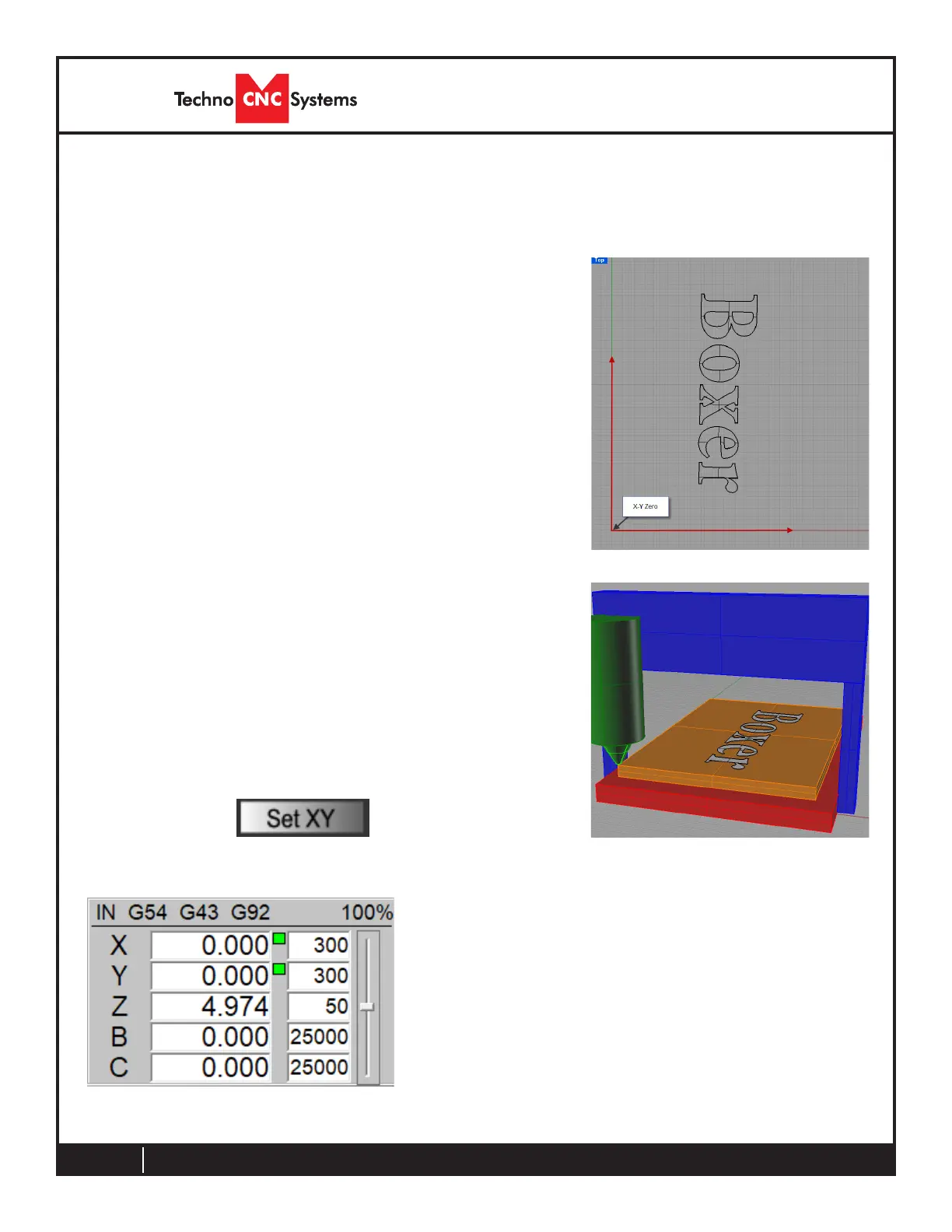
Figure 3.6c shows the axis window after setting the XY0
position.
Notice the green boxes indicating that the position has
been set. This is also apparent by the G92 located at the
top.
The coordinates now read 0.000
Fig.3.6c



 To Next Page