13
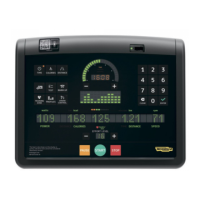
Crossover, Synchro, Vario, Bike, Recline, Climb, Step, Top - Advanced LED display
Cool down
At the end of each exercise and test, there is a cooling down stage at half the load of the exercise just completed.
The workloads can be modied using the corresponding keys in the same way as during the exercise.
The prole LED columns are blocked, showing the gradient for the exercise just ended.
Everything switches o in the goal arc; the goal dial will either show the total time of the exercise just ended, the total distance covered or the total calories burned.
The workout results alternate on the alphanumeric display:
- if the heart rate monitor has been used for at least 3 minutes during the exercise
- if the heart rate monitor has been used for at least 3 minutes during the exercise
- - in workouts at constant speed
ow3wtt
During the cool down, the TGS key can be inserted in the reader to save the results of the exercise just ended.
tttot
To stop the cool down, press the STOP key.


 To Next Page