38
Crossover, Synchro, Vario, Bike, Recline, Climb, Step, Top - Advanced LED display
Prole workout
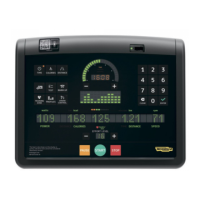
After having selected one of the proles, select the goal and give the goal value:
to
Press the key for the selected GOAL.
t3
o3
t
Type in the goal value with the number keys and then press ENTER to conrm and proceed.
Type in the eort level (based on the test result) with the number keys, then press ENTER to conrm and proceed. The exercise starts.
W
You are advised not to do the exercise at a higher eort level than that indicated by the level test.
The age and weight values are set initially, then, if the heart rate signal is detected, the age will be requested.
ott3
Type in the age with the number keys and then press ENTER to conrm and proceed. On the basis of the age, the maximum heart rate value specied by the
user is calculated; the maximum heart rate percentage is then indicated by the blinking LED in the heart rate bar.
If no data are entered, the exercise proceeds without a specic LED blinking for the heart rate.


 To Next Page