IPCAM User Manual
37
7.2 Multi-Device Settings
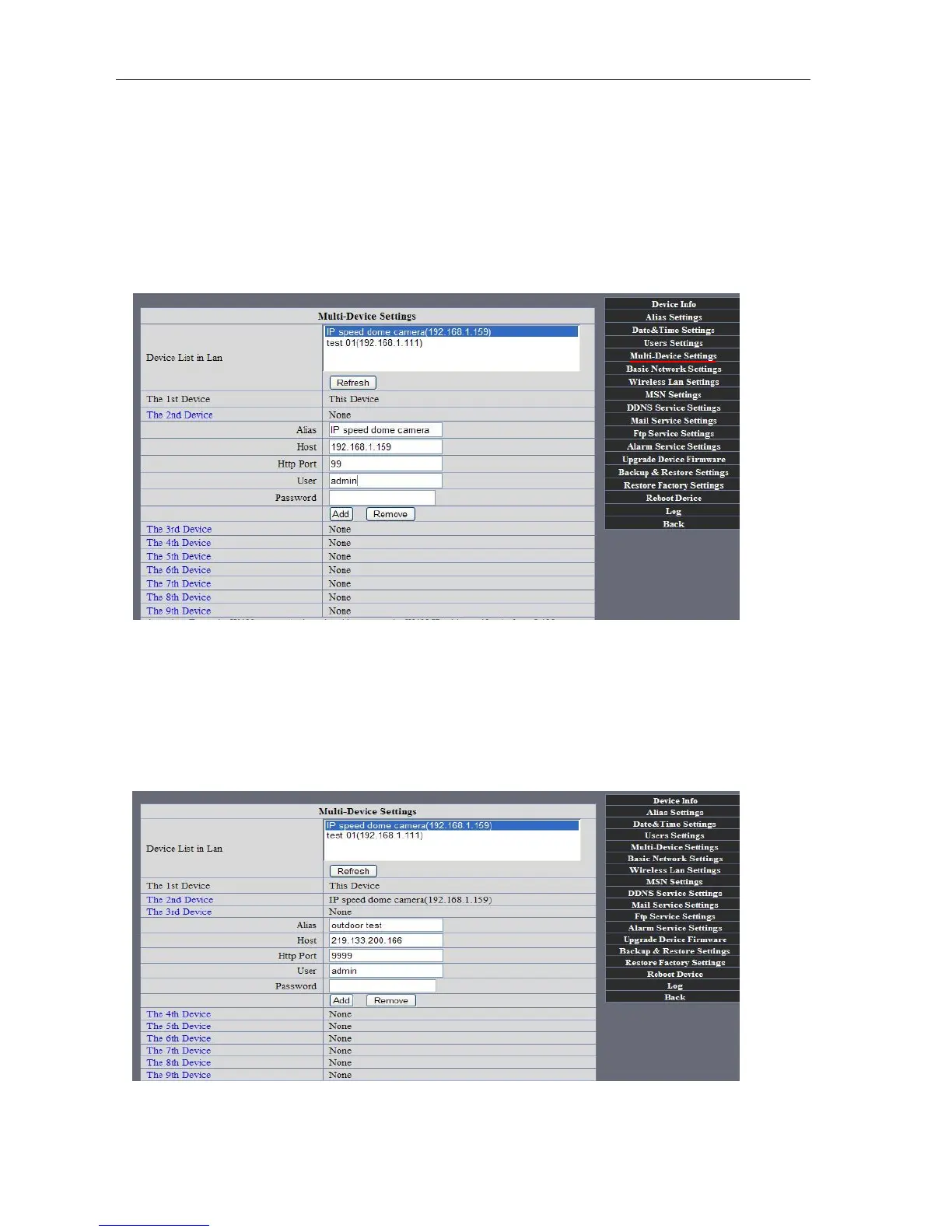
l Add cameras in LAN
In the Multi-Device Settings page, you can see all devices searched in LAN. The 1
St Device is this device in default. You can add more cameras list in LAN for monitoring. This Web software
supports up to 9 IP Cameras online simultaneously. Click “The 2ND
Device” and Double click the item in the “Device List in LAN”, Alias、Host and Http Port
will fill in automatically. Enter the correct username and password then click “add”.Add
more cameras in the same way. At last, please don’t forget the “ setting” Button
Picture 64
l Add cameras in the Internet
Firstly, make sure the camera added can access in the Internet with the IP address or
DDNS domain. Like this: http://219.133.200.166:9999or http://IPcam.dyndns.org:9999。You can enter the
Host:: 219.133.200.166 Http port: 9999 or Host:: IPcam.dyndns.org Http port: 9999. Enter the correct
username and password then click “add”. Add more cameras in the
same way.
Picture 65



 To Next Page