IPCAM User Manual
42
Note: the third party domain name is the realization of analytical way, input the domain in the browser, it will
keep this string of characters. If the port of the device isn’t 80, then need to add colon and port number .For
example:
http://reotest1.dyndns.org:8999
7.5 Mail and FTP Service
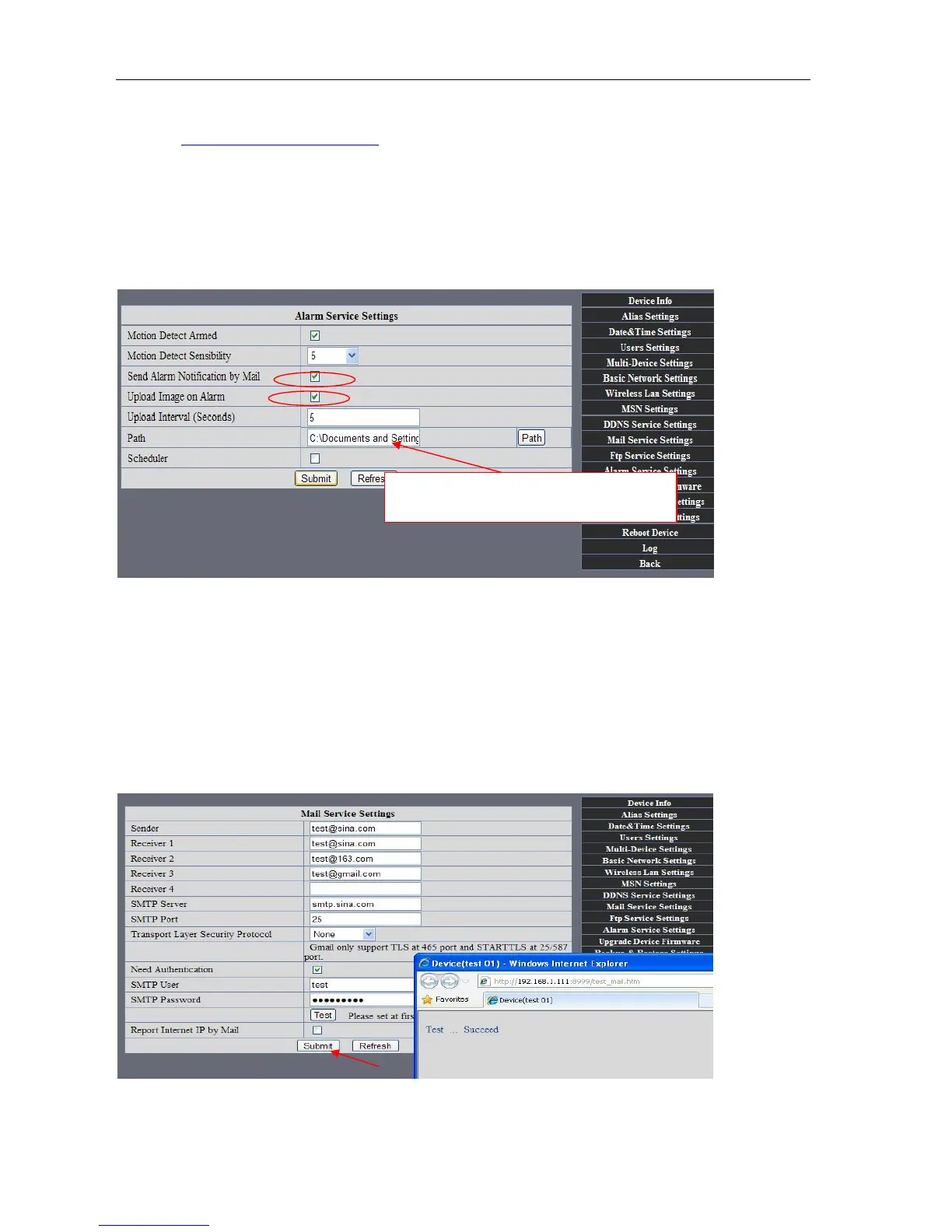
1)Configure the E-mail box to receive and send mails. The E-mail box is used for receiving
the images sent after alarm and the system IP address after successful dial-up..
Note: When Alarm Service Settings-> Send Mail on Alarm is check, the Mail
Service takes effect.
Picture 76
Configure the E-mail box to receive and send mails. The E-mail box is used for receiving the images sent
after alarm and the system IP address after successful dial-up.
Sender: This device use the sender mailbox to send mails.
Receiver: To receive the mail from the Sender. You can set up to 4 receiver mailbox.
SMTP Server: the SMTP server for the sender mailbox
Need Authentication: i
f the sender mailbox need authentication, you should check it then
input the SMTP username & Password.
Mail test: Please set the Mail parameter and click "Submit" first. There are Mail test result.
Picture 77
video Local storage in PC after alarm monitoring



 To Next Page