IPCAM User Manual
43
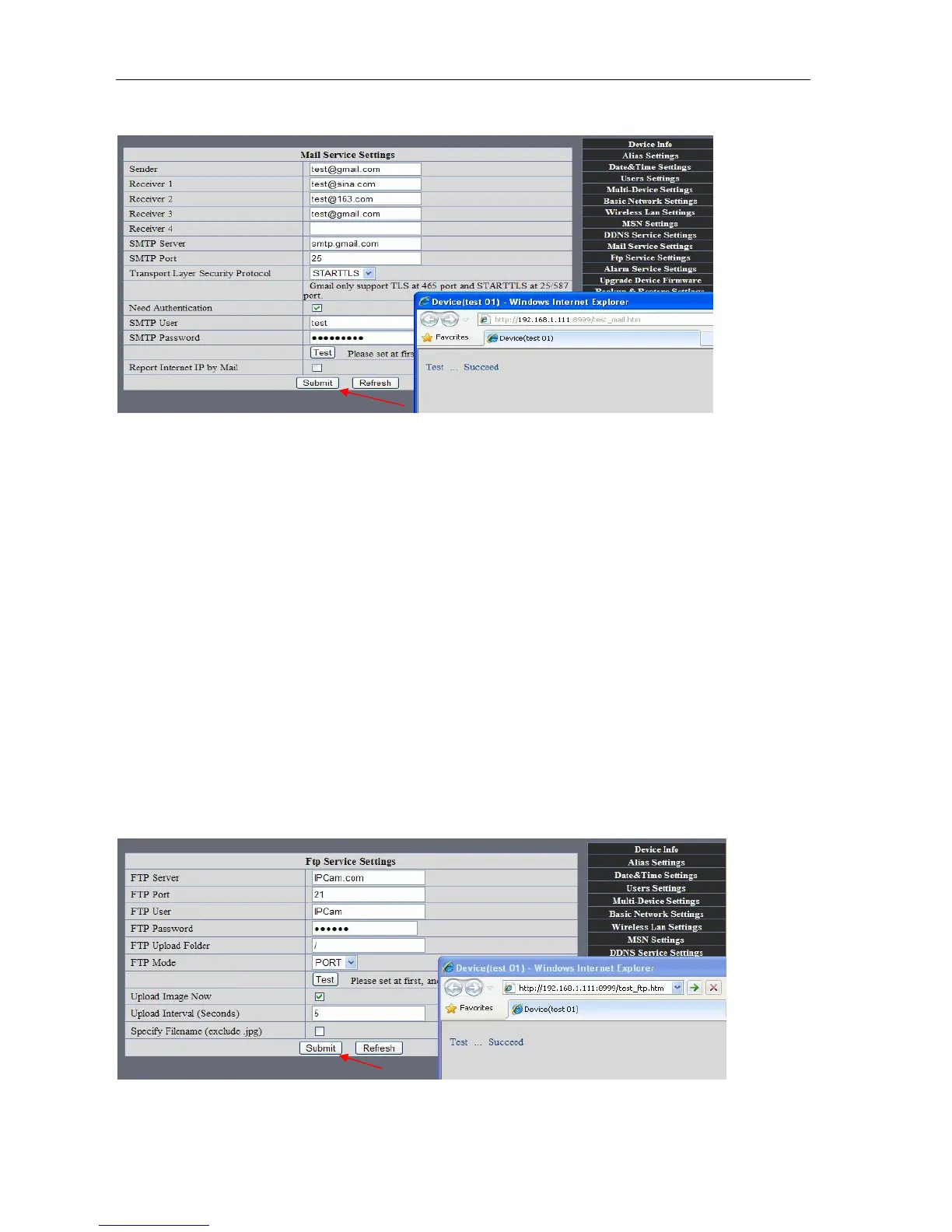
Gmail also set as the same: It only needs you to fill in correct SMTP Sever address, user and password.
Picture 78
Mail notes Internet IP address: In this option, When Internet IP and port have changed, IP Will be sent via
mail.
1 Can not connect to the server
2 Network Error. Please try later
3 Server Error
4 Incorrect user or password
5 The sender is denied by the server. Maybe the server need to authenticate the user, please check it
and try again。
6 The receiver is denied by the server. Maybe because of the anti-spam privacy of the server
7 The message is denied by the server. Maybe because of the anti-spam privacy of the server
8 The server does not support the authentication mode used by the device
Report Internet IP by Mail: When ipcam port or Internet IP changed, it will send the internet IP by
mail.(for example: IPCAM 's url is http://119.123.207.96:9002). Make sure the port is map to the router
correctly by UPNP or Virtual Map function.
2) FTP Server use and settings
·If you already have an FTP Server (ipcam. com)and email ipcam ,you can fill the
parameters as below:
Picture 79



 To Next Page