14
14.2 KEYBOARD IN STAND-BY
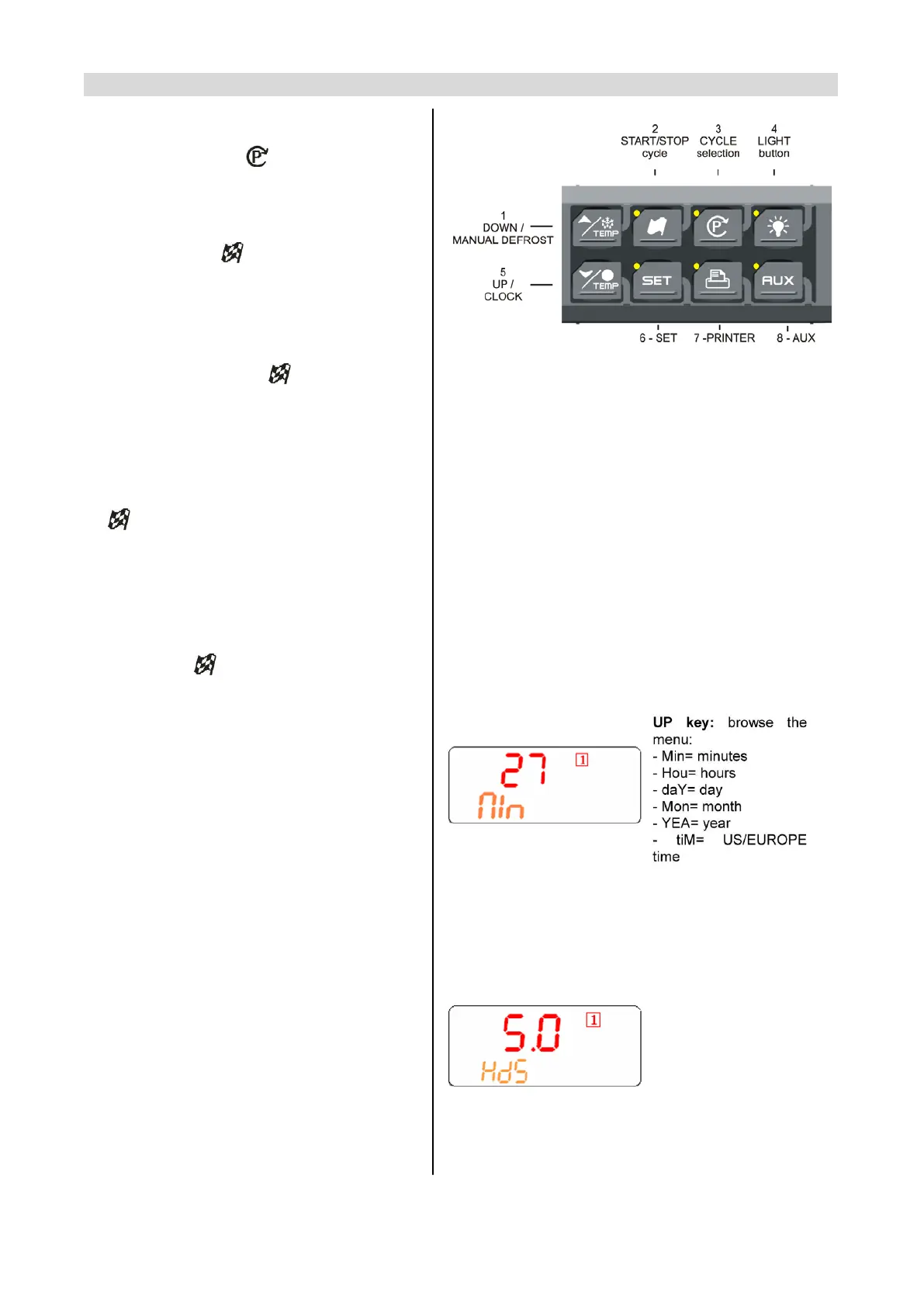
HOW TO SELECT A CYCLE:
Push and release the (3) key till the desired
cycle is selected.
HOW TO START A CYCLE: Push and release
the START/STOP
button (2). Il The
correspondent yellow LED is switched on..
HOW TO TEMPORARILY STOP THE
RUNNING CYCLE.
1. Press and release the
key.
2. The compressor and the fan will be stopped
for the PAU time (see parameters list) and
the flashing message “Stb” will be displayed.
3. To restart the cycle press and release the
key, the cycle will restart from the some
point at which it was interrupted.
4. In any case the cycle automatically restarts
after the PAU time.
HOW TO STOP A CYCLE: hold pushed the
START/STOP
button (2) till the yellow LED
will be switched off.
HOW TO SET THE TIME (RTC)
Hold pushed the DOWN key (5) till the Min
label is displayed.
Use the UP and DOWN KEY to browse the
parameters.
TO MODIFY: push the SET button and then
the UP and DOWN keys.
TO CONFIRM: push the SET button.
TO EXIT THE RTC MENU: Push together
SET + UP keys or wait 5 sec.
1. HOW DISPLAY / MODIFY THE SET
POINT OF THE HOLDING PHASE
TO DISPLAY: Push and release the SET key In this exemplum the
(6), the holding set point of the selected cycle holding set point of the
is displayed for 5 sed.. cycle 1 is modified.
TO MODIFY: while the set point is displayed
hold pushed the SET key till the HdS label start
flashing. Use the UP and DOWN key to modify
the value. TO CONFIRM: push the SET key to
confirm the value and exit.


 To Next Page