© 2009 D 527 - 06/09 16 of 28
Display Description
STEP 1
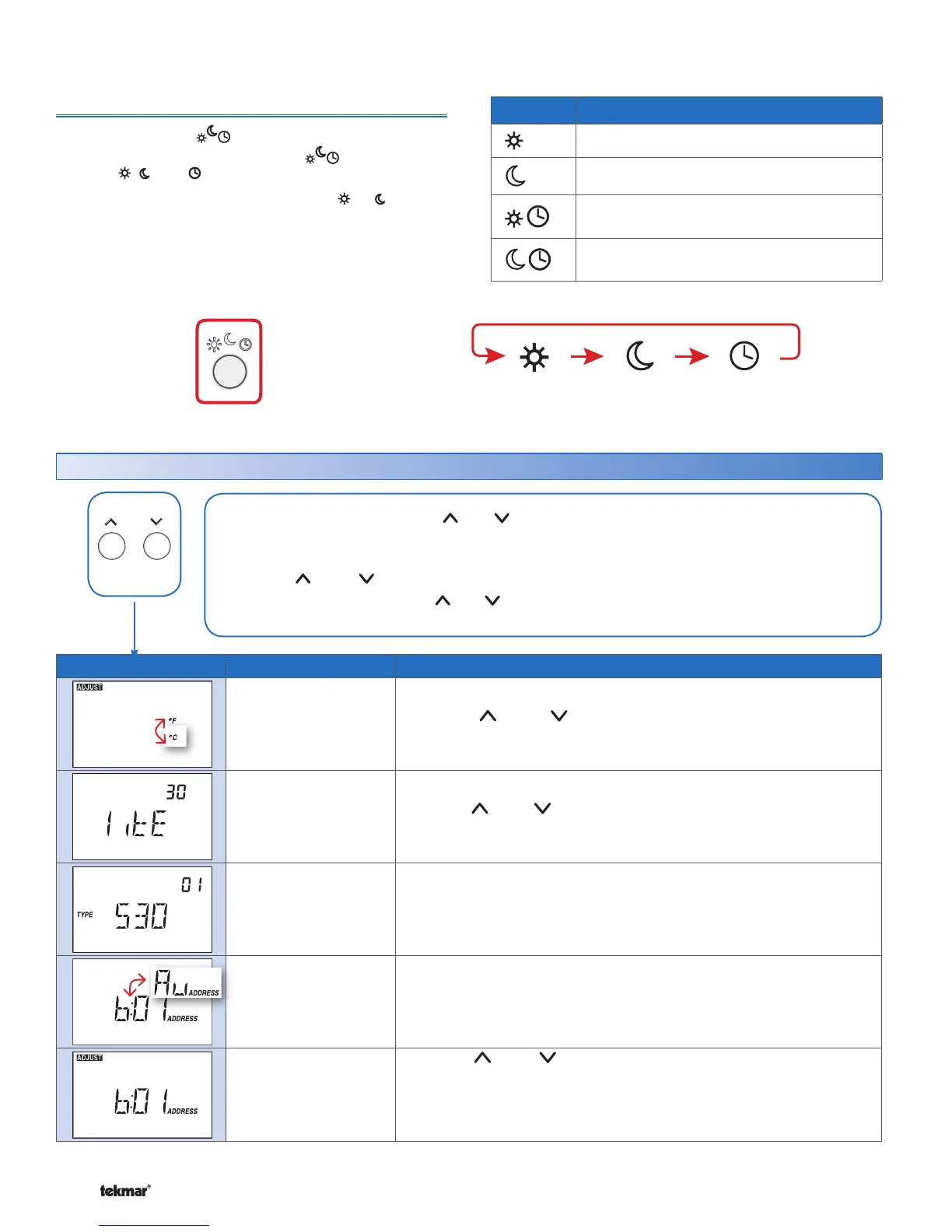
°F or °C
Press the or the button to change from °F to °C and vice
versa.
STEP 2
Backlight
Off, 30 sec, On
Press the
or the button to select the backlight to permanent Off,
30 second temporary on, or permanent On.
STEP 3
View Type and Software
Version
The large number shows the type number as 530.
The software version is shown in the upper right hand corner.
STEP 4
View tekmarNet
®
Address
The thermostat’s tekmarNet
®
address is shown.
The address toggles between a number and “Au” when using automatic
addressing.
STEP 5
Manually Change
tekmarNet
®
Address
Press the or the button to manually select an address.
The address can be returned to automatic “Au” between addresses
24 and 1.
Ensure to document the address number when manually addressing
thermostats.
User Settings (1 of 1)
Press and hold down both the and buttons to change from one step to the next. While
holding both buttons down, a new setting will display every 5 seconds.
Release both buttons once the step has been reached.
Press the or the button to change the setting, if available.
Press and hold down both the and buttons for 5 seconds to go to the next step, OR
After 10 seconds of no button activity, the display goes back to normal operation.
•
•
•
•
•
•
Press
+
Together
530 Thermostat
Display Action
Manual override at occupied temperature.
Manual override at unoccupied temperature.
Programmable schedule at
occupied
temperature.
Programmable schedule at
unoccupied
temperature.
Local Override
The Local Override ( ) button can be used to override
any schedule. Press and release the button to toggle
between , , and (if available).
The thermostat remains at the selected or override
temperature until manually changed back to the schedule.
Occupied Unoccupied Schedule
Press the
button to switch between:



 To Next Page