© 2009 D 527 - 06/09 12 of 28
Display Range Description
40 to 85°F
(4.5 to 29.5°C)
Default = 70°F
(21.0°C)
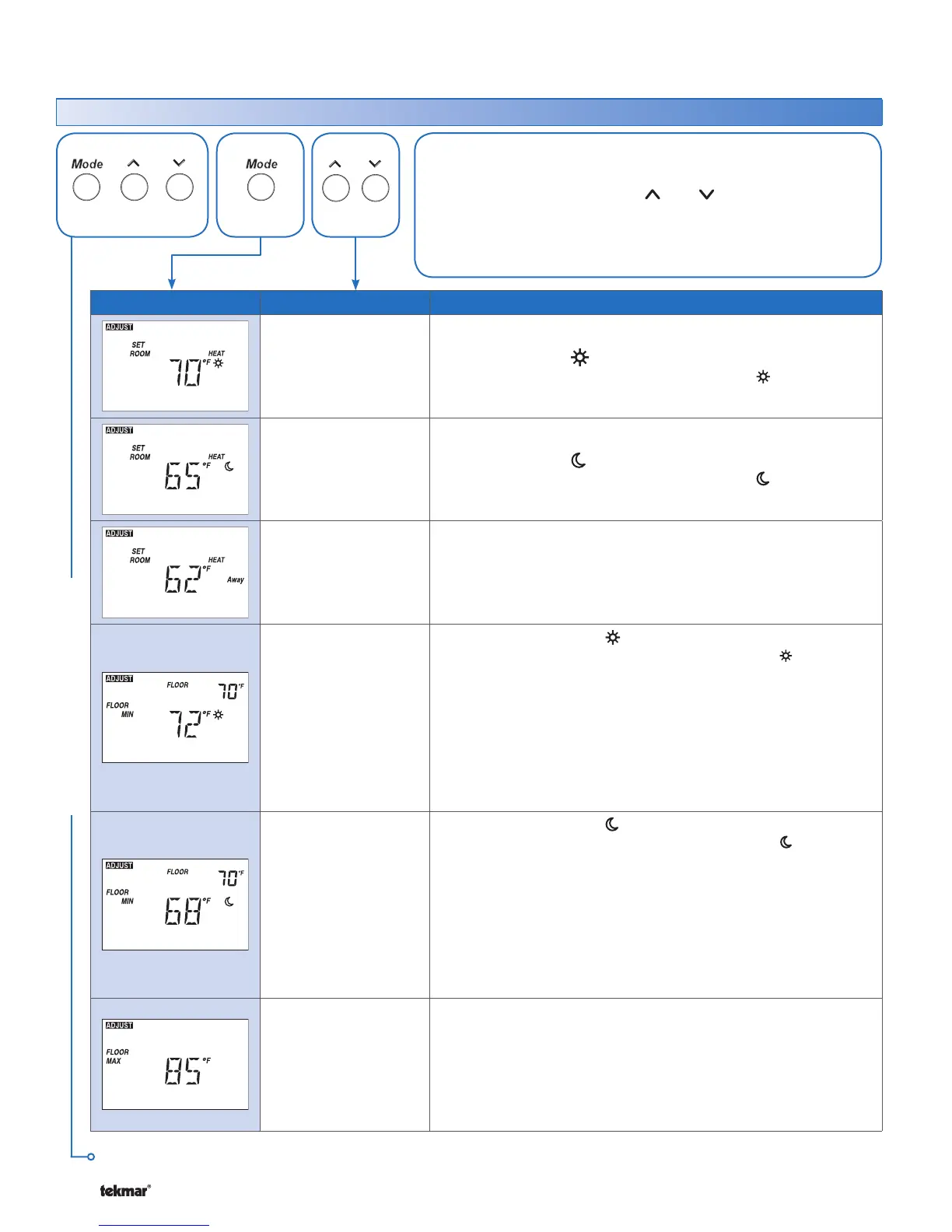
SET ROOM HEAT
Set the room heating temperature while in the event.
40 to 85°F
(4.5 to 29.5°C)
Default = 65°F
(18.5°C)
SET ROOM HEAT
Set the room heating temperature while in the event.
40 to 85°F
(4.5 to 29.5°C)
Default = 62°F
(16.5°C)
SET ROOM HEAT AWAY
Set the room heating temperature while in the Away scene.
OFF, 40 to 85°F
(OFF, 4.5 to
29.5°C)
Default = 72°F
(22.0°C)
SET FLOOR MINIMUM
Set the floor minimum temperature while in the event. The
floor minimum heats the floor even when the room temperature
is satisfied.
The measured floor temperature is shown in the upper right hand
corner of the display.
Available when:
Room Sensor setting in the Adjust menu is set to On AND
A slab sensor is installed on the auxiliary sensor input AND
Switch setting 4 is set to Floor (On position).
•
•
•
OFF, 40 to 85°F
(OFF, 4.5 to
29.5°C)
Default = 68°F
(20.0°C)
SET FLOOR MINIMUM
Set the floor minimum temperature while in the event. The
floor minimum heats the floor even when the room temperature
is satisfied.
The measured floor temperature is shown in the upper right hand
corner of the display.
Available when:
Room Sensor setting in the Adjust menu is set to On AND
A slab sensor is installed on the auxiliary sensor input AND
Switch setting 4 is set to Floor (On position).
•
•
•
40 to 90°F, OFF
(4.5 to 32.0°C,
OFF)
Default = 85°F
(29.5°C)
FLOOR MAXIMUM
Set the floor maximum temperature in order to protect the floor
covering.
Available when:
Room Sensor setting in the Adjust menu is set to On AND
A slab sensor is installed on the auxiliary sensor input AND
Switch setting 4 is set to Floor (On position).
•
•
•
Adjust Menu (1 of 2) *for installer use only
These settings are intended for use by the installer only and are
not required for use by average users of the thermostat.
Press and release the Mode, , and buttons together.
Press and release the Mode button to go to the next setting.
Once all settings are complete, wait 20 seconds for the thermostat
to return to normal operation.
•
•
•
ADJUST MENU
Continued on next page.
Press
+ +
Together
528 Thermostat



 To Next Page