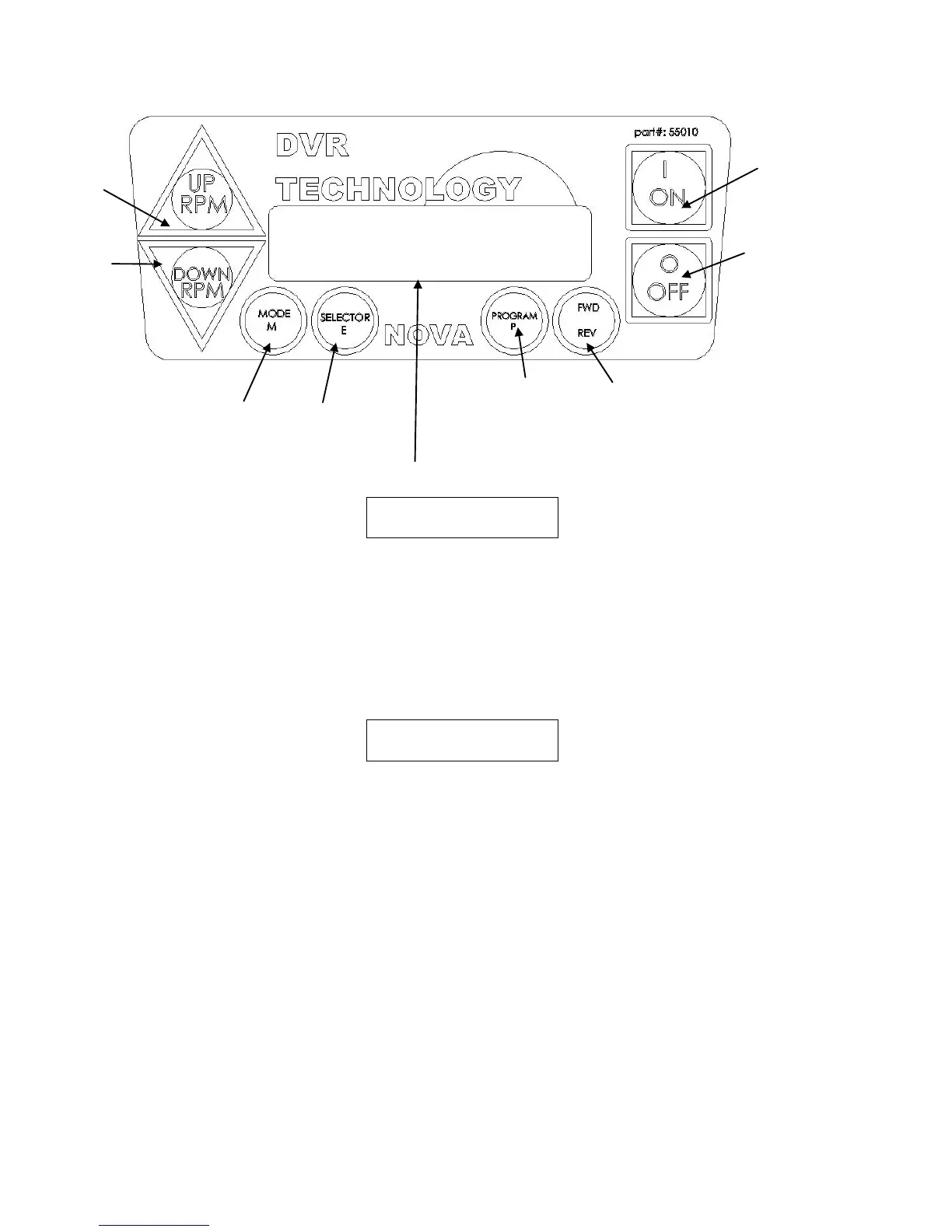
“XXXX” is the reference motor speed.
“>>” Indicates forward direction of rotation.
1. Green ON -- Press to start machine at the commanded speed -- always check that the speed has
been selected correctly. When the computer is first switched on it is set at a default speed of
500 rpm. Remember that whenever the computer is switched off at the wall or at the
incoming power supply switch the computer will restart at the default setting. The spindle
cannot restart until 1 “ON” is depressed.
As with any Woodlathe ensure that the index is off and the workpiece is free to turn without hitting the
toolrest etc. Ensure that the work piece is secure and the appropriate speed is selected.
"CCCC" = current value of the motor speed
“RRRR” = reference value. (Value selected)
When the On button is first pushed the screen will display "Go Low!! rpm" and then
"4 retries left". These messages are normal, the computer first does a self check.
2. Red OFF key. Pressing this key will stop spindle rotation.
The ON / OFF keys in the above panel only switch the motor on and off. The selected speed will
remain until adjusted or computer switched off.
3. UP RPM. To raise speed, one press of the key will increase speed by 5 rpm. Continuing to hold key
pressed will continue to raise speed. The speed can be adjusted with the spindle running or off. To
make a large adjustment in speed it is quicker when the spindle is OFF.
4. Down RPM. Press to lower speed this key operates the same as up key.
The UP and Down keys can also be used in program mode to change the parameters.
5. FWD / REV key. Pressing this key will change the motor rotation from forward to reverse. Pressing
again will select forward. You can verify the direction by the two arrows at the bottom left or right of
the screen. Important: always verify the forward or reverse is selected correctly before
switching spindle on.


 To Next Page