5 – Operating Software
DPN 402196 Issue 4.1 © Teledyne TSS 5- 5
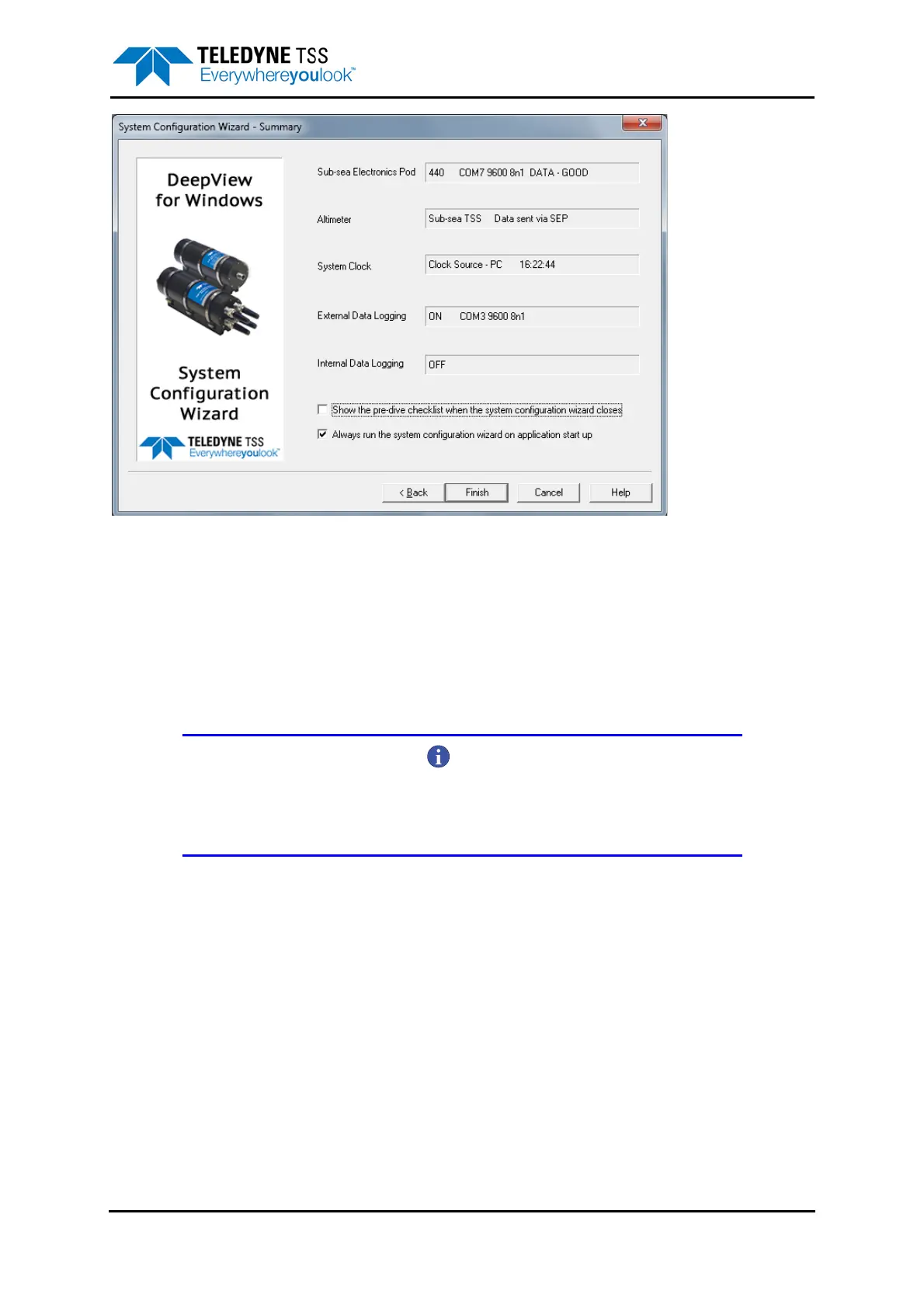
Figure 5-2: System Configuration Wizard - Summary
DeepView will now be configured to operate with the 440 System.
Before clicking on ‘Finish’ you have tick options to select:-
❐ Show the pre-dive checklist when the System Configuration Window is closed.
❐ Whether the System Configuration Wizard runs when DeepView for Windows starts.
NOTE
If the box is checked, the System Configuration Wizard will be run when
DeepView for Windows starts. If the box is not checked and if a configuration file is
available, the configuration file will be used to configure DeepView for Windows.
DeepView stores the configuration details automatically in an initialisation file when DeepView is
closing down. This allows the System to establish the same configuration when you next power-on the
SDC – provided it recognises the data format arriving from the SEP as being compatible with the
stored configuration details. This means that you should power-on the SEP before you power-on the
SDC.









 To Next Page