5 – Operating Software
DPN 402196 Issue 4.1 © Teledyne TSS 5- 23
5.3.3.3 External Output
DeepView for Windows allows you to record the survey data acquired by the 440 System.
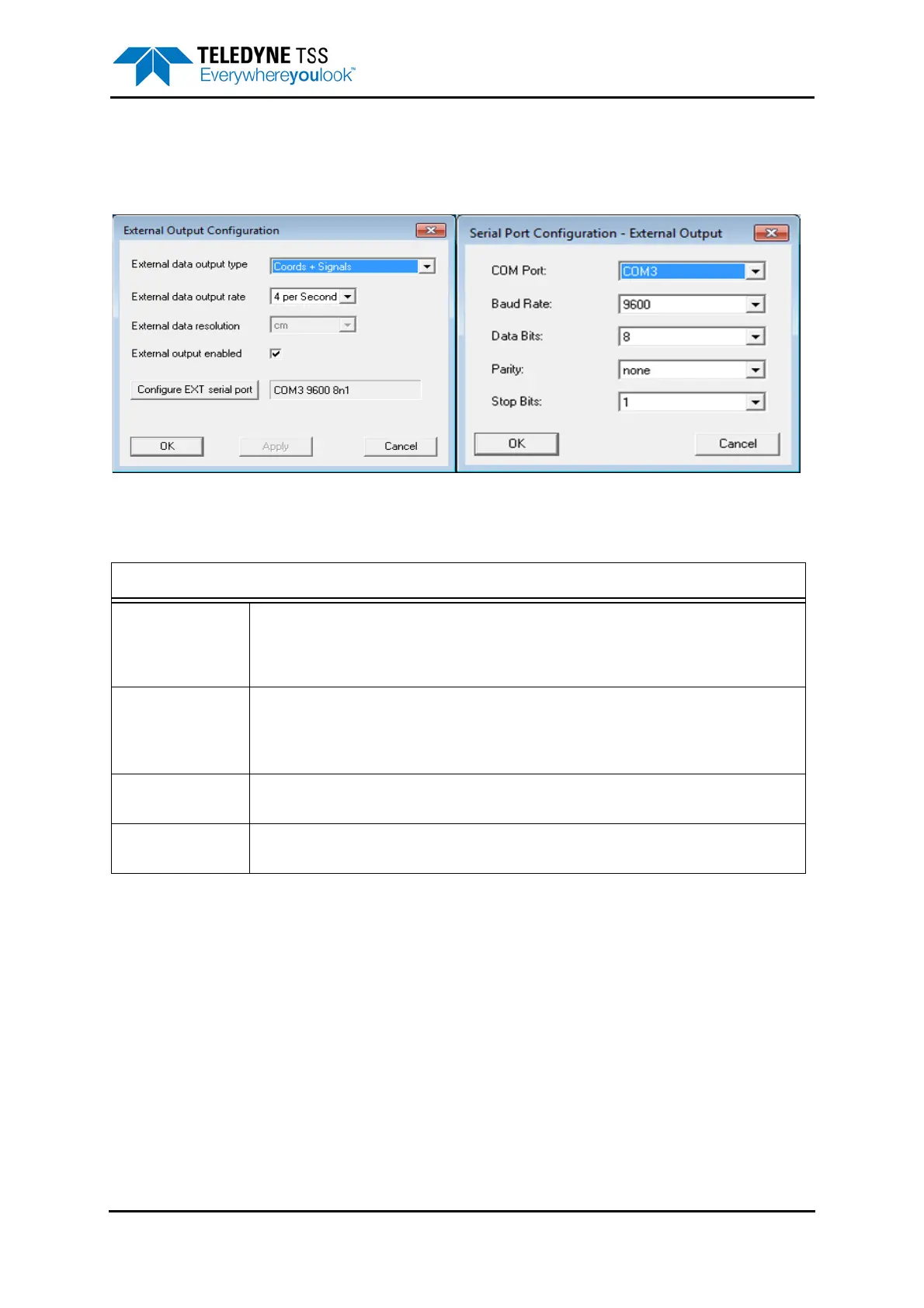
To edit these settings, select Configuration
➥External Output. Note external logging is defaulted to on.
Figure 5-11: External Output Configuration and Serial Port menu
Table 5-5: External Output Configuration
External Output Configuration
External Data
Output Type:
In 440 mode, the system always outputs a sentence which combines the signal and coordi-
nate information.
See section 6.3.7 "Data Logging" on page 6-19 for a description of these data for-
mats.
External Data
Output Rate:
The SDC can transmit data to the data logger at either four records or one record per sec-
ond. The default setting is four records per second.
You should consider the available storage space and the desired linear track resolution for
the survey before you decide between these alternatives.
External Output
Enabled
This box must be checked to enable the external output. If it is enabled, then a tick will
appear against the “external output” item in the “configuration” menu.
Configure EXT
Serial Port
Options to configure, COM Port, Baud Rate, Data Bits, Parity and Stop Bits. See Figure 5-11.




 To Next Page