6 LCD64 - Operation Manual
English
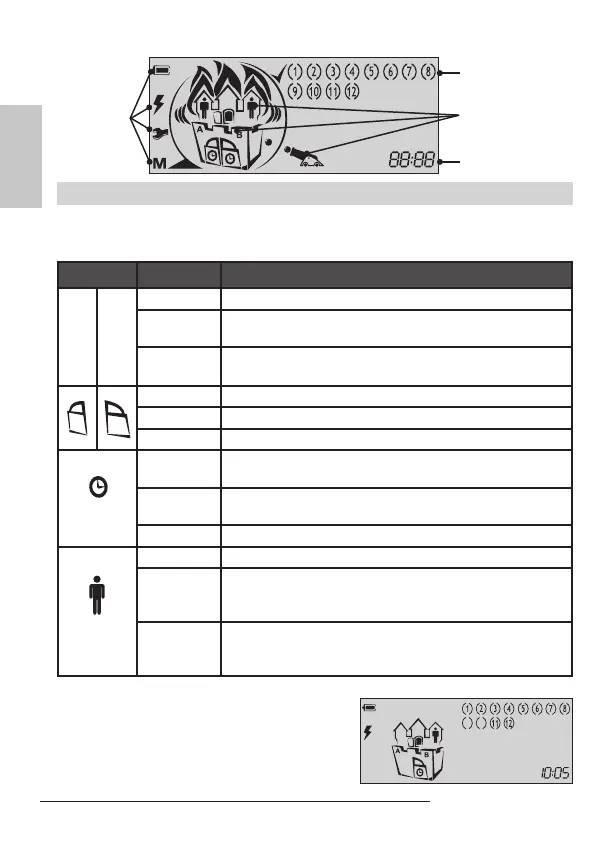
Icons for
status of the
control panel
Icons for
Partition status,
ARM mode and
events
Zones status
Clock; addresses
Icons for Partitions Status and ARMING mode
The animated icons for A and B partitions are situated in a house divided into two
groups. According the current status of the system the icons have the following per-
formance:
Icon Indication Description
A B
OFF Partition A / Partition B is not ready for ARMING.
ON
Partition A / Partition B is ready for ARMING; or the par-
tition is ARMED, regardless of the ARMING mode.
Blinking
“Alarm”, “Fire” or “Memory” event in the respective par-
tition.
OFF The respective partition is DISARMED.
ON
The respective partition is ARMED.
Blinking Entry-exit time is running.
OFF
The respective partition is DISARMED; or the partition
is ARMED in “Instant ARM” mode.
ON
The respective partition is ARMED in “Full ARM” or
“Stay ARM” mode.
Blinking Entry-exit time is running.
OFF There are no bypassed zones in the system.
ON
There are bypassed zones in ARMED system.
The numbers of the bypassed zones are missing - only
the brackets are visible.
Blinking
There are bypassed zones in DISARMED system.
The numbers of the bypassed zones are missing - only
the brackets are visible.
Example:
The Partition A is ready to be armed - the icon
“A” lights on. The Partition B is in “Stay ARM”
mode - the icons “clock”, “door” and “man” light
on. Zones 9 and 10 are bypassed - only the
brackets are visible.



 To Next Page