LCD64 - Operation Manual 7
English
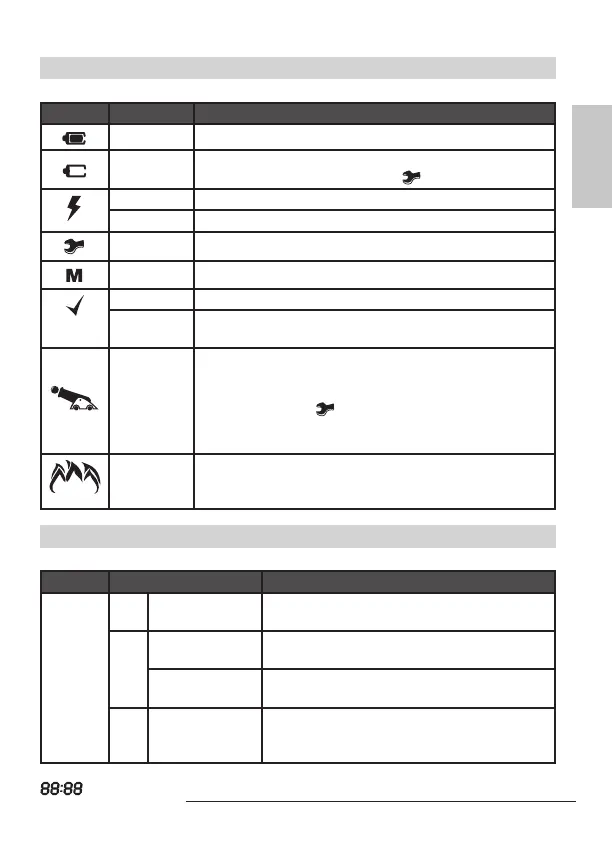
Icons for Status of the control panel
The status of the control panel is visualized with the following icons:
Icon Indication Description
ON The battery of the control panel works properly.
Blinking
The Battery of the control panel is at low charge or is
missing; blinks together with the
icon.
ON Power supply 220 VAC.
Blinking Power supply 220 VAC lost.
Blinking Technical trouble in the system - see page 13.
ON Memory events LOG - see page 14, 18.
ON The system is ready to be armed.
Blinking
Blinking fast - programming mode;
Blinking slowly - partition A or B is not ready for ARMING.
Animation -
gun ring
BURGLAR alarm event in the system - the gun is ring
towards the house.
TAMPER alarm in the system - the gun is ring towards
the house and the icon is blinking.
The icon (A or B) of the partition in burglar / tamper alarm
is blinking.
Animation -
ames over
the house
FIRE alarm event in the system - the ames are blinking
over the house.
The icon (A or B) of the partition in re alarm is blinking.
The zone status is visualized with the following icons:
Zones Indication* Description
1, 2,
...
12
1 Number only
No activated detectors in the system; the
zone is closed.
(1)
Number with
blinking brackets
Activated detectors in the system; the brack-
ets around the opened zones are blinking.
Number in
brackets (1 - 6)
Technical trouble. The icon (A or B) of the par-
tition with trouble is blinking.
( ) Brackets only
The zone is bypassed. The icon “man” blinks
slowly when the partition is DISARMED and
lights on when the partition is ARMED.
* Refers to all zones in the system - from 1 to 12.
- displays various information (time, date, codes, etc.)



 To Next Page