User manual
“DTR-7287
”
35
ENGLISH
Once you have installed the DTR 7287 adaptor, proceed to switch it on with
the switch on the back panel.
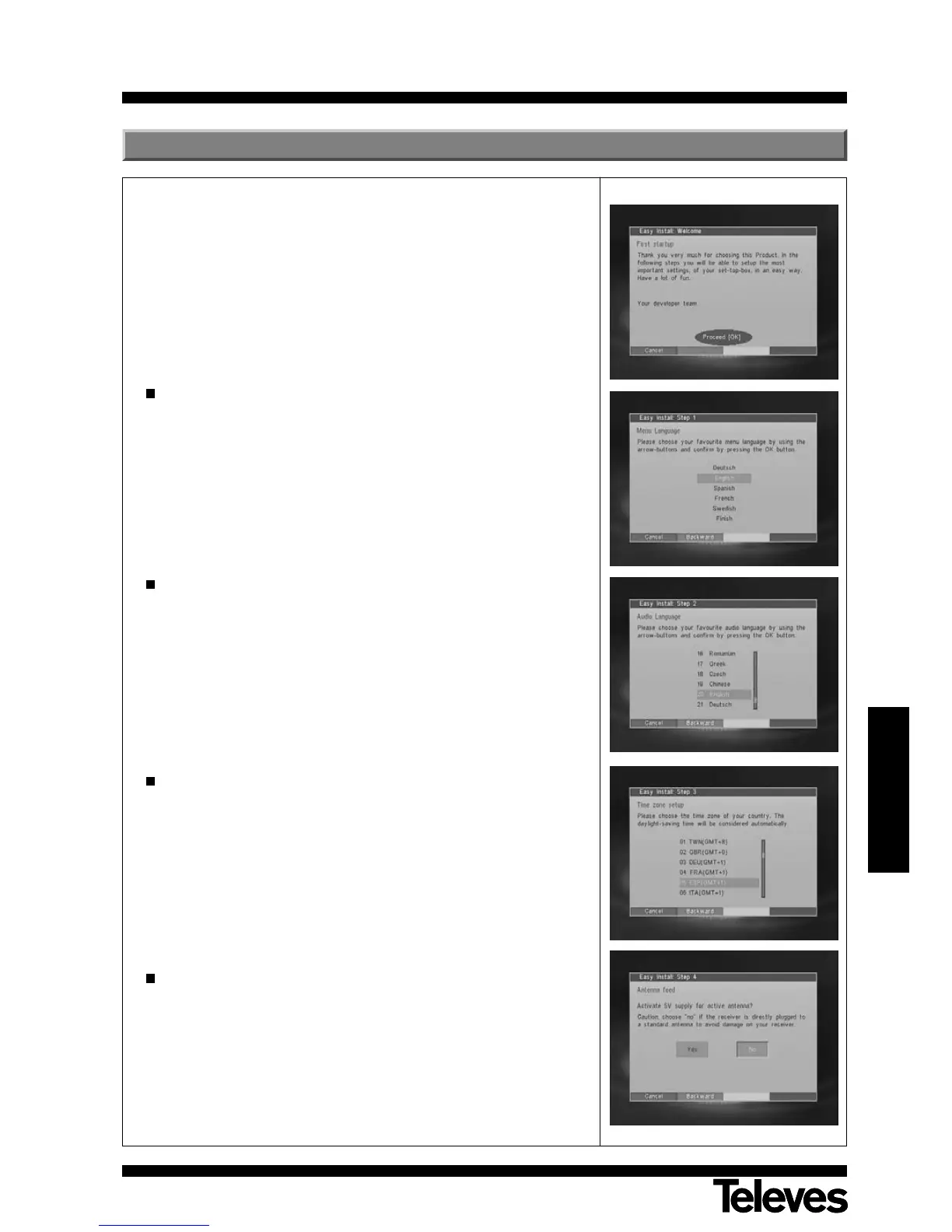
The first time the adaptor is switched on, it will show a guided installation
window. Follow the instructions below to configure the parameters:
Press the OK button to access the first menu Menu Language.
With buttons P+/P
-,
select the desired language for the menu.
Languages available are German, English, Spanish, French, Swedish,
Finnish, Portuguese, Italiano and Greek.
Press the OK button to confirm.
Next, the menu Audio Language will appear.
Using the buttons P+/P
-,
select the desired audio language.
Press the OK button to confirm.
Next, the menu Time Zone Setup will appear.
Using the buttons P+/P
-,
select your country’s time zone.
Daylight saving time will be automatically selected.
Press the OK button to confirm.
Next, the Antena Feed menu will appear.
Using the buttons V
-
/V+ indicate whether you do (YES), or do not (NO)
wish to feed a possible amplifier on the aerial.
If no amplifier is available, you should select the NO option, otherwise
the adaptor may be damaged.
Press the OK button to confirm.
5.- Installation startup



 To Next Page