Data Over Coax Gateway Ref.769301
20
The configuration of this interface hast two different elements:
• Radio configuration: RF network parameters can be configured; Operation Mode, frequency, and
bandwidth use.
• Access point configuration: VAP (virtual access points) can be configured. For each network the
SSID name and the security should be set.
Configuration of the radio interface
The WiFI interface supports the IEEE 802.11bgn standard.
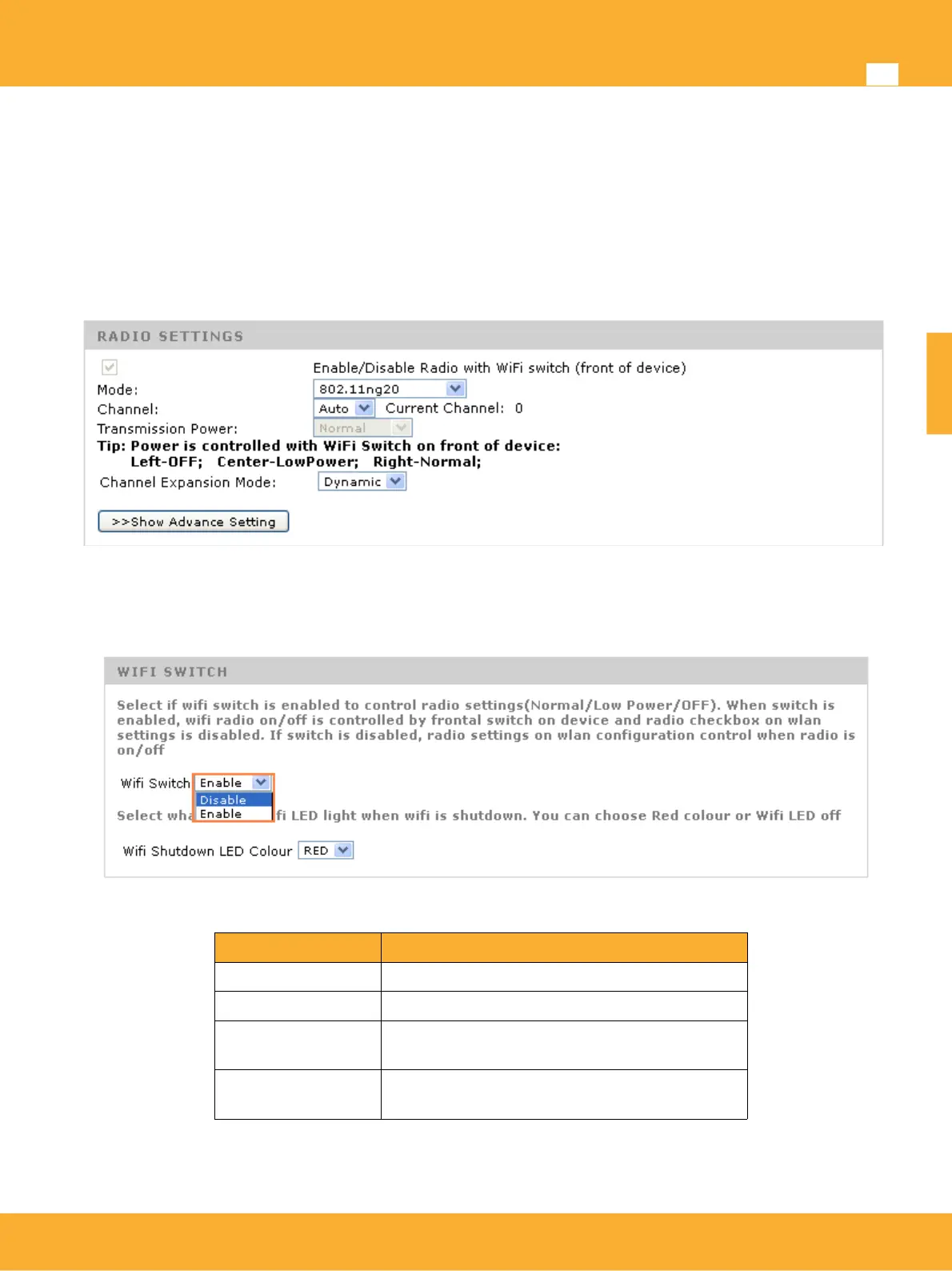
Enable Radio: Activate WiFi network. This option is controlled by the switch located on the front
pannel of the product and is not available on web. In case you want to use this option, you need to
disable wifi switch on web page in Device Management> Advanced Management.
WiFi Mode: Selects the WiFi mode
Standard Description
802.11b 802.11 supporting 11Mbps througput
802.11g 802.11 supporting 54Mbps througput
802.11ng20 802.11n supporting 144Mbps, througput with
20Mhz bandwidth channels.
802.11ng40plus
802.11ng40minus
802.11n supporting 300Mbps througput with
40Mhz bandwidth channels.
Channel: Indicated the channel being used by the WiFi network.Occupied bandwidth depends on
WiFi mode. There are 13 possible channels.
www.televes.es
ENGLISH


 To Next Page