Televes
®
39
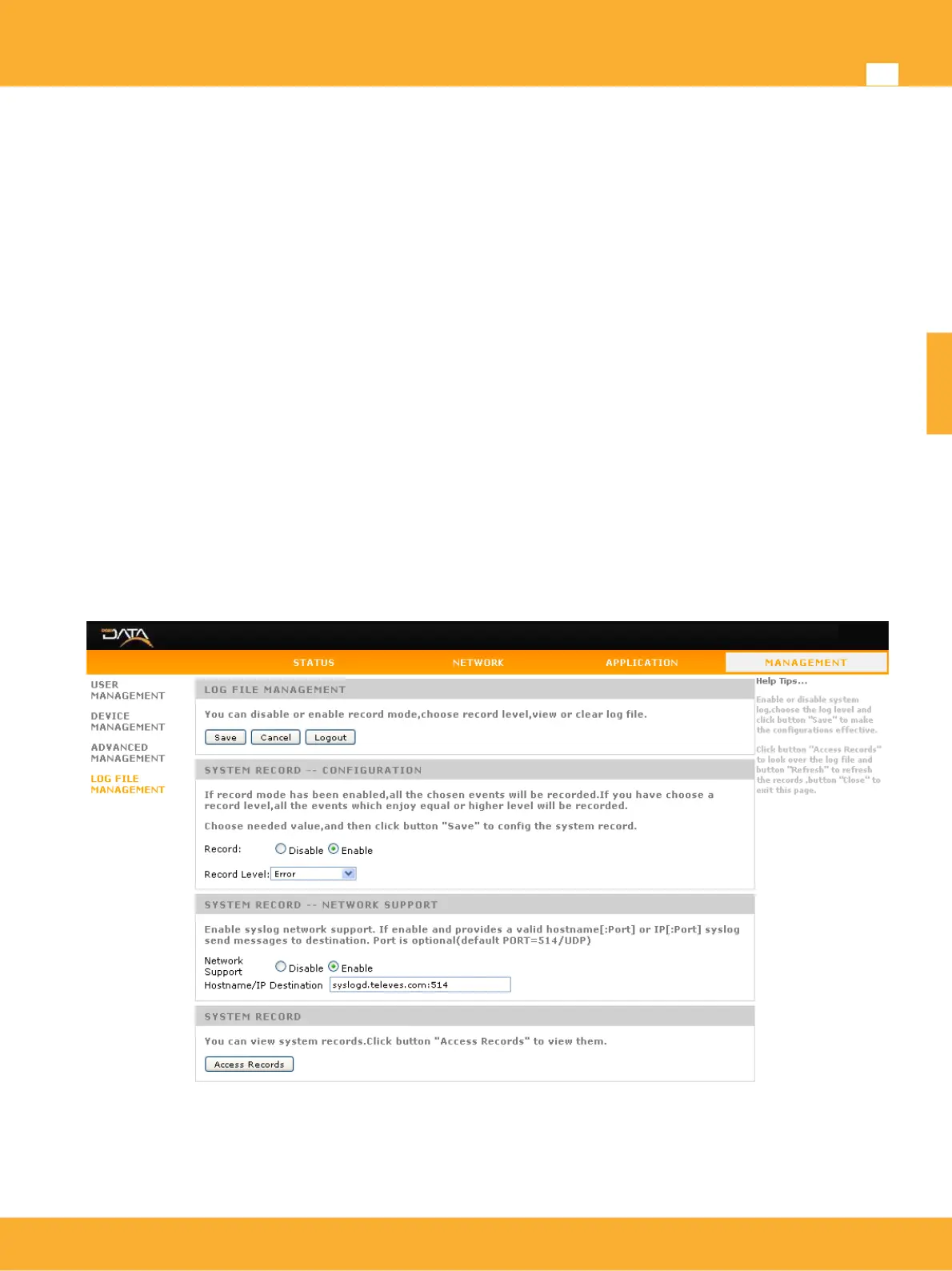
Log Management
Logging system allows to monitoring and register device operation. All activity is recorded: Web access,
New WiFi device association, network services, etc. ..
Record: Enable/Disable logging system
Record Level: If you have choose a record level,all the events which enjoy equal or higher level
will be recorded. Permitted levels ranging from the emergency level (system fault) to more
descriptive debug messages (Debugging)
Access Records: Shows system events
The system also allows you to enable remote logs using network support and configure a remote server for
receiving them.
• Network Support: Network Support: Enables sending of logs generated by the system to a remote
server to store them for later review
• Hostname/IP Destination: Server name or IP destination address to which the logs will be sent. By
default if no port is specified at standard syslog (UDP port 514) will be sent. In case the destination
address specified with the format hostname[: port] or IP[: port] devices messages will be sent to the
specified port.
www.televes.es
ENGLISH


 To Next Page