Data Over Coax Gateway Ref.769301
38
Device Management
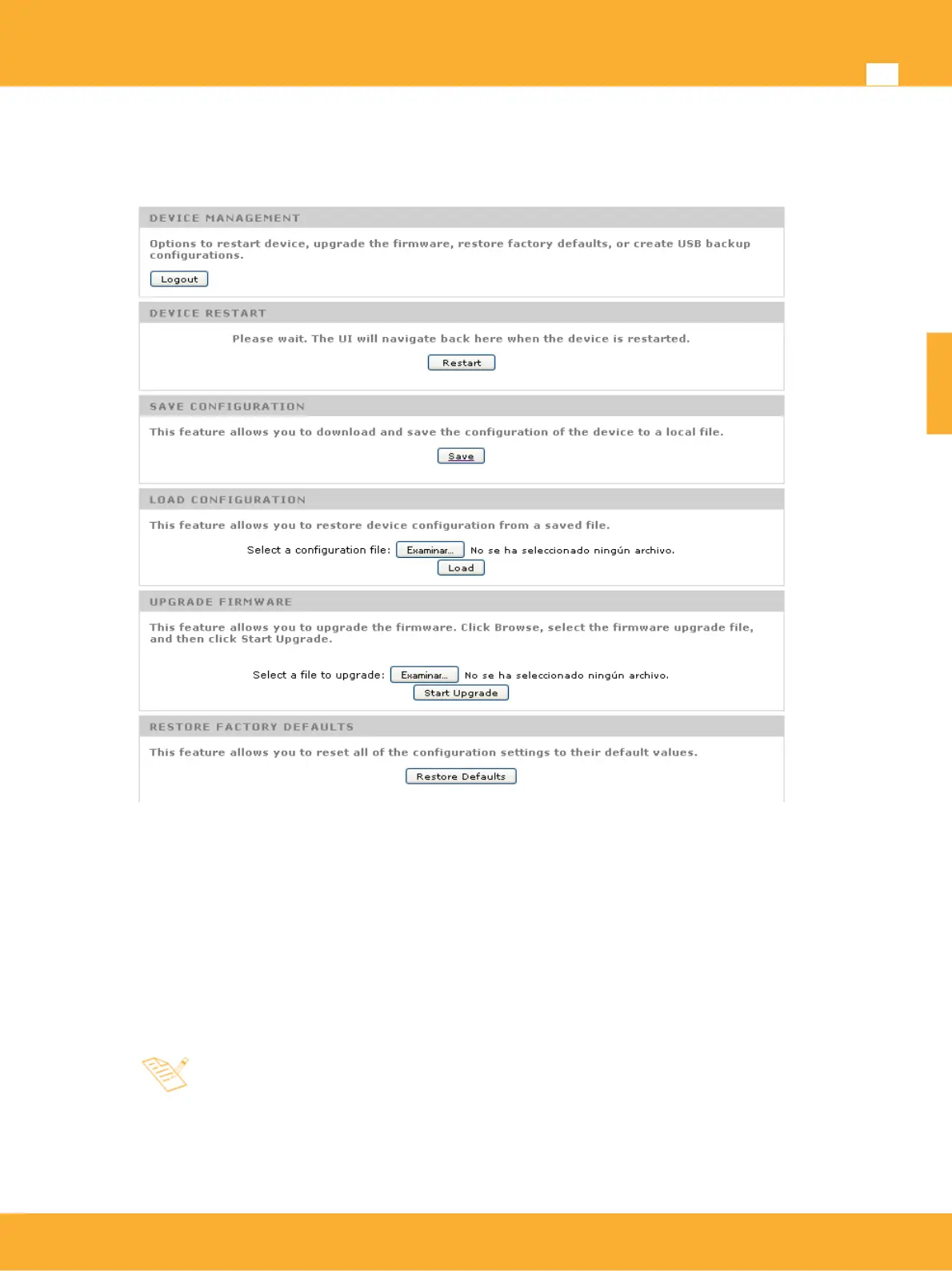
Web Configuration device management includes saving/loading configuration parameters, set factory
defaults, reboot and device firwmare upgrade
Device Restart: The device will reboot.
Save Configuration: Saves the actual configuration of the device on a file. This file can be used as
backup or to clone this configuration in other devices.
Load Configuration: Loads the configuration on a device. After the loading has finished, the
devoce will reboot and start with the new parameters.
Firmware upgrade: This option will load a new firmware to the device. This file can only be
supplied by Televes.
Upgrade process might take up to 3 minutes and the product should not
be powered off during this process as could cause permanent device
malfuncion
Restore Factory Defaults: This option will restore the configuration of the product to factory
default. It has the same effect as pushung the reset button for over 5 seconds.
www.televes.es
ENGLISH


 To Next Page