Televes
®
35
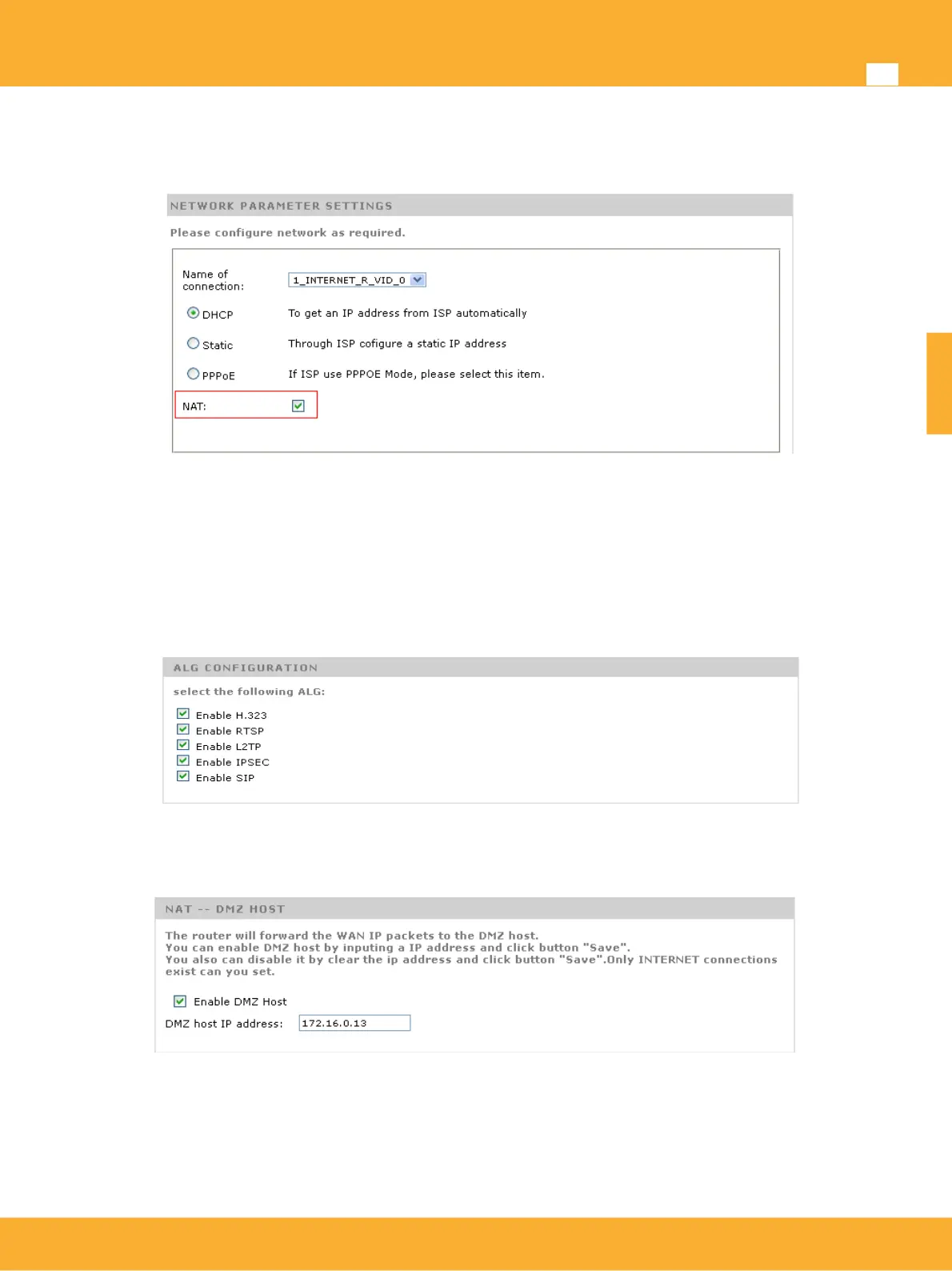
Advanced NAT Configuration
When are on Router mode, NAT option will be automatically activated. If this option is not required just
unselect.
When NAT enabled, following options will be available:
ALG Configuration (Application Level Gateway): this option allows the possibility of adding to the
firewall advanced parameters so that the selected services will be supported. As an example , SIP
service will allow an incomming call reaching the IP phone on the LAN even with the firewall
activated due to the fact that the VoIP telephone has been identified.This will be done in a
transparent mode for the end use without the need of further configuration.
DMZ host (Demilitarized zone host): In this option a host on the LAN will have all ports open except
thoses mentioned on the NAT section (see next option).
NAT Mode: Select most appropiate NAT Type on device
• Linux Native (more restrictive): Allows a port from an external host (hAddr: hport) can be
connected to a device on the LAN (iaddr: iPort) sending packets to WAN port (eAddr: ePort)
only if you have previously sent packets. This option allows only one external host and port to
which the connection is established initially to connect to the local service through NAT.
www.televes.es
ENGLISH


 To Next Page