Televes
®
33
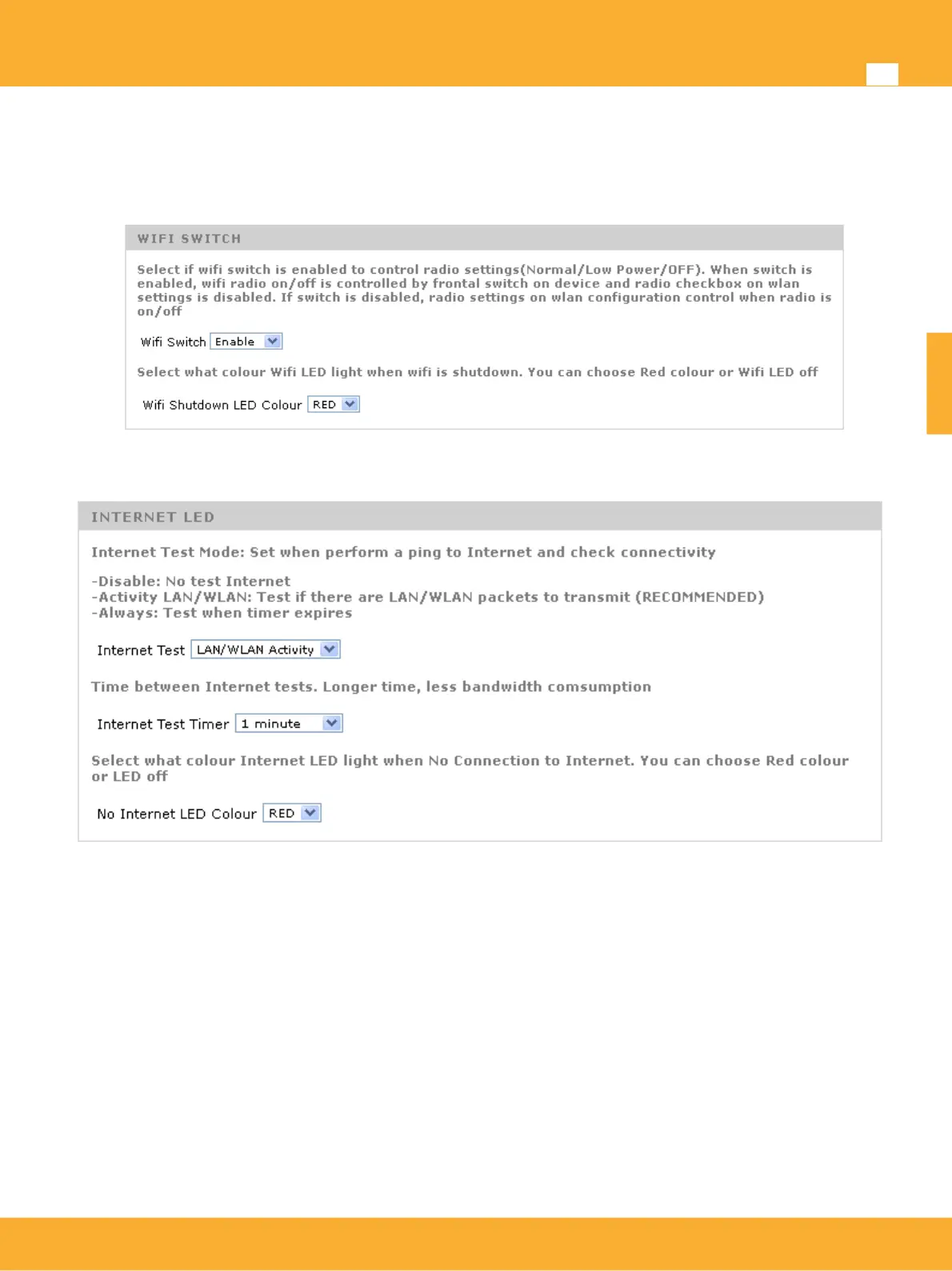
• Shutdown Wifi LED Colour (OFF / RED): Selects the LED color when the wifi is turned off or the
power level is changed. You can enable the red LED on the front setting the color
(green/orange/red) or (green/green/off) for different transmission modes (normal/low power/off)
This option allows providers to customize LED colors so red color disappears from the front.
Internet test
If the device is in router mode incorporates a LED that indicates Internet access status.
Test Internet: Test modes
• Disable: Internet test will not be performed.
• Enable: Performs test periodically when timer expires
• LAN / WLAN Activity (default configuration): perform the test only if activity is detected on
the device. This activity is measured as receiving packets from the Ethernet LAN or WLAN
connection. This option saves bandwidth on the device since the devices that do not have any
active user does not perform any test.
Test Timer: Allows test is performed periodically if test mode is enable or when detected
LAN/WLAN activity. Timer values of 1/2/5/10 minutes are available.
Internet LED Colour (OFF/RED): Internet led colour indicating test result. OFF: When test fails
internet led off. RED: When the test fails, internet led lights red.
www.televes.es
ENGLISH


 To Next Page