Televes
®
29
This configuration of the switch allows to assign certain ports to a specific VLAN. A series of checks are
included to ensure that the port settings are correct:
• Each port can only be Untagged in one VLAN: A port can only be declared untagged in a single
VLAN. All traffic without tag arriving or departing from that interfacewill be associated with that
VLAN. This limitation comes from the fact that if a port is declared as untagged in two different
VLANs the device won't know to which VLAN associate the traffic.
• VLAN 1: VLAN tag 1 is used internally by the switch as a default VLAN. If there is no entry in the
configuration, all ports are members of VLAN 1 as untagged, which guarantees that initially all
switch ports are able to communicate with each other. This VLAN can not be used for creating
VLAN entries on the switch.
• CPU Port Tagged: When the CPU port is declared tagged in a VLAN, the device will automatically
create an interface in the system, therefore if an VLAN entry on the switch (for example VLAN 100)
configures the CPU Port as Tagged, eth1.100 interface is created so it can be used and added to a
particular bridge.
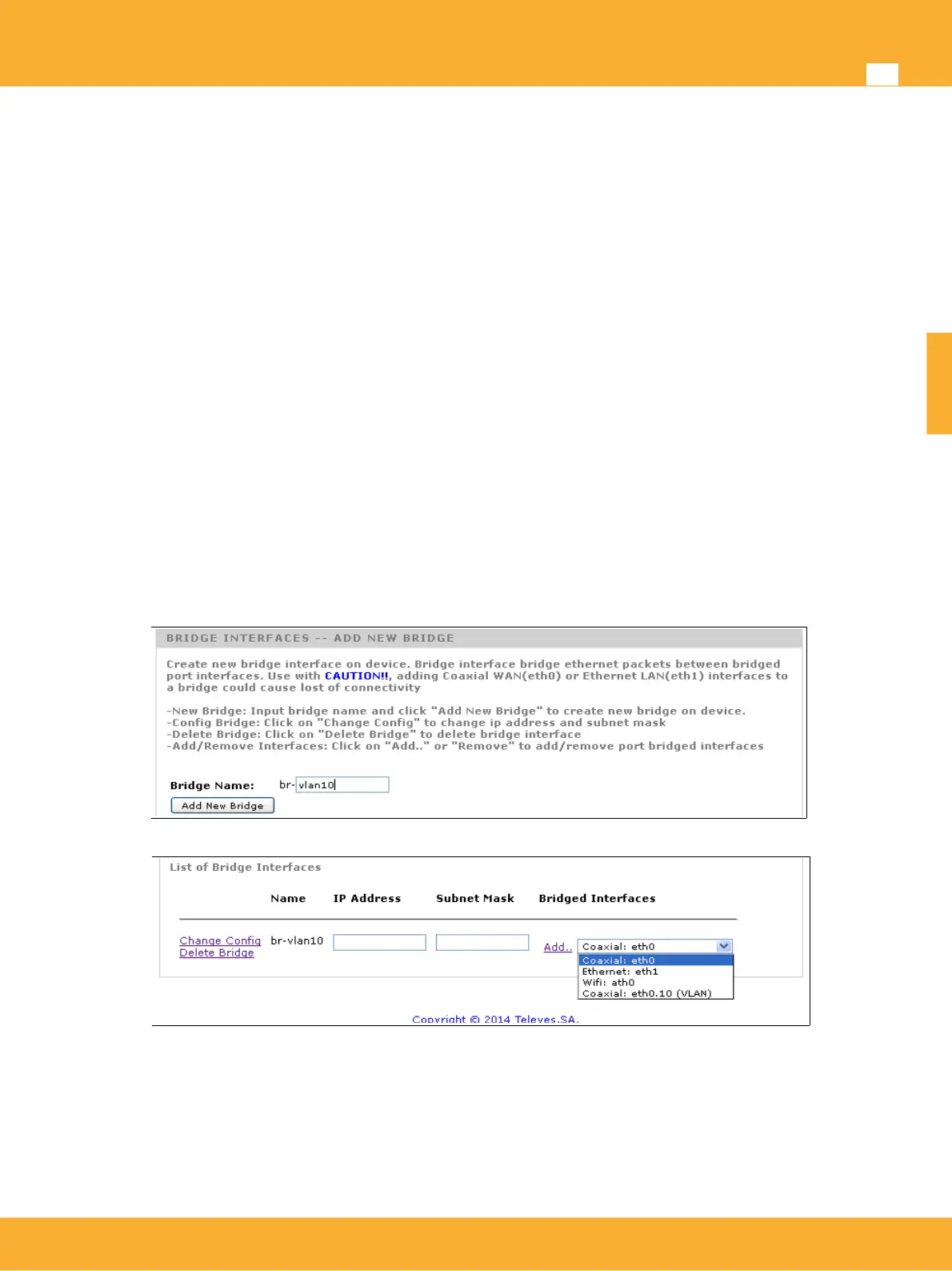
Creating Bridge interfaces on the device
In order to transmit or receive VLAN tags on the device, it is necessary to create a Bridge on the device
and then add the interfaces that operate in it. The function of the bridge is to allow communication between
different interfaces that have been added. This communication is at Ethernet packet level, layer2.
To create a Bridge in the device, it's needed:
• Bridge Name: This is a descriptive name of the Bridge, it will be used to identify it as an interface.
• Add New Bridge: Adds a new Bridge to the device
Once the Bridge is created it will appear in the system's List of Bridges Interfaces.
• Change Config: Changes the configuration of a Bridge. This configuration changes include the IP
Address assigned to the bridge and the Subnet Mask. This allows the operators to connect to the
device via the Bridge interface created. If no communication with the device through VLAN is
needed for maintenance operations, it is not necessary to specify any IP address associated with
the bridge.
• Delete Bridge: Removes a bridge from device.
www.televes.es
ENGLISH


 To Next Page