Data Over Coax Gateway Ref.769301
30
The newly created Bridge will be incorporated as an interface to the system.
Next step is adding to the Bridge the interfaces that we want it to operate with. These interfaces might be:
• System Interfaces: These are the Coaxial, Wireless and/or Ethernet interfaces. When one of this
interface is added, it indicates that the bridge will operate on packets with or without tag arriving at
the bridge from this interface, unless a specific VLAN interface is created with a VLANID tag.
• VLAN Interfaces: These interfaces correspond to the tagged packets on the corresponding system
interface. This would be Coaxial, Ethernet or Wifi interface, configured with an specific VLAN ID tag.
When an interface is added to a bridge, it will not be available for other bridges of the system, since an
interface can be added only to one Bridge.
• Add: Adds an interface to a Bridge
• Remove: Removes the interface from a Bridge.
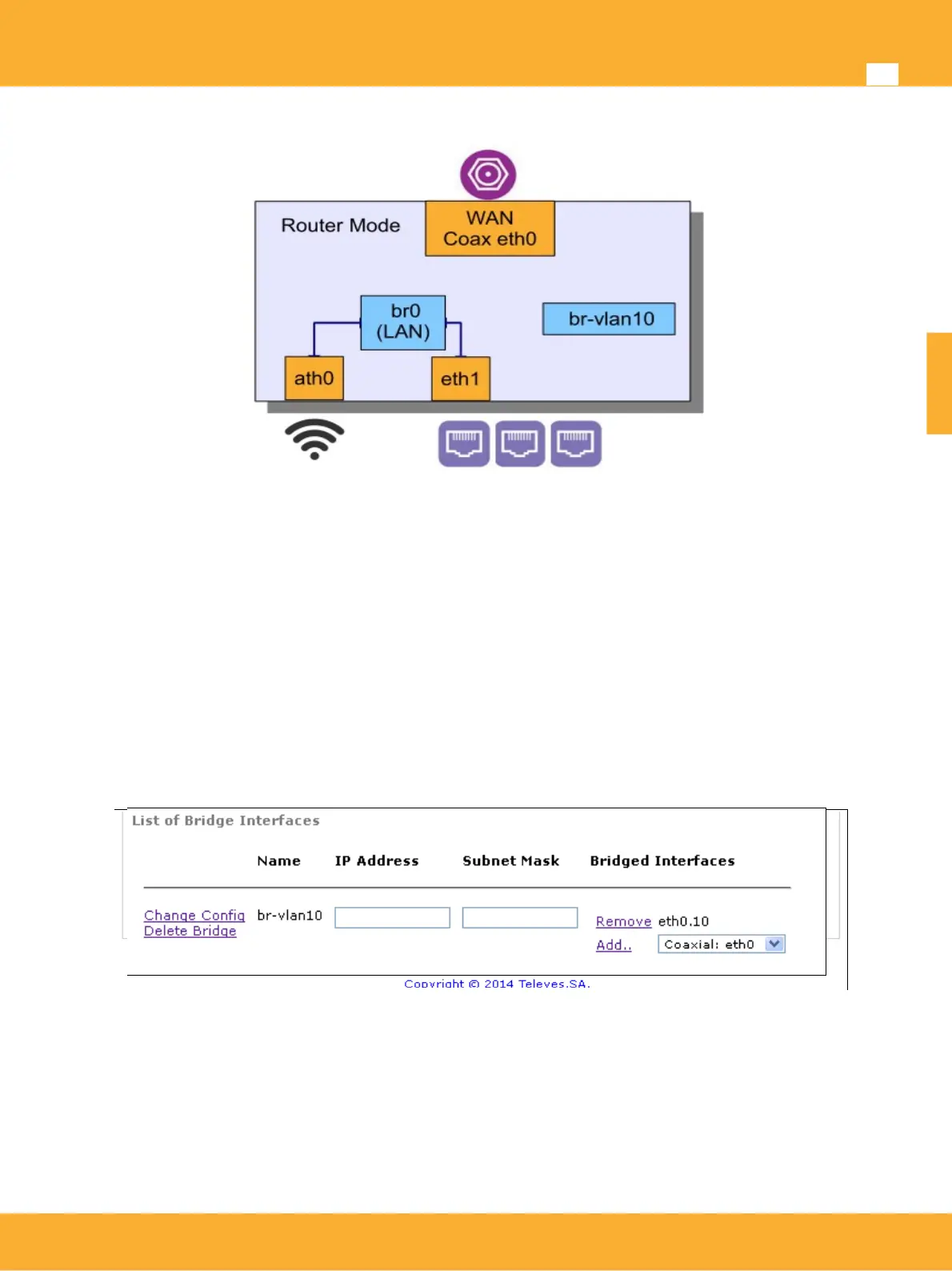
VLAN interface has been added to bridge created, br-vlan10, so traffic with VlanID 10 tag coming from the
coaxial, eth0.10, it will be handled by this bridge.
The following Picture graphically displays the system configuration
www.televes.es
ENGLISH


 To Next Page