3-11
Controls and Operating
2103
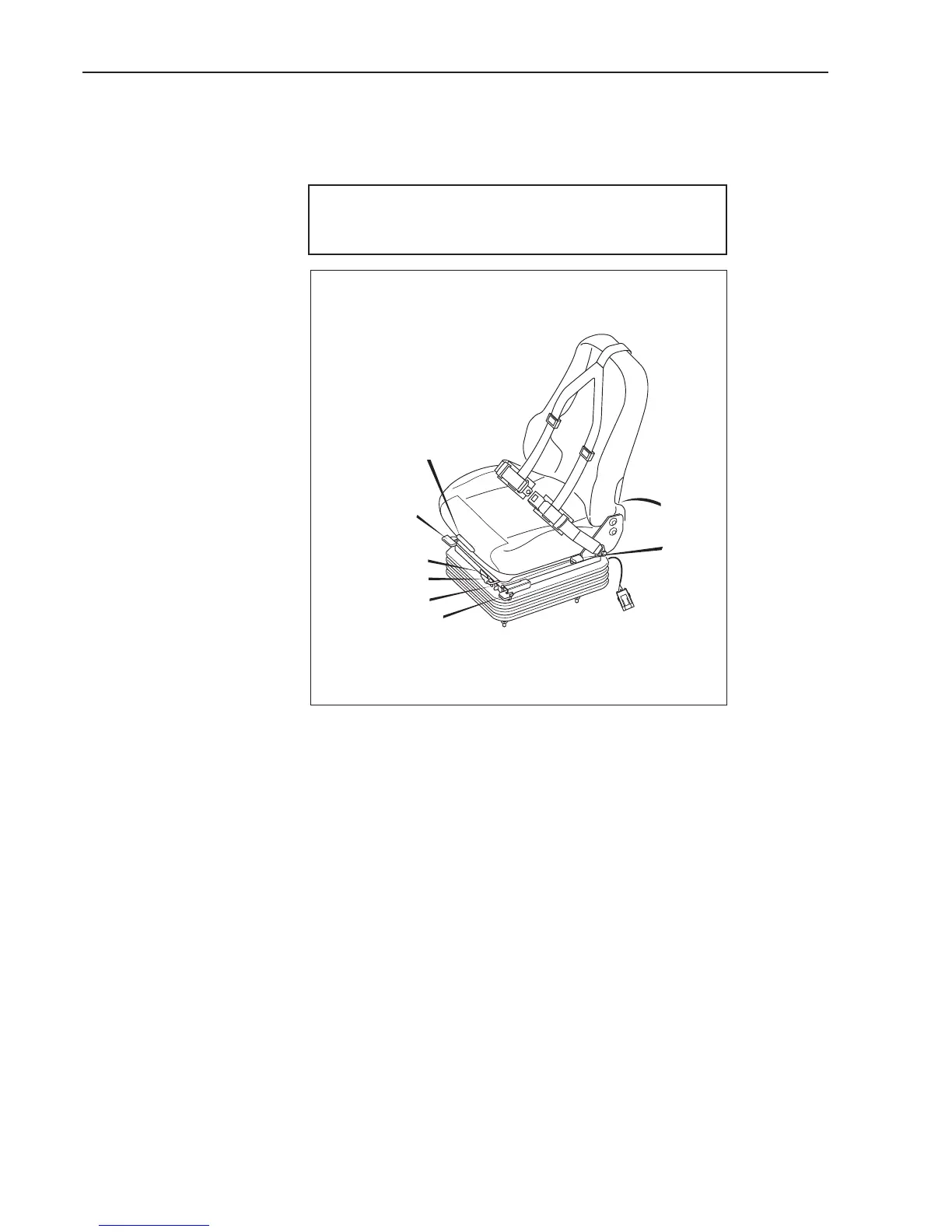
The following is the list of controls provided for the seat:
1. Seat cushion tilt adjustment. The operator removes their weight from the
seat while lifting the handle. Raise or push down on the front of the seat
cushion to adjust its angle. Release the handle at one of the three
positions provided.
2. Ride zone indicator. When the operator is seated, the suspension height
and weight adjustment (6) is pulled out to lower the seat, or respectively
pushed in to raise it, until the white indicator (2) shows in the green zone.
3. Forward and rearward positioning. The operator has the facility to move the
entire seat bodily forwards or rearwards, by first lifting this handle,
adjusting the horozontal seat position, then releasing the handle in one of
several positions provided.
4. Repeatedly switch the air conditioning on and off for at least 1 minute.
This should be at least 12 repetitions.
5. Commissioning the air conditioning unit is complete and ready for
use.
1
2
3
4
5
6
7
8
OPERATOR'S SEAT - AIR SUSPENSION
The air seat only reacts when the driver sits on the seat. When unoccupied the
seat sinks to the lowest position to allow easier access. The incorporated
suspension system maintains the seat in position for driving.
NOTE :
Follow the instructions given above, otherwise the
machine may be damaged.


 To Next Page