www.ti.com
Battery Management Studio Software
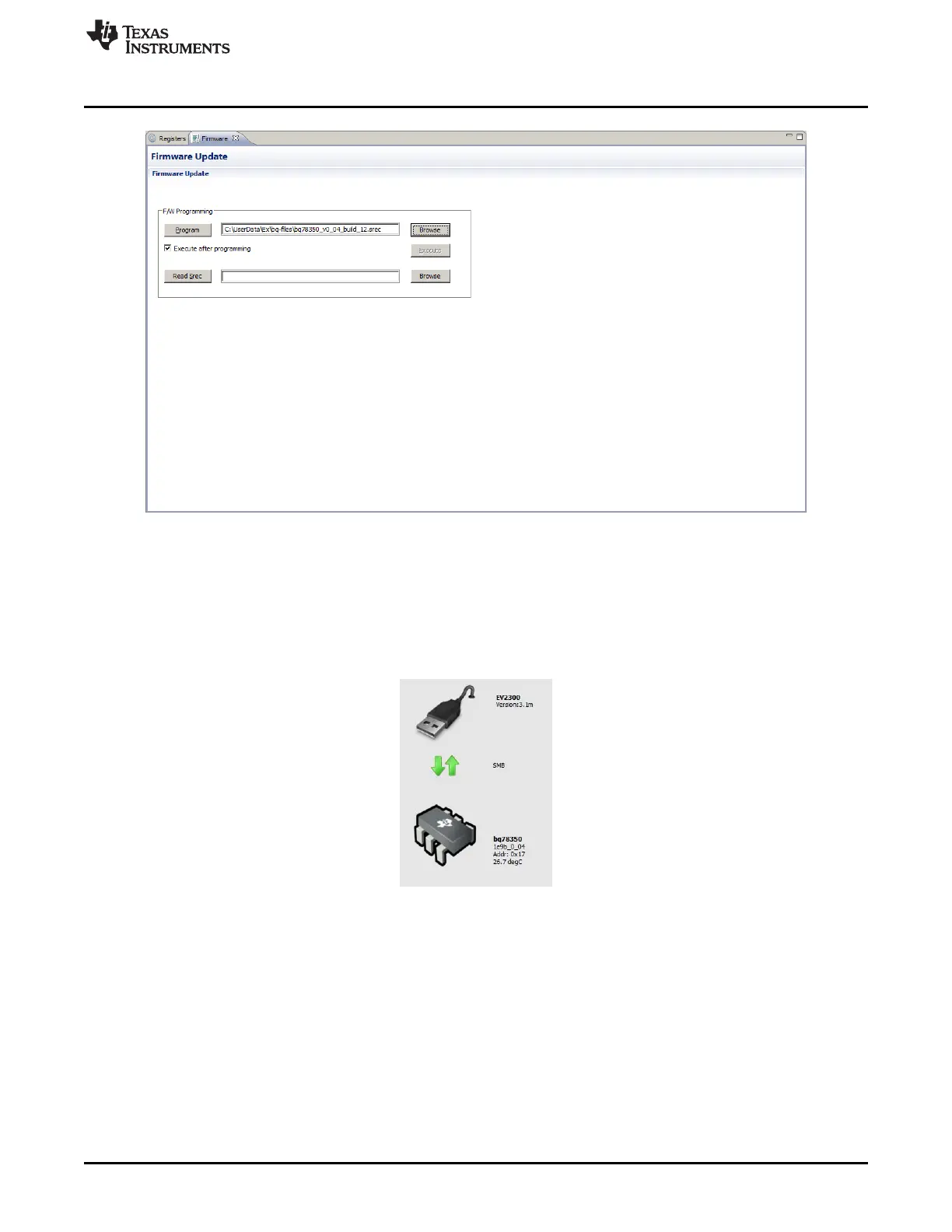
Figure 9. Firmware View
After programming, restart the bqStudio software so that it will autodetect the new firmware and load the
proper configuration for the tools. After start with autodetection, the dashboard display should show the
version read from the device rather than a version input from the Target Selection Wizard. An example of
the dashboard display is shown in Figure 10. If the version read by the autodetect is the same as the
version previously selected in the Target Selection Wizard, no change may be apparent, but restarting to
allow tool configuration is still recommended.
Figure 10. Dashboard Adapter and Device Version Display
The default configuration of the firmware is for 3 cells. An example of the register view after restart is
shown in Figure 11. Note that 3 cell voltages are present. The device must be configured for operation
with other cell counts, this includes basic operation of the EVM.
21
SLVU925B–April 2014–Revised July 2014 bq76930 and bq76940 Evaluation Module User's Guide
Submit Documentation Feedback
Copyright © 2014, Texas Instruments Incorporated








 To Next Page